...

What We Think

Blog

Keep up with the latest in technological advancements and business strategies, with thought leadership articles contributed by our staff.
TECH

January 11, 2024

The cost of quality (CoQ) in software development

The software production and business environment is becoming more and more competitive, customers have more and better choices of high-quality products or services on the market.
Companies must differentiate themselves from the competition by hearing customer requirements and providing products or services that meet customer requirements with high levels of reliability and quality.

  • The cost of quality (CoQ)

The cost of quality is all of the costs that the software development team must bear to ensure the production of quality products or services.
The cost of quality allows the software development team to analyze the causes of problems and improve their products or services.
The cost of quality associated with a project consists of the cost of good quality and the cost of poor quality.
The cost of good quality (Cost of conformance) includes Prevention costs and Appraisal costs.
The cost of poor quality (Cost of nonconformance) includes Internal failure costs and External failure costs.

  • Prevention costs

These are costs associated with preventing problems and errors from occurring during the development of a product or service.
This includes activities such as training, process improvement, quality management planning, etc.

  • Appraisal costs

These are costs associated with evaluating product or service quality by finding errors and detecting defects during the development of a product or service.
This includes activities such as testing, inspection, etc.

  • Internal failure costs

Internal failure costs are the costs that arise when problems or issues are found and corrected before the product or service is released to users.
This includes costs associated with rework, scrap, etc.

  • External failure costs

External failure costs are the costs that arise when problems or bugs are found in a product or service after it has been released to users.
This includes costs associated with customer complaints, warranty claims, etc.

In summary, the cost of quality plays an important role in ensuring the quality of a product or service and creating value for customers.
The software development team should invest in preventing problems and errors from occurring by training employees on quality,
improving quality control processes and strengthening evaluation activities of product quality in the production process to ensure that the product or service meets quality standards and customer requirements.
The optimal cost of quality reflects the appropriate balance for investing in the cost of prevention and appraisal to avoid failure costs (internal/external).

Image Source
https://www.freepik.com

View More
TECH

December 8, 2023

Introducing Ngrok: Unified Ingress Platform for developers

By creating a tunnel from your computer (desktop, localhost) through the Firewall/Nat system, you can access the workstation from the internet.  Ngrok can help you run project demos for customers to view from their own computers without needing to deploy the web to the server.
Additionally, you can test responsiveness on mobile easily through the URL that Ngrok provides and build a webhook to your local host.
Ngrok is available for macOS, Windows, and Linux.

How does Ngrok Work?

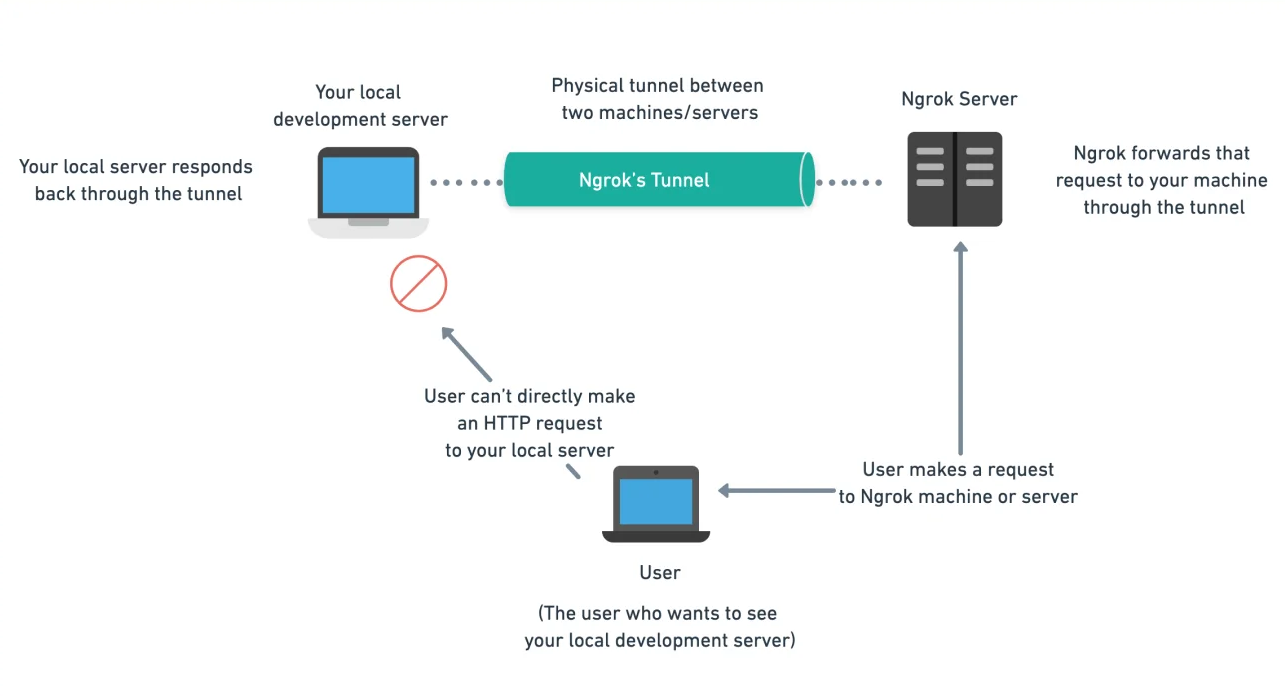
When you use Ngrok, you start it on your local machine and specify the port number of the local server that you want to expose. When you do that, Ngrok creates a secure tunnel to a public endpoint (a ngrok.io URL) that is accessible over the internet.


So now, all the traffic to the public endpoint is forwarded as a request to the local server running on your machine. Your local server responds to this request or traffic back to this public endpoint. This is also called port forwarding or localhost tunneling. This is the underlying principle through which Ngrok maps your local development server to one of its servers, making it seem like it’s just your local development server hosted somewhere.

Pricing

Ngrok currently includes 1 free package and 3 paid packages.

About pricing: https://ngrok.com/pricing

Ngrok Security

Ngrok is a highly secure platform for remote access and is safe to use. Ngrok provides tunneling, as mentioned above, which enables users to access local-hosted servers from outside the machine.

Quick start

  • Step 1: Install Ngrok

https://ngrok.com/download

  • Step 2: Connect your account

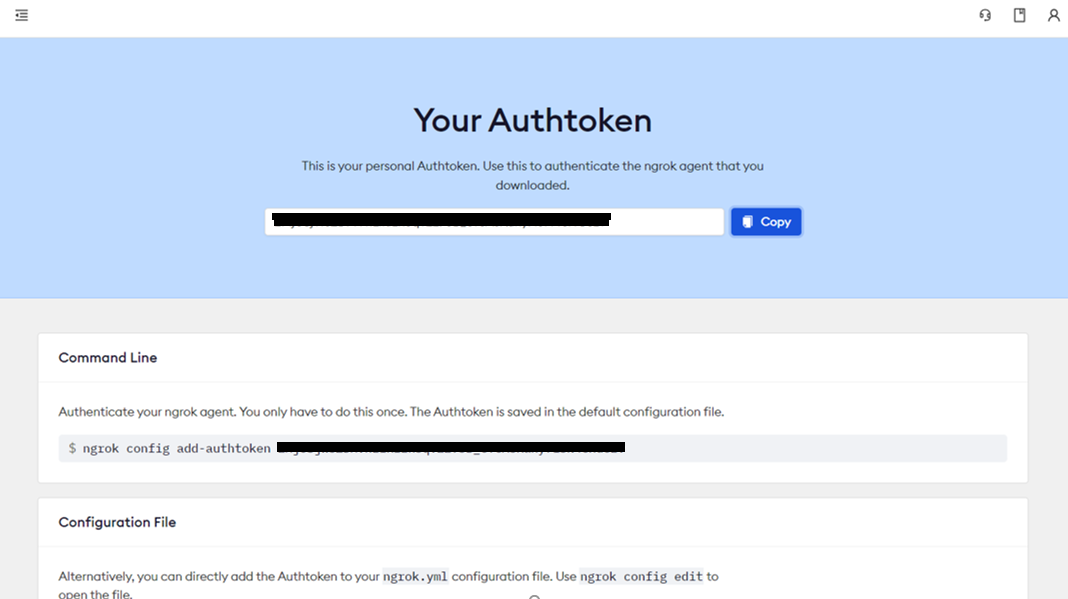
You need to go to the homepage https://dashboard.ngrok.com/, register and manage your account, here after logging in, go to the Your Authtoken section to get the login token.

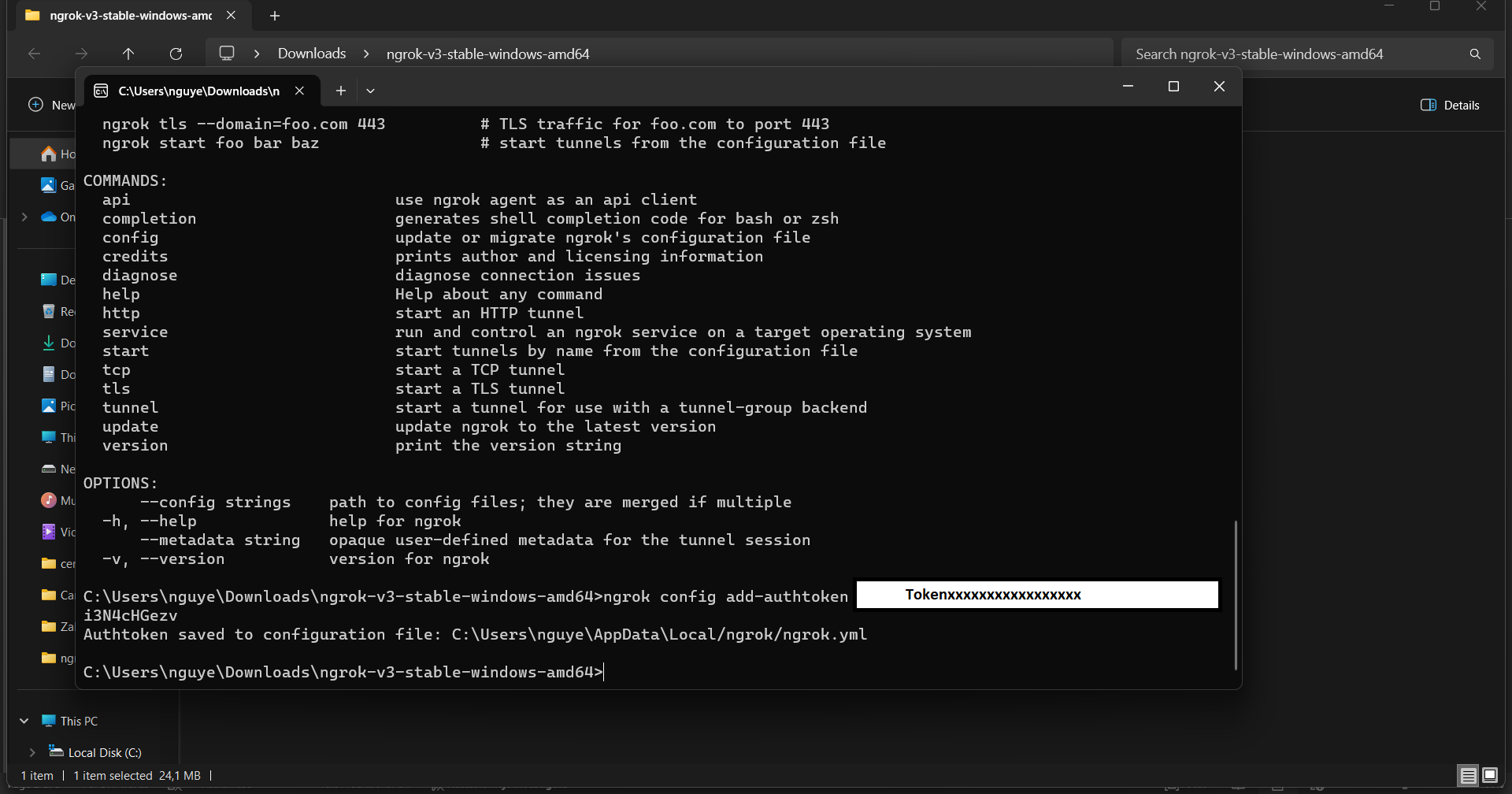
Run the following command in your terminal to install the auth token and connect the Ngrok agent to your account.

-> ngrok config add-authtoken <TOKEN>


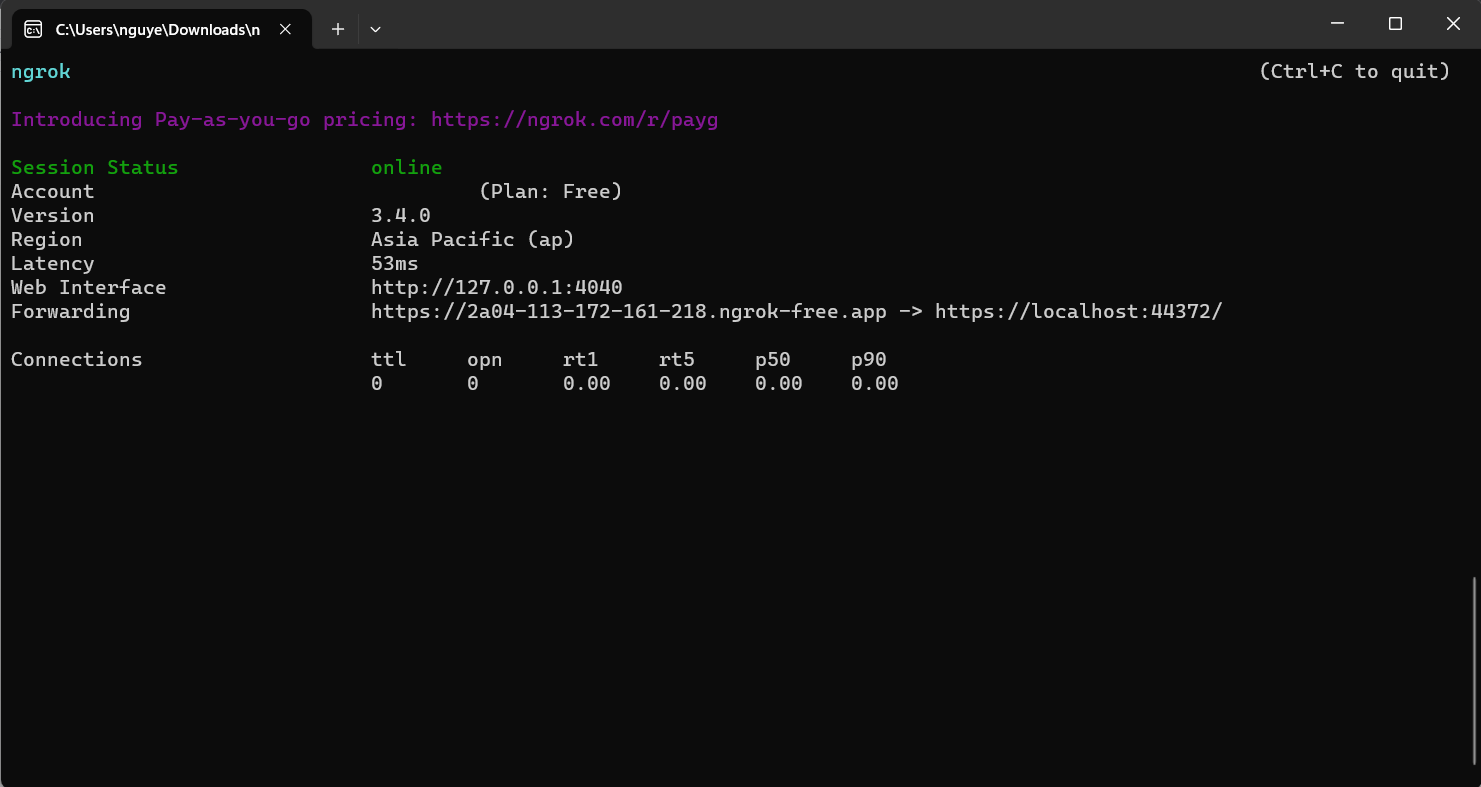
  • Step 3: Start Ngrok by running the following command

-> ngrok http http://localhost:8080

If your app is listening on a different URL, change the above command to match.


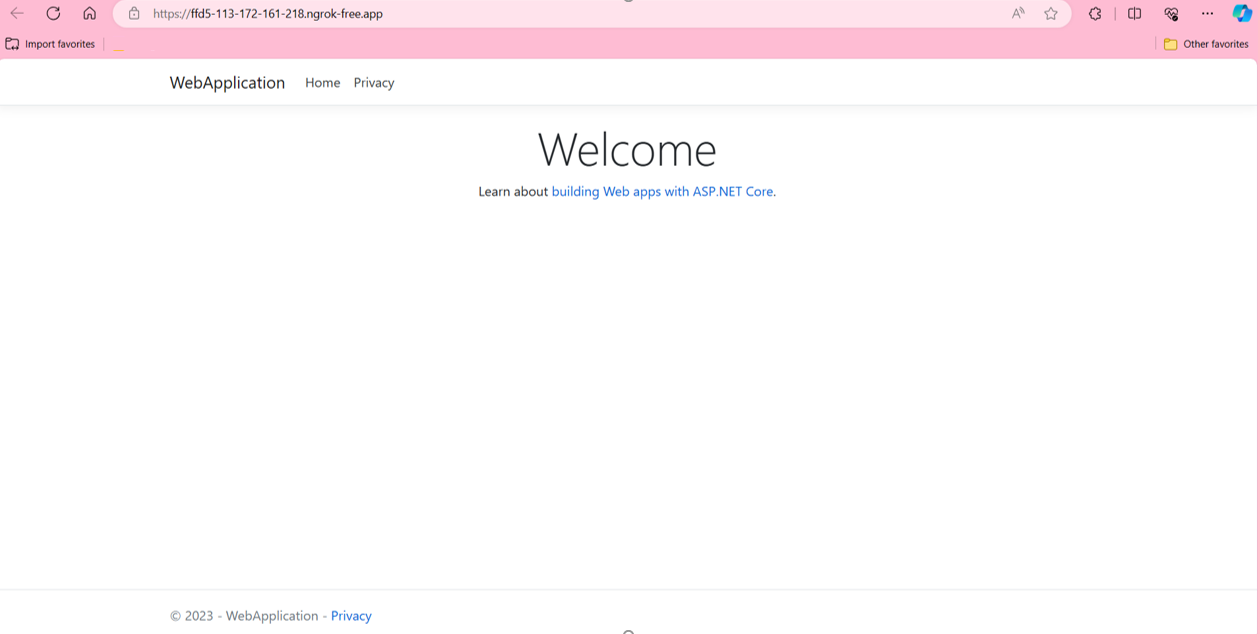
As shown above, the tunnel is created - press CTRL+C to terminate this connection, once the connection is maintained you can access your web application using the URL provided by ngrok
You can access this address from any device on the internet such as using your phone to access, send to friends, send customers to check first...

Conclusion

We’ve learned how Ngrok works internally by understanding the concept of port-forwarding and local-host tunneling. Ngrok is an extremely helpful tool for developers, especially for testing and debugging purposes in various types of applications.

References

[1]: https://ngrok.com/

[2]: https://www.huntress.com/hubfs/Blog%20-%20The%20State%20of%20the%20Dark%20Web/Blog-Ngrok-Tunnelling.jpg

[3]: https://requestly.io/wp-content/uploads/2023/09/646e1ca5cf42db6cf447b6cd_5.webp

View More
TECH

December 7, 2023

Some Tips to improve quality and performance with C#

As a developer, you are always looking for ways to improve the performance of your application.

l will introduce tips for optimizing the performance of your .NET applications, complete with illustrative examples in C#.
 
Now, let's begin !!!
 
  1. Check with NULL value

    Not good:  The == operator can be overridden. So, no guarantee that the results will be as we expect

    var lstEmployee = GetEmployees();

    if (lstEmployee == null)
    {
        // ...
    }

    Good: Using is operator instead

    var lstEmployee = GetEmployees();

    if (lstEmployee is null)
    {
        // ...
    }


  2. Using IDisposable interface to release unmanaged resources

    Not good: unmanaged resources might not be released, causing potential memory leaks
    public class Stock
    {
        private Stream _ioStream;
     
        public Stock(string filePath)
        {
            _ioStream = File.OpenRead(filePath);
        }
     
    }
     
    Good: Release resource after using
    public class Stock: IDisposable
    {
        private Stream _ioStream;
     
        public Stock(string filePath)
        {
            _ioStream = File.OpenRead(filePath);
        }
     
        // Disposing the unmanaged resource.
        public void Dispose()
        {
            _ioStream?.Dispose();
        }
    }


  3. Using ConfigureAwait(false) to prevent deadlocks

    Not good: a risk of potential deadlocks may be occurred
    public async Task<string> LoadData()
    {
        var data = await ReadData();
        return ProcessData(data);
    }
     
    Good: Using ConfigureAwait(false) to avoid potential deadlocks
    public async Task<string> LoadData()
    {
        // Use ConfigureAwait(false) to avoid potential deadlocks
        var data = await ReadData().ConfigureAwait(false);
        return ProcessData(data);
    }


  4. Using Parallel loops to take advantage of multicore CPUs

    Not good: a standard for loop is used to process the data collection, it will execute of sequential operations

    private void ProcessData(List<int> data)
    {
        for (int i = 0; i < data.Count; i++)
        {
            TakeOperation(data[i]);
        }
    }

    Good: Using Parallel loops can speed up processing of large collections, helping to optimize processing times

    private void ProcessData(List<int> data)
    {
        Parallel.ForEach(data, item => TakeOperation(item));
    }


  5. Force immediate execution using ToList() or ToArray() when needed to improve performance


    Not good: IEnumerable will be enumerated multiple times when processing.

    public IEnumerable<int> GetOddNumbers(IEnumerable<int> numbers)
    {
        var odds = numbers.Where(n => n % 2 != 0);

        return odds;
    }

    Good: 

    public IReadOnlyList<int> GetOddNumbers(IEnumerable<int> numbers)
    {
        var odds = numbers.Where(n => n % 2 != 0);

        return odds;
    }


  6. Using StringBuilder instead of concatenate strings in loops

    Not good: a new string object is created when each element of "stringArray" is appended to "result", wasting processing time and memory

    private string ProcessString(string[] stringArray)
    {

        string result = "";
        for (int i = 0; i < stringArray.Count; i++) {
            result += stringArray[i];
        }

        return result;
    }

    Good: use only one StringBuilder, save processing time and memory

    private string ProcessString(string[] stringArray)
    {

        StringBuilder stringBuilder = new StringBuilder();
        for (int i = 0; i < stringArray.Count; i++){

          stringBuilder.Append(stringArray[i]);

        }

        return stringBuilder.ToString();
    }


  7. Using Span over arrays to circumvent unnecessary memory allocations and copying

    Not good: Using the arrays may lead to unnecessary memory allocations and copying
    byte[] inputData = GetData();
    ProcessingData(inputData);

    Good: Using Span<T> helps avoid additional memory allocation and copying
    byte[] inputData = GetData();
    Span<byte> spanData = inputData.AsSpan();
    ProcessingData(dataSpan);


  8. Using Lazy Loading for Resources

    Not good: Loading image resource when not needed
    var employeeImage = LoadImage();
    // Some processsing

    Good: Loading image resource when need to use
    Lazy<Bitmap> employeeImage = new Lazy<Bitmap>(() => LoadImage());
    // After doing some processsing
    //...
    // Load the image when accessed
    Bitmap actualEmployeeImage = employeeImage.Value;


    Conclusion:

    These are just a few examples for improving performance when working with C#.

    I hope you find this article is helpful.

    References:

    https://www.c-sharpcorner.com/UploadFile/dacca2/5-tips-to-improve-performance-of-C-Sharp-code/
    https://dev.to/bytehide/7-simple-optimization-tips-in-c-nhn
    https://code-maze.com/csharp-tips-improve-quality-performance/
    https://www.bytehide.com/blog/performance-optimization-tips-csharp
    Image source: https://www.freepik.com/free-vector/stream-binary-code-design_16399103.htm


View More
TECH

December 7, 2023

SOLID principles in programming

In the mid-1990s, Robert C. Martin gathered five principles for object-oriented class design, presenting them as the best guidelines for building a maintainable object-oriented system.

Michael Feathers attached the acronym SOLID to these principles in the early 2000s.

SOLID Class Design Principles

Single Responsibility Principle (SRP).

Open-closed principle (OCP)

Liskov Substitution Principle (LSP)

Interface Segregation Principle (ISP)

Dependency Inversion Principle (DIP)

Single Responsibility Principle (SRP)

The “S” in SOLID is for the Single Responsibility Principle. Classes should have one, and only one, reason to change. Keep your classes small and single-purpose.

Ex: Class ProductManager is performing 3 tasks: getting data from the database, processing data, and printing reports.

class ProductManager {
   public void QueryDataFromDB();
   public void ProcessData();
   public void PrintReport();
}

The ProductManager class is performing 3 tasks: getting data from the database, processing data, and printing reports. One class performs many tasks, so it violates the Single Responsibility Principle.

According to the principle, we need to separate this class into 3 separate classes so that the code is easy to read, has few bugs, and is easy to maintain.

class ProductManager {
    public void QueryDataFromDB();
}

class ReportLogic {
    public void ProcessData();
}

class PrintService {
   public void PrintReport();
}

Open-Closed Principle (OCP)

The “O” in SOLID is for the Open-Closed Principle. Design classes to be open for extension but closed for modification; you should be able to extend a class without modifying it. Minimize the need to make changes to existing classes


Ex: We have a ConnectionManager class that can be implemented to connect to database systems such as SQL Server, and MySQL.

class ConnectionManager {
    public function doConnection(object $connection) {
        if ($connection instanceof SqlServer) {
            // connect with SqlServer
        } elseif ($connection instanceof MySql) {
            // connect with MySql
        }
    }
}

With the above class, if we want to support another database system like PostgreSQL, we must modify the class to support creating a connection to PostgreSQL, thus violating the Open-Closed Principle.

To not violate the above principle, we can correct it as follows:

abstract class Connection {
    public abstract function doConnect();
}
class SqlServer extends Connection {
    public function doConnect() {
           // connect to SqlServer
    }
}
class MySql extends Connection {
    public function doConnect() {
        // connect to MySql
    }
}
class ConnectionManager {
    public function doConnect(Connection $connection) {
         $connection->doConnect();
        // do something...
   }
}


Liskov Substitution Principle( LSP)

The “L” in SOLID is for the Liskov Substitution Principle. Subtypes should be substitutable for their base types. From a client's perspective, override methods should not break functionality.

Ex: We define the Brid interface to have 3 functions: fly(), eat() and walk ().

interface Bird {
    public function fly();
    public function walk();
    public function eat();

}
class Pigeon implements Bird {
    public function fly() {
        // do something
    }
    public function walk() {
        // do something
    }
    public function eat() {
        // do something
    }
}
class Penguin implements Bird {
    public function fly() {
        // penguin can not fly.
    }
    public function eat() {
        // do something
    }
    public function walk() {
        // do something
    }
}

In the case of the Pigeon class implementing Bird, it is correct, but the Penguin class implementing Bird violates the Liskov Substitution Principle because Penguin cannot fly.
We can fix it in the following way so as not to violate the Liskov Substitution Principle.
interface Bird {
    public function eat();
}
interface FlyingBird extends Bird {
    public function fly();
}
interface WalkingBird extends Bird {
    public function walk();
}
class Pigeon implements FlyingBird, WalkingBird {
    public function fly() {
        // do something
    }
    public function eat() {
        // do something
    }
    public function walk() {
        // do something
    }
}
class Penguin implements WalkingBird {
    public function eat() {
        // do something
    }
    public function walk() {
        // do something
    }
}

Interface Segregation Principle (ISP)

The “I” in SOLID is for the Interface Segregation Principle. Clients should not be forced to depend on methods they don’t use. Split a larger interface into several smaller interfaces.

Ex: The Bird interface defines many functions, but not every class that inherits this interface uses all the functions that have been defined. For example, Pigeon implementing Bird cannot use the fly function.

interface Bird {
     public function fly();
     public function walk();
     public function eat();
}

We can divide the Bird interface according to each function as follows:

interface Bird {
    public function eat();
}
interface FlyingBird extends Bird {
    public function fly();
}
interface WalkingBird extends Bird {
    public function walk();
}

Dependency Inversion Principle (DIP)

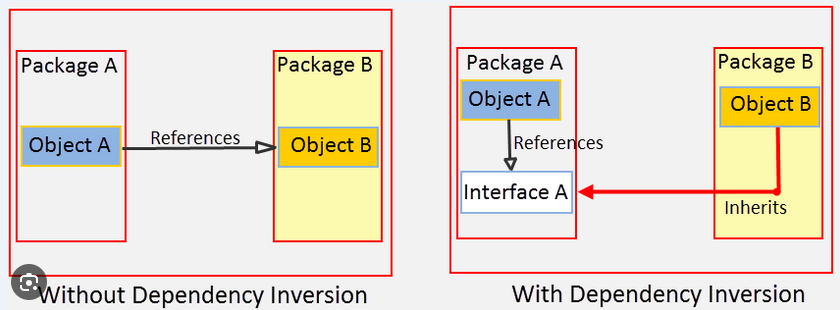
The “D” in SOLID is for the Dependency Inversion Principle. High-level modules should not depend on low-level modules; both should depend on abstractions. Abstractions should not depend on details; details should depend on abstractions.


Why does SOLID help programming be more efficient?

Easy to understand: The clear division of functions of each class makes reading the code easier to understand.

Easy to update & maintain: Because it is easy to understand, updating or maintaining will be easier when a bug occurs.

Reuse: because the components do not depend on each other, each module can be separated and these modules can be reused for future projects.

[Reference Source]

  1. https://www.toptal.com/software/single-responsibility-principle (image)
  2. https://springframework.guru/principles-of-object-oriented-design/dependency-inversion-principle (image)
  3. https://www.globalnerdy.com/2009/07/15/the-solid-principles-explained-with-motivational-posters 
  4. https://wit-computing-msc-2017.github.io/agile/topic08-srp-and-tdd-4/index.html


View More
TECH

December 7, 2023

Exploring String Comparison in C#: A Deep Dive into == Operator and Equals() Method

When it comes to string comparison in C#, which method do you typically use? There are two fundamental methods for comparing strings in C# that developers commonly employ. One is the == operator, and the other is the Equals() method. These two methods of string comparison have differences in their functionality, how they are utilized in C#, and what considerations should be kept in mind when employing these two string comparison approaches. Today, let's delve into a thorough exploration of these methods through this blog post.

View More
TECH

December 7, 2023

Automation testing is simple with Selenium IDE

Automation testing is a testing technique that applies automated testing support tools to execute many sets of highly complex test cases. Automation testing plays an important role in improving testing performance, avoiding errors during test case execution and synthesizing results while minimizing tester boredom with repetitive test cases repeat.

View More
TECH

December 6, 2023

UI/UX – One of Solutions in Developing a Great product

During the process of implementing a website or an application, many questions have arisen such as:

“How can the product reach the users more easily?”

“How can the product be more attractive to the end user?”

Besides the outstanding features of the product, an excellent User Interface will create an instant attraction to your app while a superb User Experience will have a lasting impact on the users’ minds.

What is UI (User Interface)?

UI (User Interface) is used to describe the user interface, including elements displayed on the screen of a website or application such as layout, colors, fonts, etc.

Those are all elements of the interface that users come into contact with when using a product.

What is UX (User Experience)?

UX (User Experience) is the experience of the users. This is how users interact with the generated UI elements. It includes factors such as interface design, user experience, interactivity, and user-friendliness.

The goal of UX is to provide the best possible experience for users, helping them find information or complete a task easily and quickly.

The role of UI/UX

UI/UX plays an important role in user experience on applications and websites. UI focuses on the way a product communicates and presents information and layout, while UX focuses on the overall user experience when using that product.

A good UI/UX design helps increase user satisfaction, reduces the time spent learning how to use the application, and also increases credibility and positive interaction with the product.

Why should Developers have knowledge of UI/UX design?

The benefits of UI/UX development for developers include:

  1. Improving product quality: Solid knowledge of UI/UX helps developers understand users’ needs and desires, thereby building applications with good and engaging experiences.
  2. Saving product development time: Good design minimizes future repair and adjustment errors. It saves development time and resources.
  3. Easy collaboration: Understanding UI/UX makes it easier for developers to collaborate with design and business teams to properly ensure that the product meets market and user needs.
  4. Enhance interaction: Learn about design principles that help developers create user interfaces that users can interact with naturally and easily.
  5. Increasing user satisfaction: An easy-to-use interface and eye-catching presentation make users feel more satisfied, which can contribute to the success of the application.
  6. Understanding the users: Developing UX knowledge helps developers understand the users, thereby adapting the product to their actual needs.

Conclusion

After understanding UI/UX and the close relationship between them, we can understand that a product with optimized UI/UX is ideal for increasing customer impression and experience, thereby indirectly affirming our brand and increasing revenue effectively.

Hopefully, through this post, you will have an overview of what UI/UX is and the role of UI/UX in developing a product.

Reference

[1] https://flatironschool.com/blog/what-is-ux-ui-design/

[2] https://www.studio14online.co.uk/importance-of-ui-ux-design-in-building-a-great-product-2/

Image Sources

[1] https://img.freepik.com/free-vector/gradient-style-ui-ux-background_52683-69621.jpg?w=1380&t=st=1701171735~exp=1701172335~hmac=b55ec915b2b368120d2cdb1c7b8b14a6f71ba865ed2ea9b4ad8e27119905eb37

[2] https://appinventiv.com/wp-content/uploads/sites/1/2019/02/How-Important-is-UI-UX-Design-in-an-App-Development-Process.png

[3] https://www.netsolutions.com/insights/wp-content/uploads/2023/03/the-8-steps-of-ux-design-process.png.webp

[4] https://www.betabreakers.com/wp-content/uploads/2020/12/122780970_s.jpg

[5] https://img.freepik.com/free-vector/programming-concept-illustration_114360-1351.jpg?w=740&t=st=1701174270~exp=1701174870~hmac=6d3d3b8cf27da6d81b168afdd95fd59315957bf96a11a483dfa06987c3137851

View More
TECH

December 6, 2023

Unleashing the Power of Smart Pointers in C++

In the dynamic landscape of C++ programming, mastering memory management is paramount for creating robust and reliable code. A key ally in this endeavor is the smart pointer, a powerful tool designed to streamline memory handling and eliminate common pitfalls. In this post, we will delve into the world of smart pointers and explore their usage through illustrative code samples.

1. Understanding Smart Pointers

Smart pointers are objects in C++ that mimic the behavior of pointers while adding features to automate memory management. Unlike raw pointers, smart pointers automatically handle memory allocation and deallocation, reducing the likelihood of memory leaks and enhancing code readability.

Types of Smart Pointers:

C++ offers three main types of smart pointers:

1.1 std::unique_ptr

  • Represents exclusive ownership of an allocated resource.
  • Ensures that only one unique_ptr points to a specific memory location.
  • Automatically deallocates memory when the unique_ptr goes out of scope.

Output:

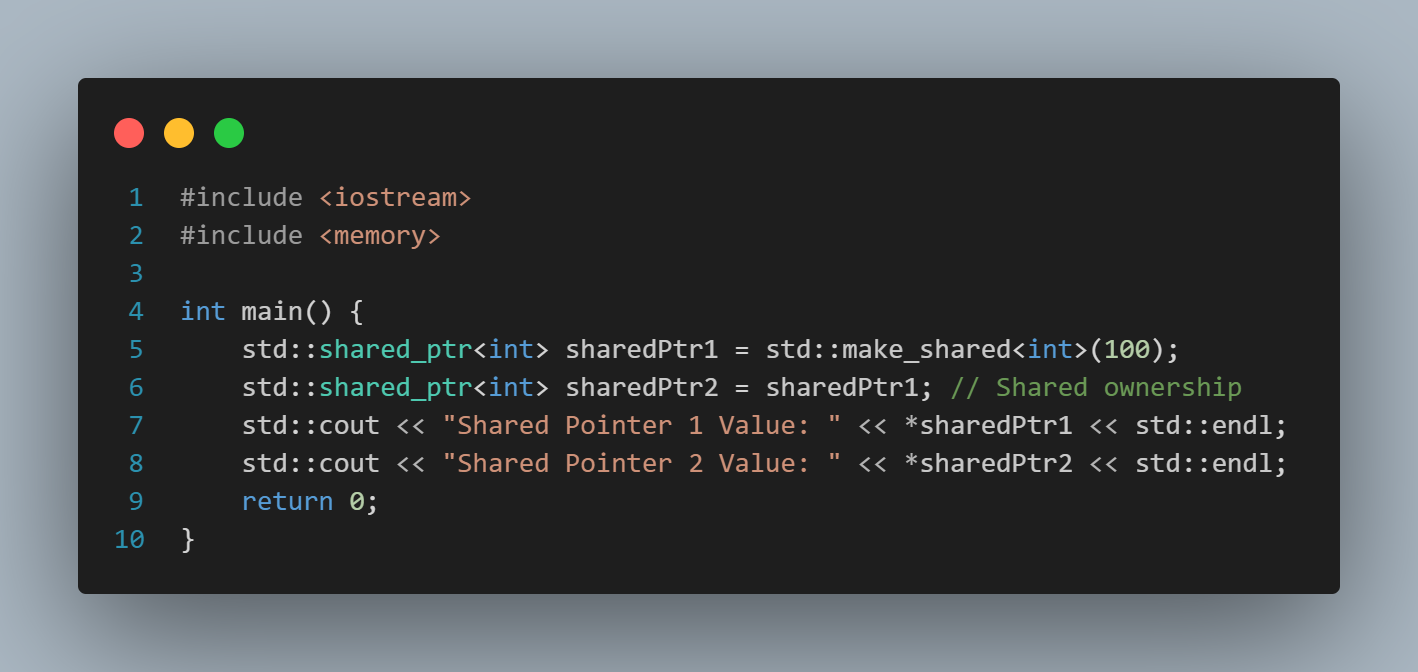
1.2 std::shared_ptr

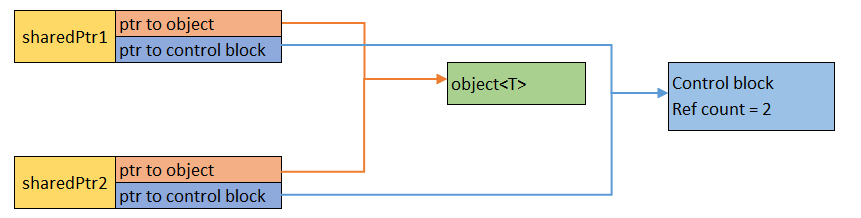
  • Allows multiple smart pointers to share ownership of the same resource.
  • Keeps track of the number of shared_ptrs pointing to a resource.
  • Deallocates memory only when the last shared_ptr is destroyed.

Output:

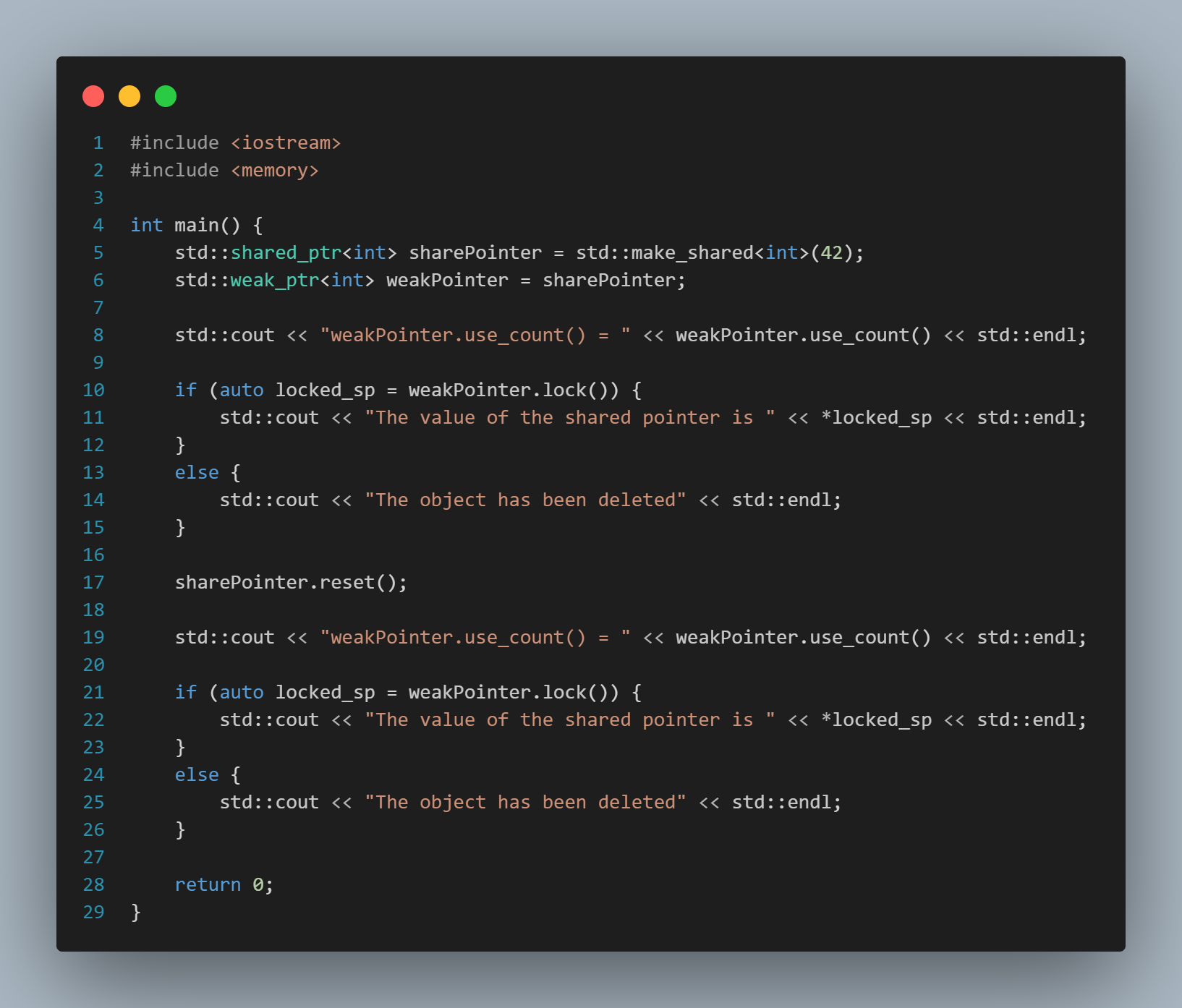
1.3 std::weak_ptr

  • A weak_ptr is used in conjunction with shared_ptr to break circular references.
  • It provides a non-owning, weak reference to an object controlled by a shared_ptr.
  • Weak pointers do not affect the reference count of the shared_ptr.

Output:

2. Differences among the pointers

Before making decisions on which type of pointer to use in your project, let's collectively examine the distinctions for each type of pointer:

  std::unique_ptr std::shared_ptr std::weak_ptr
Ownership Represents exclusive ownership of a dynamically allocated object. It ensures that only one unique_ptr can own the object at a given time. When the unique_ptr is destroyed, it deletes the associated object. Represents shared ownership of a dynamically allocated object. It keeps a reference count, and multiple shared_ptr instances can share ownership of the same object. The object is only deleted when the last shared_ptr owning it is destroyed.  It is used in conjunction with shared_ptr and does not affect the reference count. It provides a non-owning "weak" reference to an object held by a shared_ptr. It is useful to break circular references in situations where shared_ptr is used.
Copying and Assignment Cannot be copied. It can only be moved, indicating a transfer of ownership. Can be copied, and each copy shares ownership of the object. The reference count is increased with each copy. Can be copied, but it does not affect the reference count. It is used to observe the state of a shared_ptr without affecting its ownership.
Performance and Overhead Typically has lower overhead compared to shared_ptr because it does not maintain a reference count. Has a higher overhead due to maintaining a reference count to manage shared ownership. Introduces minimal overhead compared to shared_ptr.
Use Cases Use when you have exclusive ownership and want to transfer ownership or use move semantics. It is a good choice for resource management. Use when multiple owners need to share ownership of an object. It provides automatic memory management and helps avoid memory leaks. Use when you need to break circular references in situations where shared_ptr is used. It is often used in combination with shared_ptr to prevent strong reference cycles.
Thread Safety Not designed for sharing ownership across multiple threads. Provides thread-safe reference counting, making it suitable for shared ownership across multiple threads. Provides a non-owning reference and does not affect the reference count atomically. It should be used with caution in a multi-threaded environment.

In summary, the choice between unique_ptr, shared_ptr, and weak_ptr depends on the ownership requirements and the desired behavior of your program. Each smart pointer has its own strengths and use cases.

3. Benefits of Smart Pointers

Automatic Memory Management:

Smart pointers automate memory allocation and deallocation, reducing the risk of memory leaks.

Enhanced Safety:

Helps prevent common pitfalls like dangling pointers and null pointer dereferencing.

Improved Code Readability:

Leads to cleaner and more readable code, allowing developers to focus on program logic.

4. Conclusion

Smart pointers have become indispensable in modern C++ programming, offering a safer and more convenient approach to memory management. By incorporating unique_ptr, shared_ptr, and weak_ptr into your codebase, you can significantly improve the robustness and maintainability of your software. As you embrace smart pointers in your C++ journey, you'll discover a more efficient and reliable path to creating high-quality applications.


[Reference Source]

  • https://learn.microsoft.com/en-us/cpp/cpp/smart-pointers-modern-cpp?view=msvc-170
View More
TECH

December 5, 2023

Why the Android so popular

We are in the 4.0 era and smartphones are an indispensable device in daily life. Smartphones today are present in every area of human life. They come from many different brands, but if classified by operating system, there are two popular platforms: Android and iOS.

Apple was the first company to bring the concept of the modern touchscreen smartphone to consumers, and the iPhone's market share has declined significantly since it was first introduced.

In 2010, Android surpassed iOS in market share, becoming the most popular mobile operating system in the world. It's a title that Android still holds to this day. And although some may argue about which operating system is better, there is no denying which operating system is more popular as Android maintains over 80% of the global market share.

Why are Android phones more popular than iPhones?

1. More and more smartphone manufacturers are using Android

In 2007, Google and several mobile operators, software companies, and hardware companies formed the Open Handset Alliance (OHA) to compete with the launch of the iPhone. This alliance established Android as the mobile platform of choice, granting open-source licenses to manufacturers. It is this factor that makes more and more smartphone and device manufacturers use Android as the operating system for their devices. In contrast, IOS is limited to iPhones and iPads manufactured by Apple.

Additionally, regional brands and new startup manufacturers are also adopting this operating system. The boom in demand for smartphones in the Chinese and Indian markets has meant that local companies' adoption of Android has enhanced their global share of the smartphone market. Several other mobile operating systems continue to try to compete with Android and IOS like Windows Phone or Symbian.

However, when these companies failed to gain a significant foothold in the market, their smartphone brands eventually switched to Android. In fact, in the Vietnamese market, all phone companies currently use the Android operating system, and only Apple uses the iOS operating system. Android dominates in both the number of manufacturers and the number of phones produced during the year.

For example, Samsung can make up to 20 phone lines in 1 year spanning different price segments, while Apple only makes 4-5 phone lines.

2. Android devices cover a wide range of price segments

One reason why the Android operating system is more popular than iOS is because of the diverse prices of Android devices. This is extremely important for countries with developing economies and weak USD exchange rates, where even low-cost Apple smartphones are beyond the financial capabilities of the majority of users.

Not only that, the populations of India and China account for about 1/3 of the world's population, so the popularity of the Android operating system in these countries has put iOS at a big disadvantage. That is why Apple is currently promoting its business plans in these populous world markets.

3. Android devices can connect to many devices

Although Apple has opened up the IOS ecosystem to include several third-party devices, it is still a relatively closed mobile platform. However, Android has a much broader ecosystem of peripherals and wearables. This means you can have a Samsung smartwatch, a Google Home speaker, and a Huawei smartphone, and the different devices will work together.

Furthermore, data transfer and device synchronization are much simpler. This broader ecosystem attracts users who don't want to be tied to certain hardware brands. After all, if you change the Android device you use, this doesn't make all your peripherals incompatible. You can also keep many similar cables and accessories.

4. Android is becoming more and more practical

In recent years, Android has caught up to IOS in many aspects, with Google Assistant and its excellent voice control features achieving great success. Many apps that were previously iOS-only have now launched Android versions, and Google has also introduced AI to help automate your smart home. Official Google services and major app developers have significantly raised the overall quality of Android software.

Furthermore, Android integrates many expected features with each new version and improves the entire product. Now, Android phone manufacturers have paid more attention to optimizing the Android platform so that users can use the device more optimally and practically, instead of just racing for configuration like before.

5. Ability to customize and install APK files

If you are too bored with the current features and interface on your Android device You can try to customize it by installing ROMs of other platforms, something that is very difficult to do on iOS.
Due to the open-source nature of the Android operating system, anyone can obtain its source code. This also means that manufacturers, as well as independent programmers, can freely customize Android to get the best performance or remove unnecessary features.

Currently, in the Android user community, there are many ROMs with high customization, most notably EvolutionX or lineage OS, in addition to other ROMs that Make your phone simpler and optimize performance like Pixel Experience or CyanogenMod. Android group pages also have a large number of members They can help with any problems you encounter during ROM installation or use.

Besides great customization capabilities, the ability to install APK files is also an advantage for Android users to continue using old devices. Most of you will often download applications on your phone through app stores like CH Play or APPSTORE. But sometimes there are some apps you won't find on these stores for various reasons.

At this time, the ability to install APK files on Android will shine. You can also install and experience new Android builds that are often leaked in advance to use exciting new features, or download applications that are limited to certain regions so cannot be downloaded directly from the app store.

In addition, installing APK files also helps you update new application versions faster or you can even install older versions of the application to optimize for your old devices. Besides, if your device does not have access to the Play Store app store, installing the APK file will be your only choice.

In short, the diversity of Android as well as the competition between operating systems promotes a technology race between brands, helping users easily find a device that suits their financial capabilities and meets their needs meet your own needs.

[reference resources]

  • https://fptshop.com.vn/tin-tuc/danh-gia
  • https://www.thegioididong.com/tin-tuc/dien-thoai-thong-minh-da-thay-doi-cuoc-song-cua-chung-ta-1404983
  • https://medium.com/android-news/the-best-android-sdk-tools-of-the-year-b546f66edf28
  • https://support.google.com/android/answer/12761388?hl=en
View More
TECH

December 5, 2023

What is Docker Registry?

If you deploy an application inside a container, you may already use a Docker Registry. The Docker Registry provides a simple, secure, and easily extensible way for developers to distribute images and for users to search and download them.

This article will introduce the basic information about Docker Registries and how to create a private Docker Registry.

What is Docker Registry?

Simply, Docker Registry is a tool provided by the Docker project that helps store and distribute containers images. Docker Registry is open source and everyone can download and run for storing your own images.

More broadly, we can understand it as a tool used to store and distribute container images and the Docker project's Docker Registry is a solution, but there are other solutions such as:

  • Harbor (an open source option).
  • Docker Hub (a solution from Docker).
  • JForg Artifactory (a tool to store container images in both on-premises and cloud environments).
  • Amazone Elastic Container Registry (a Docker Registry service in the AWS cloud).
  • Azure Container Registry (a solution from Azure).
  • Google Cloud Container Registry.

How to create a Docker Registry.

When using Docker, people often use container images from Docker Hub.

However, there are some limitations of Docker Hub such as:

  • The server is located abroad, so when the international network has problems, downloading container images will take a lot of time.
  • Network restrictions for security purposes at some tech companies will also make downloading images from Docker Hub more difficult.
  • In some cases, you don't want to make your container images public and the Docker Hub will charge you for the images you host as private. In case you have many percentages of images, the cost is quite a lot of money

With the above information, you can build your own Docker Registry to serve the needs of storing and distributing these container images for project development purposes.

Below are instructions for running a Docker Registry, creating, and pushing a container image to the Docker Registry.

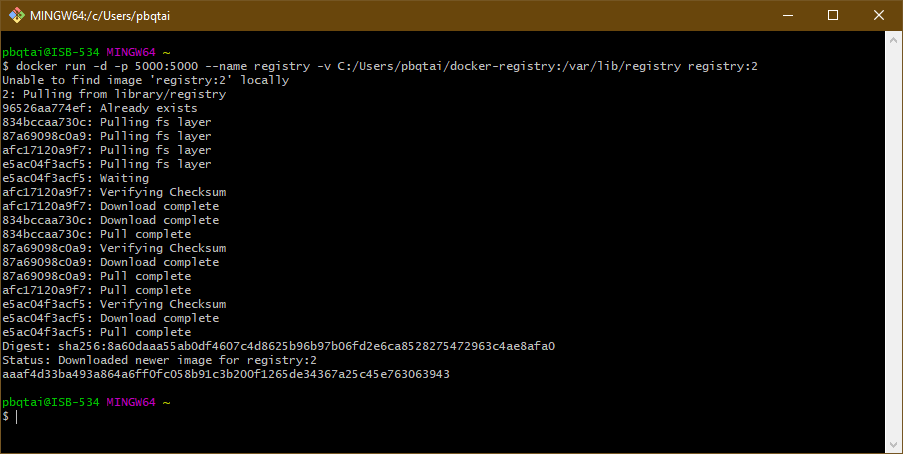
Creating a Docker container from image registry:2

docker run -d -p 5000:5000 --name registry -v C:/Users/pbqtai/docker-registry:/var/lib/registry registry:2

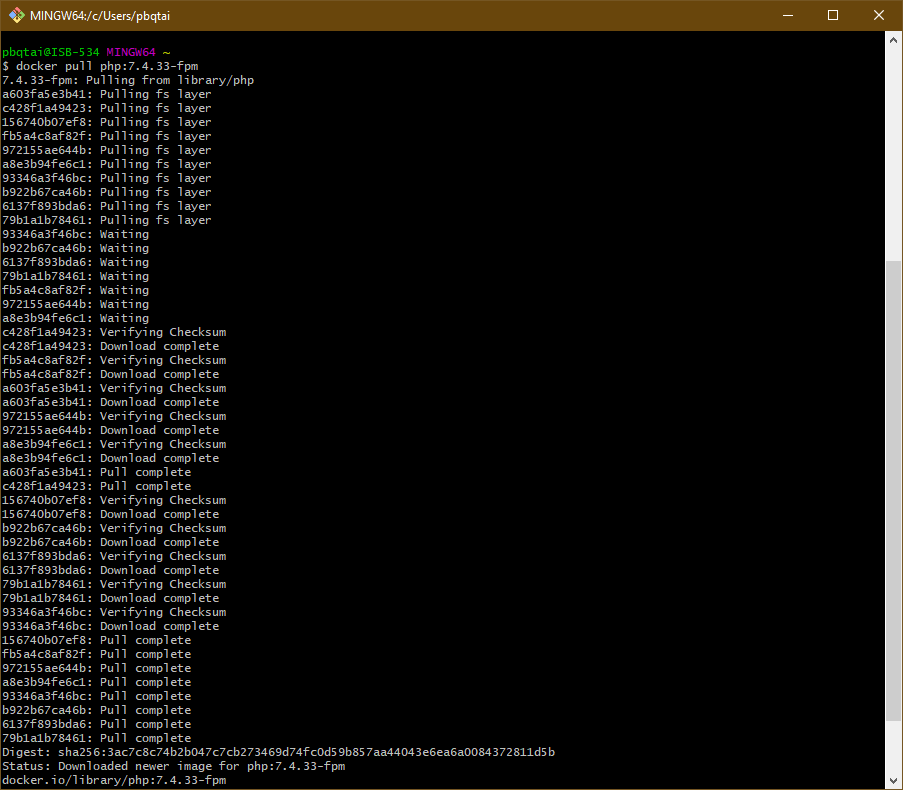
Creating and pushing a container image to the newly created registry.

docker pull php:7.4.33-fpm

Using the below command to perform image tagging.

docker image tag php:7.4.33-fpm localhost:5000/php:7.4.33-fpm

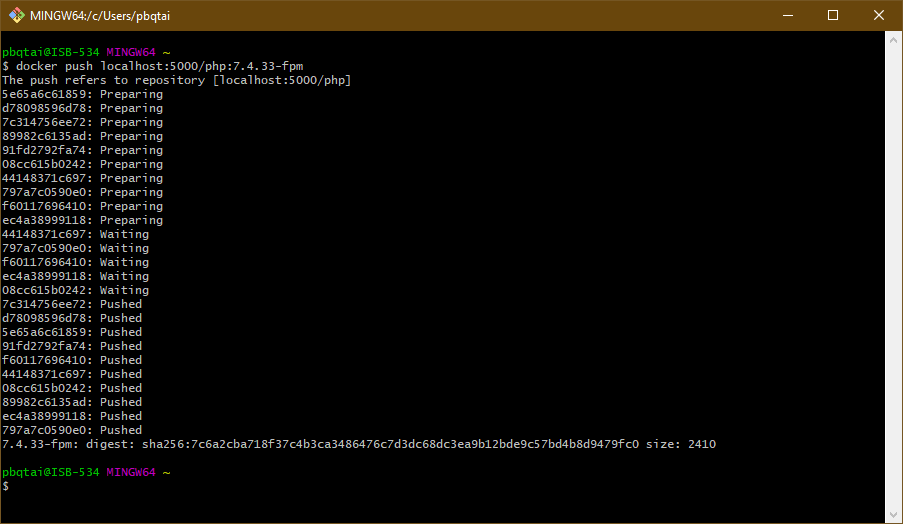
Perform image push to registry server.

docker push localhost:5000/php:7.4.33-fpm

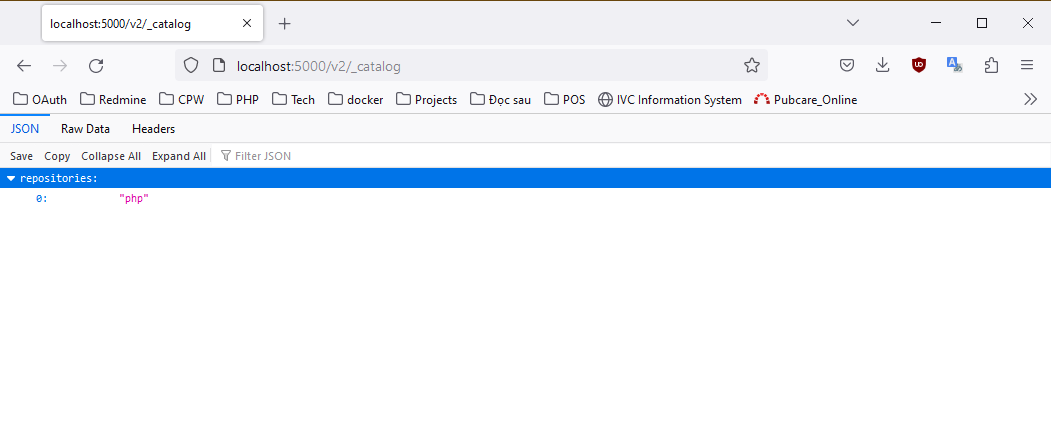
To check whether the container image has been saved in the Docker Registry or not, you can access the url: http://localhost:5000/v2/_catalog

To use this image, type the below command:
docker pull localhost:5000/php:7.4.33-fpm 

Now the image will be loaded from the Docker Registry we just created instead of from the Docker Hub.

Hopefully the above information, you can understand more about the Docker Registry and can creating a simple Docker Registry for yourself.

[Reference Source]

  1. https://appmaster.io/blog/docker-container-overview (Source of images)
  2. https://hub.docker.com/_/registry
  3. https://sysdig.com/learn-cloud-native/container-security/what-is-a-docker-registry/


View More
1 17 18 19 20 21 23
Let's explore a Partnership Opportunity

CONTACT US


At ISB Vietnam, we are always open to exploring new partnership opportunities.

If you're seeking a reliable, long-term partner who values collaboration and shared growth, we'd be happy to connect and discuss how we can work together.

Add the attachment *Up to 10MB