...

What We Think

Blog

Keep up with the latest in technological advancements and business strategies, with thought leadership articles contributed by our staff.
TECH

April 23, 2026

Mastering Burp Suite: Are you really getting the most out of it for your web security testing?

In the world of software testing, if automation tools ensure that a system works, then Burp Suite ensures that the system cannot be broken. As we move further into the era of complex architectures like UI-BFF-API, simply checking features is no longer enough. To truly level up your career, you must master the gold standard of security testing: Burp Suite.

But what makes this tool so indispensable? Let’s dive into its most effective applications.

  1. The Core Power: Intercepting Proxy

The most effective and fundamental application of Burp Suite is its Intercepting Proxy.

How it works: Burp Suite sits between your browser and the server. When you click Submit, Burp catches the request. This allows you to pause, inspect, and modify the data before it ever reaches the server. Why is this a "Game Changer" for Testers?

  • Bypassing Front-end Validation: You can bypass UI restrictions (like disabled buttons or character limits) to see if the Server-side is truly secure.
  • Parameter Tampering: Have you ever wondered what happens if you change a product price from $1,000 to $1 during checkout? With the Proxy, you can test this in seconds.  
  • Broken Access Control: In a multi-site system (Candidate, Parent, Admin), you can swap authorization tokens to see if a Parent can sneak into the Admin panel.

  1. Top 3 Features to Supercharge Your Testing

Beyond intercepting traffic, Burp Suite offers specialized modules that act like superpowers for a QC:

  • Repeater: Unlimited Experimentation

Instead of re-loading the web page and re-filling forms, Repeater allows you to send the same request over and over with different modifications. It’s the fastest way to pinpoint logic flaws and edge cases.

  • Intruder: Automated Attacks

Need to test 1,000 different password combinations? Or check for IDOR (Insecure Direct Object Reference) by cycling through 500 different User IDs? Intruder automates these repetitive tasks, saving you hours of manual work.

  • Scanner (Pro Version): Automated Vulnerability Detection

For busy QCs, the Scanner automatically crawls the application to find common vulnerabilities like SQL Injection, XSS, and Security Misconfigurations while you focus on more complex testing scenarios.

  1. Applying Burp Suite to the UI-BFF-API Model

In your daily work with the UI-BFF-API architecture, Burp Suite becomes a surgical tool:

  • Testing the BFF Layer: Ensure that the Backend-for-Frontend is properly filtering sensitive data before sending it to the UI.
  • Role-Based Testing: With four distinct sites (Candidate, Parent, University Admin, System Admin), Burp makes it easy to manage multiple sessions and ensure that users stay within their permitted boundaries.
      1. Tips for Junior QCs Starting with Burp Suite

      Don’t let the complex interface intimidate you. Here is how to start:

      • Learn Proxy Configuration first: This is your gateway to understanding how the web talks.
      • Monitor the HTTP History: Simply observing the flow of requests and responses will teach you more about web architecture than any textbook.
      • Ethics First: Always use Burp Suite in a staging/UAT environment. Never use it on a production system without explicit permission.

      Would you like me to create a Quick Start Guide for configuring Burp Suite with your UI-BFF-API application?

      To test an architecture consisting of an Exam Candidate, Parent, and Admin sites, you need to see exactly how the UI talks to the BFF (Backend-for-Frontend).

      Step 1: The Basic Connection (The Proxy)

      1. Launch Burp Suite: Open the application and select Temporary Project.
      2. Use the Built-in Browser: Go to the Proxy tab > Interceptor sub-tab > Click Open Browser
        • Why? This is much easier than configuring Firefox or Chrome manually, as Burp handles the SSL certificates for you automatically.
      3. Turn Intercept off: For now, keep it off so you can browse the sites freely while Burp records the history in the background. 

        Step 2: Organize Your Scope (Crucial for 4 Sites)

        Since you are working with four different sites, your history will get messy quickly.

        1. Go to the Target tab > Scope sub-tab.
        2. Add the URLs of all four sites (e.g., https://candidate.example.com, https://admin.example.com).
        3. Go to the Proxy tab > HTTP History.
        4. Click the Filter bar at the top and check Show only in-scope items.
          • Result: You will now only see traffic related to your project, hiding background noise like Windows updates or Google analytics.

        Step 3: Mapping the UI-BFF-API Flow

        1. Open your Candidate Site in the Burp Browser and perform a Login.
        2. Look at the HTTP History. You will see a request going from the UI to the BFF.
        3. The Secret Sauce: Right-click that Login request and select Send to Repeater.
        4. In Repeater, you can now manually change the username or password and hit Send to see how the BFF responds without re-typing anything in the browser.

        Step 4: Testing Roles (The Parent vs. Admin Test)

        This is the most effective test for your specific architecture:

        1. Log in as a Parent in the browser.
        2. Find a request in the history that fetches Parent Data from the BFF. Look for the Authorization: Bearer <TOKEN>
        3. Now, try to access an Admin API URL by pasting it into the Repeater.
        4. If the BFF returns 200 OK instead of 403 Forbidden, you've found a Critical Security Bug!

        Finally, if AI is the assistant that helps you write test cases faster, Burp Suite is the microscope that helps you find the invisible bugs that could destroy a company’s reputation. By mastering Burp Suite, you transition from a standard Tester to a Security-Aware Quality Engineer.

        Whether you need scalable software solutions, expert IT outsourcing, or a long-term development partner, ISB Vietnam is here to deliver. Let’s build something great together—reach out to us today. Or click here to explore more ISB Vietnam's case studies.

        View More
        TECH

        April 23, 2026

        When Should You Use ADO.NET vs Entity Framework?

        When developing applications with the .NET platform, developers often face a common question: Should we use ADO.NET or Entity Framework for database access? Both technologies are widely used in the .NET ecosystem and each has its own strengths. Choosing the right one can significantly impact performance, maintainability, and development speed. In this article, we’ll explore the differences and discuss when you should use ADO.NET and when Entity Framework is the better choice.

        Understanding ADO.NET

        ADO.NET is the traditional data access technology used in .NET applications. It provides low-level access to databases and requires developers to write SQL queries manually.

        Typical components include:

        • SqlConnection
        • SqlCommand
        • SqlDataReader
        • DataTable
        With ADO.NET, developers have full control over how queries are executed and how data is retrieved.

        Advantages of ADO.NET

        • ✅ High performance
        • ✅ Full control over SQL queries
        • ✅ Suitable for complex database operations

        Disadvantages

        • ❌ More boilerplate code
        • ❌ Manual mapping between database tables and objects
        • ❌ Harder to maintain in large applications

        Understanding Entity Framework

        Entity Framework (EF) is an Object-Relational Mapper (ORM) developed by Microsoft.

        Instead of writing SQL queries, developers interact with the database using C# objects and LINQ queries.

        Example:

        var users = context.Persons.Where(u => u.Age > 18).ToList();

        Entity Framework automatically converts this into SQL and executes it against the database.

        Advantages of Entity Framework

        • ✅ Faster development
        • ✅ Cleaner and more readable code
        • ✅ Automatic object-relational mapping
        • ✅ Strong integration with LINQ

        Disadvantages

        • ❌ Potential performance overhead
        • ❌ Less control over generated SQL
        • ❌ Not always optimal for complex queries

        When Should You Use ADO.NET?

        1. When Performance Is Critical

        If your application processes large volumes of data or requires extremely optimized queries, ADO.NET is often the better choice. Examples:
        • Financial systems
        • High-traffic enterprise applications
        • High-traffic enterprise applications
        • Batch processing systems
        Because SQL is written manually, developers can optimize queries precisely.

        2. When Working with Complex Queries or Stored Procedures

        Some database operations involve:
        • Advanced joins
        • Complex stored procedures
        • Custom indexing strategies
        ADO.NET allows developers to execute and optimize these queries directly.

        3. When Maintaining Legacy Systems

        Many older .NET applications were built using ADO.NET.

        If you are maintaining or extending an existing system, continuing to use ADO.NET may be more practical than refactoring everything to an ORM.

        When Should You Use Entity Framework?

        1. When Rapid Development Is Important

        Entity Framework significantly reduces the amount of code needed for common operations.

        It is ideal for:

        • Web APIs
        • Internal business applications
        • Startup or MVP projects
        Developers can focus on business logic rather than SQL queries.

        2. When Your Application Has a Strong Domain Model

        If your application contains many business entities like:

        • Users
        • Orders
        • Products
        • Invoices
        Entity Framework helps map these entities directly to database tables, making the architecture more intuitive.

        3. When Maintainability Is a Priority

        Entity Framework improves:

        • Code readability
        • Maintainability
        • Developer onboarding

        New developers can understand the system faster because the code closely reflects the domain model rather than raw SQL.

        Best Practice: Use Both

        In many modern projects, teams combine both approaches.

        A common strategy is:

        • Entity Framework → for standard CRUD operations
        • ADO.NET or raw SQL → for performance-critical queries

        This hybrid approach balances development productivity and performance optimization.

        Conclusion

        There is no one-size-fits-all solution.

        • Use ADO.NET when performance and SQL control are critical.
        • Use Entity Framework when you want faster development and easier maintenance.

        Understanding when to use each technology will help you design scalable, efficient, and maintainable .NET applications.


        Whether you need scalable software solutions, expert IT outsourcing, or a long-term development partner, ISB Vietnam is here to deliver. Let’s build something great together—reach out to us today. Or click here to explore more ISB Vietnam's case studies.

        View More
        TECH

        April 23, 2026

        Implementing Access Tokens and Refresh Tokens "The Right Way"

        Implementing Access Tokens and Refresh Tokens is the gold standard in modern authentication (especially with JWT - JSON Web Tokens). The goal is to balance security and user experience.
        Below is a detailed guide on how to use these two token types "correctly" and most securely.

        1. Why do we need 2 types of tokens?

        Why not use a single token with a permanent expiration? Because if a hacker obtains that token, they gain access forever. We split them into two to minimize risk:
        Feature
        Access Token (AT)
        Refresh Token (RT)
        Purpose
        Access resources (API)
        Request a new Access Token
        Lifespan
        Very short (15 minutes - 1 hour)
        Long (7 days - 30 days)
        Storage Type
        Stateless (usually JWT)
        Stateful (stored in DB/Redis for control)
        Risk
        If lost, the hacker can only use it for a short time
        If lost, consequences are more serious (but it can be revoked)

        2. Standard Workflow (The Flow)

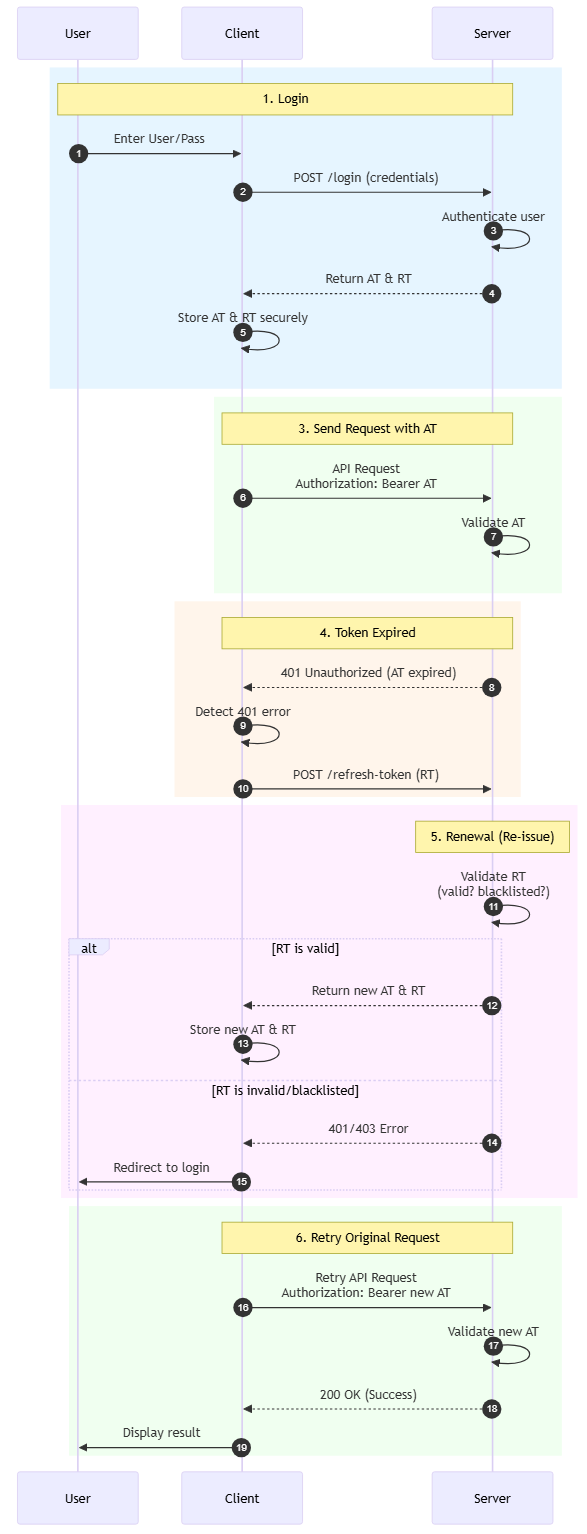
        Here is the standard lifecycle of this authentication mechanism:
        1.Login: User sends User/Pass. Server authenticates and returns an AT and RT pair.
        2.Storage: Client stores AT and RT in a secure place (see section 3).
        3.Send Request: Client sends a request with AT in the Header (Authorization: Bearer <token>).
        4.Expired:
        - Server checks AT. If expired -> Returns 401 Unauthorized error.
        -  Client receives 401 error -> Automatically sends a /refresh-token request with RT to the Server.
        5.Renewal:
        * Server checks RT (is it valid? is it blacklisted?).
        * If valid -> Server returns a new AT (and usually a new RT - see Token Rotation section).
        6.Retry: Client uses the new AT to retry the original request without the user realizing it happened.

        3. Storage "Best Practices"

        This is the most important part to avoid security vulnerabilities (XSS and CSRF).

         A. For Web Applications (SPA - React, Vue, Angular)

        The common way is to save to `localStorage`, but the safest way is:


        Access Token: Store in JavaScript local variable (in-memory).
        Pros: XSS attackers cannot read the token (because it is not in storage).
        Cons: Token is lost when the page is refreshed (F5) (solved by silently calling a refresh token API immediately upon page load).


        Refresh Token: Store in HttpOnly Cookie.
        Cookie configuration: HttpOnly (JS cannot read), Secure (sent only over HTTPS), SameSite=Strict.
        Pros:* Completely immune to XSS. Hackers cannot copy this token.


        B. For Mobile Apps (iOS/Android)

        Store both in the operating system's secure storage.
        iOS: Keychain.
        Android: EncryptedSharedPreferences / Keystore.

        4. Token Rotation Mechanism

        To enhance security, you should not use the same Refresh Token forever. Use the Refresh Token Rotation technique:

        1. Every time the Client uses Old_RT to request a new token.
        2. The Server will return New_AT and New_RT.
        3. The Server marks Old_RT as used (or deletes it) in the Database.
        4.Theft Detection: If a hacker steals Old_RT and tries to use it to refresh -> The Server sees that Old_RT has already been used -> The Server immediately revokes all RTs related to that user, forcing the user to log in again.

        Conclusion

        1. Access Token short, Refresh Token long.
        2. Web: Prioritize HttpOnly Cookie for Refresh Token, In-memory for Access Token.
        3. Mobile: Use Keychain/Keystore.
        4. Backend: Always validate Refresh Token in the database (to allow revocation/revoke when needed).
        5. Rotation: Change to a new Refresh Token after every use.

        Whether you need scalable software solutions, expert IT outsourcing, or a long-term development partner, ISB Vietnam is here to deliver. Let’s build something great together—reach out to us today. Or click here to explore more ISB Vietnam's case studies.

        [References]
        View More
        OUTSOURCING

        March 16, 2026

        DevOps Best Practices: What to Build and What to Outsource

        DevOps can speed up releases and improve reliability, but many mid-sized teams get stuck. Tooling is inconsistent, environments drift, incidents are handled reactively, and delivery slows down as systems grow. When you do not have dedicated SRE or DevOps specialists, the challenge is not knowing what to implement first, and what you can safely hand off to a partner.

        Fueled by digital transformation, the DevOps outsourcing market is surging as organizations seek to manage complex cloud-native environments, address talent gaps, and accelerate their time-to-market. According to Future Market Report (2025), the market is valued at approximately USD 12.5 billion and is projected to reach USD 28.4 billion by 2032, growing at a CAGR of 10.8%. North America leads with a 35.6% market share, with the U.S. accounting for the largest single-country portion at 22.1%.

        This guide breaks down DevOps best practices that work in real projects. We clarify the minimum deliverables to aim for, how to split responsibilities between in-house and outsourced teams, and the common failure patterns that derail DevOps efforts. You will also learn what drives cost, which engagement model fits your situation, and how to evaluate a DevOps partner before you commit.

        What DevOps Means in Practice

        devops best practices

        In real projects, DevOps is not a philosophy deck. It is an operating system for how your team builds, tests, secures, and delivers software.

        For companies running web services or internal platforms, DevOps typically includes:

        • A standard CI pipeline used by every developer
        • Infrastructure as code to control environment drift
        • Automated testing and deployment
        • Monitoring tied to business impact
        • Defined ownership and incident response

          The key shift is control. You move from reactive issue handling to a structured, measurable delivery model.

          Why DevOps Matters for Mid-sized Teams

          devops best practices

          For mid-sized organizations, the business impact of slow delivery is now measurable. A 2025 TechRadar Pro report found that software projects are delayed by an average of four months, costing companies approximately £107,000(around USD 135,000) per year due to missed opportunities and inefficiencies. The report emphasizes that executives increasingly view sluggish delivery as a strategic liability that directly affects competitiveness and revenue growth.

          At the same time, DevOps is expanding beyond traditional application delivery. Another 2025 TechRadar Pro article highlights that 85% of machine learning models never make it into production, largely due to fragmented processes between development, operations, and data teams. This statistic underscores the growing need to unify DevOps and MLOps into a single, end-to-end software supply chain.

          Together, these figures reinforce that modern DevOps is not just about faster releases. It is about reducing measurable business loss and ensuring that innovation actually reaches production.

          DevOps Best Practices That Actually Work
          devops best practices

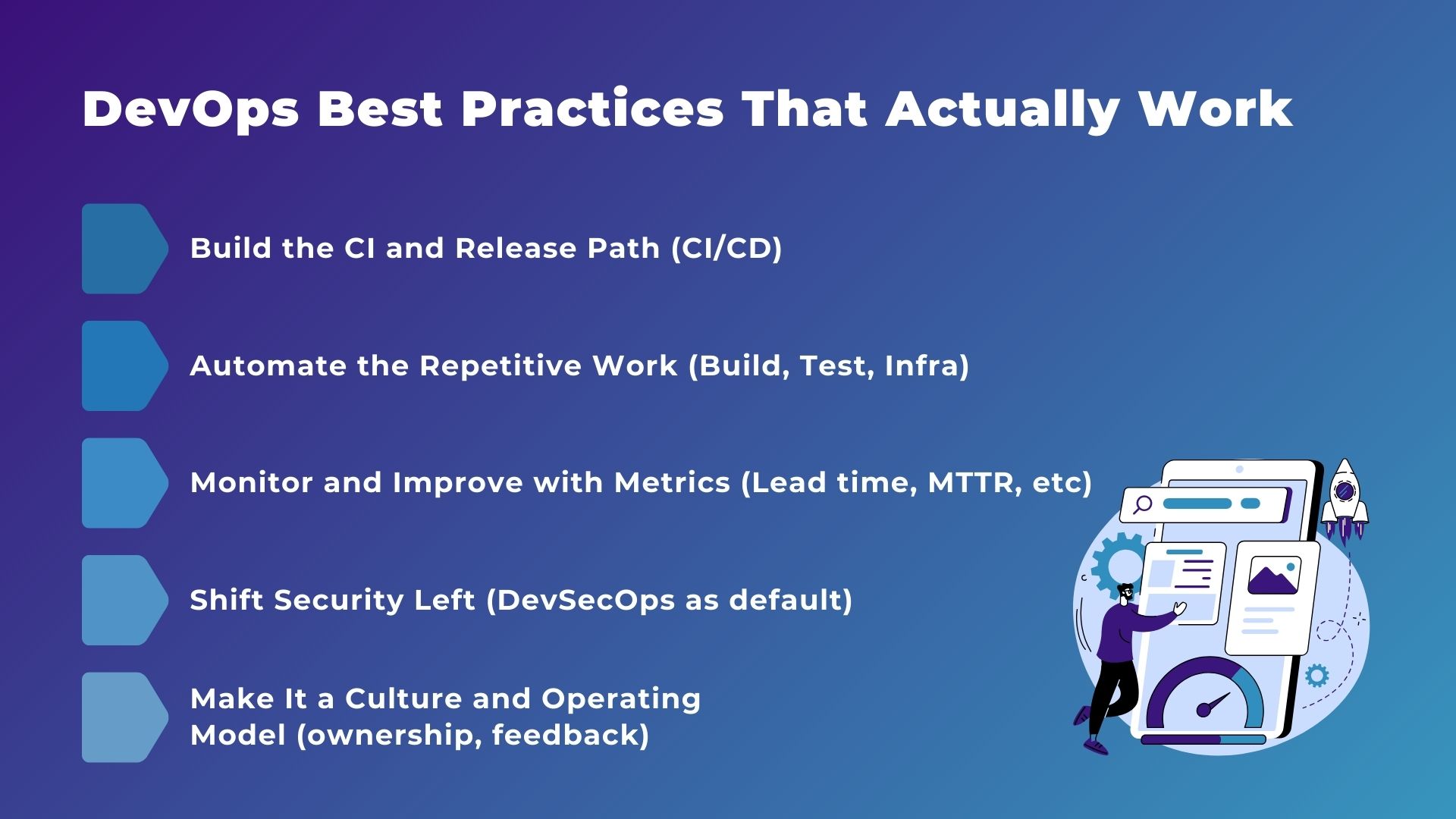
          DevOps works best when it combines reliable processes, automation, and a culture of ownership. The practices below show how mid-sized teams can build a delivery system that is fast, secure, and scalable.

          Build the CI and Release Path (CI/CD)

          A consistent CI/CD workflow is the foundation of reliable delivery. Every change should flow through an automated pipeline from commit to production, ensuring builds, tests, and deployments happen the same way every time. This reduces manual errors, prevents environment drift, and gives teams confidence that changes are safe to release.

          Automate the Repetitive Work (Build, Test, Infra)

          Manual tasks slow teams down and introduce risk. Automation of builds, testing, infrastructure provisioning, and configuration management frees engineers to focus on higher-value work. As the system grows, these automated processes protect delivery speed and maintain consistency across environments.

          Monitor and Improve with Metrics (Lead time, MTTR, etc.)

          Monitoring is only effective if it drives action. Teams should track key metrics like lead time and mean time to recovery (MTTR), and tie alerts directly to accountable owners. Structured incident reviews and continuous feedback loops turn monitoring data into real improvements, reducing repeated failures and improving overall reliability.

          Shift Security Left (DevSecOps as default)

          Security should be part of the pipeline from the start. By integrating automated scans, access controls, and compliance checks early, teams reduce late-stage blockers and prevent vulnerabilities from reaching production. Security becomes a natural part of the workflow rather than an afterthought.

          Make It a Culture and Operating Model (ownership, feedback)

          DevOps succeeds when it is embedded in the team’s culture. Clear service ownership, fast feedback loops, and shared responsibility for incidents create an environment where continuous improvement thrives. Automation and tooling support the model, but the culture and defined processes are what make it sustainable.

          Minimum Deliverables Checklist
          devops best practices

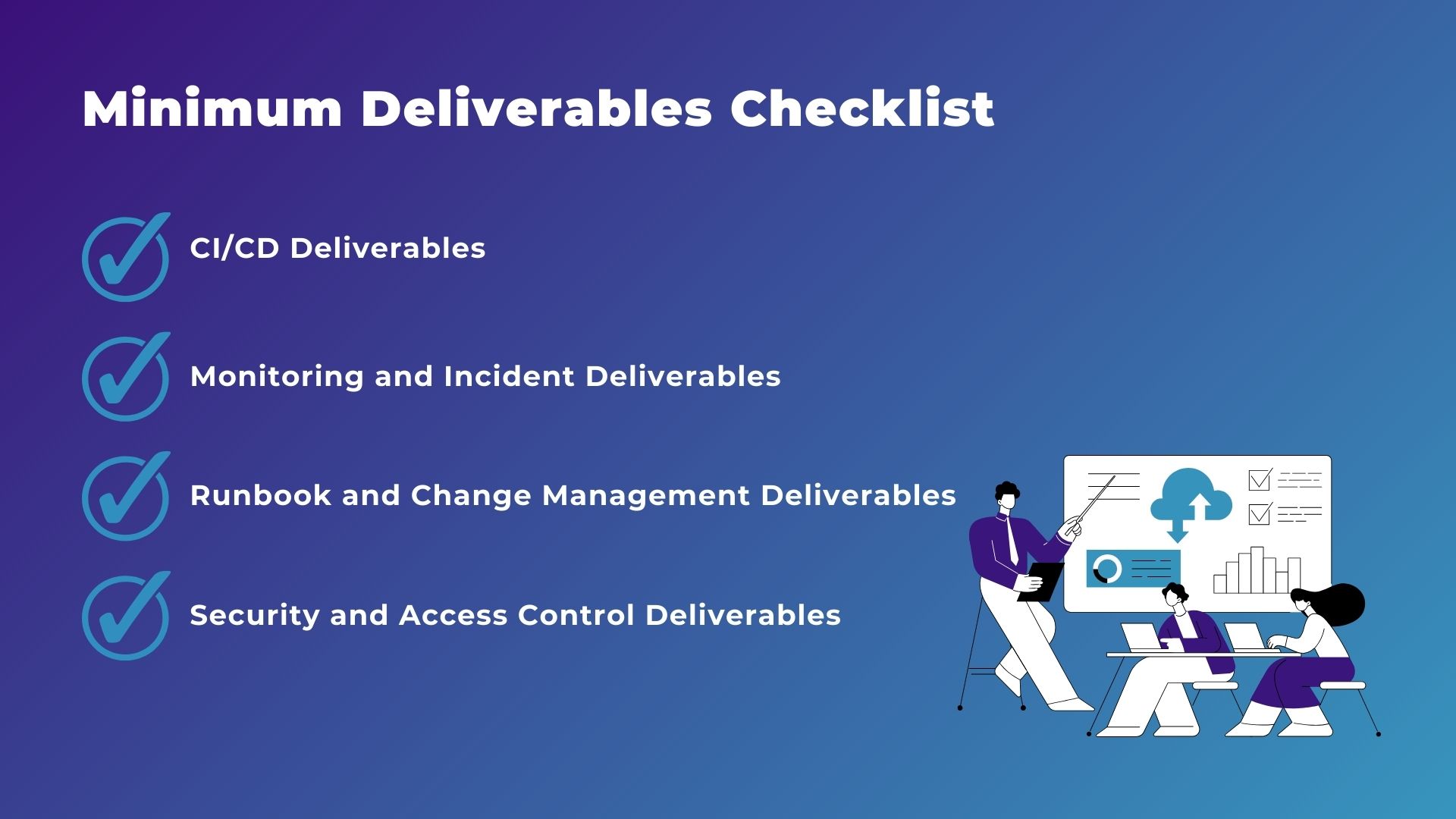
          When implementing DevOps, it’s important to define concrete deliverables to ensure reliability and consistency.

          Key deliverables include:

          • CI/CD Deliverables: A standardized pipeline covering automated builds, testing, staging and production deployments, and rollback procedures.
          • Monitoring and Incident Deliverables: Centralized logging, actionable alerts tied to ownership, and structured incident response processes.
          • Runbook and Change Management Deliverables: Operational runbooks, escalation procedures, release checklists, and post-incident review templates.
          • Security and Access Control Deliverables: Role-based permissions, secrets management, automated vulnerability scanning, and audit logging.

          Together, these deliverables create a clear operational framework that supports faster, safer, and more predictable software delivery.

          What to Outsource vs Keep In-house

          devops best practices

          Deciding what to handle internally versus what to outsource is critical for mid-sized teams with limited DevOps resources. A clear strategy ensures that your team focuses on high-value work while partners handle tasks that benefit most from specialized expertise.

          What You Should Keep In-house

          Core responsibilities that directly affect your product and business outcomes should remain in-house. This includes strategic decisions about architecture, service ownership, and compliance responsibilities. Internal teams should also maintain control over final security decisions and business-critical workflows to ensure accountability and alignment with company goals.

          What You Can Outsource Safely

          Tasks that are repetitive, highly technical, or require specialized expertise can often be outsourced. This includes setting up CI/CD pipelines, implementing infrastructure as code, integrating monitoring systems, and managing automated security tools. By leveraging external partners for these areas, your internal team can focus on product development and operational oversight rather than low-level setup and maintenance.

          Where a Hybrid Model Works Best

          Many mid-sized teams benefit from a hybrid approach, where external partners build and maintain foundational systems while internal teams oversee operations and gradually take ownership. This model allows for knowledge transfer, continuous improvement, and ensures that your team retains control over critical decisions while still leveraging external expertise for speed and scalability.

          Common Failure Patterns and How to Avoid Them

          devops best practices

          Even with the right tools, DevOps initiatives can fail if teams neglect process, ownership, or culture. Understanding common failure patterns helps mid-sized teams avoid costly mistakes and implement DevOps effectively.

          Tool-first Implementation (no operating model)

          Many teams focus on adopting tools before defining how work should flow, which leads to inconsistent practices and confusion. Tools alone cannot enforce collaboration, standardization, or accountability. To avoid this, first establish a clear operating model that defines workflows, responsibilities, and feedback loops, then select tools that support that model.

          No Ownership and Unclear Responsibilities

          When no one is explicitly responsible for a service, incidents, or releases, tasks fall through the cracks and problems persist. Clear ownership at both team and individual levels ensures accountability. Documenting roles and responsibilities, and linking them to incident management and monitoring processes, prevents delays and repeated errors.

          CI/CD Exists but Releases Are Still Manual

          Implementing CI/CD pipelines is not enough if the final deployment still relies on manual steps. This undermines the benefits of automation and introduces human error. Fully automating the release process, including rollback and verification, ensures that teams can deploy reliably at any time.

          Monitoring Without Action (alerts, but no response)

          Setting up monitoring without defining how alerts will be handled creates noise and frustration. Alerts must be actionable, assigned to responsible owners, and tied to follow-up processes. Combining monitoring with structured incident response and post-mortem reviews ensures that data leads to meaningful improvements rather than ignored warnings.

          Cost Drivers and Engagement Models

          devops best practices

          Understanding the costs of implementing DevOps and choosing the right engagement model is essential for mid-sized teams planning their budgets.

          What Drives Cost Up

          The figures below are indicative estimates based on global market data. Actual costs may vary depending on your region, team size, and project scope.

          DevOps costs vary widely depending on project complexity, required expertise, and tool selection. Setting up a CI/CD pipeline typically costs between USD5,000 and USD15,000, while implementing IaC ranges from USD8,000 to USD25,000. Full-stack managed DevOps services usually run USD8,000 to USD20,000 per month, and 24/7 monitoring or incident response adds another USD2,500 to USD6,000 per month. Larger projects, such as full CI/CD automation or cloud migrations, can cost USD100,000 to USD200,000, and enterprise-wide DevOps transformations may exceed USD200,000.

          Common Engagement Models (Fixed, T&M, Dedicated Team)

          There are several common engagement models with different cost implications and flexibility. Fixed-scope projects, such as implementing CI/CD or security integration, usually fall between USD10,000 and USD50,000, offering predictable budgets. Time & Materials (T&M) contracts provide flexibility for evolving requirements but monthly costs vary depending on hours and expertise. Dedicated team arrangements, where external DevOps engineers work alongside internal teams, typically cost USD6,000 to USD14,000 per engineer per month.

          How to Choose a DevOps Partner
          devops best practices

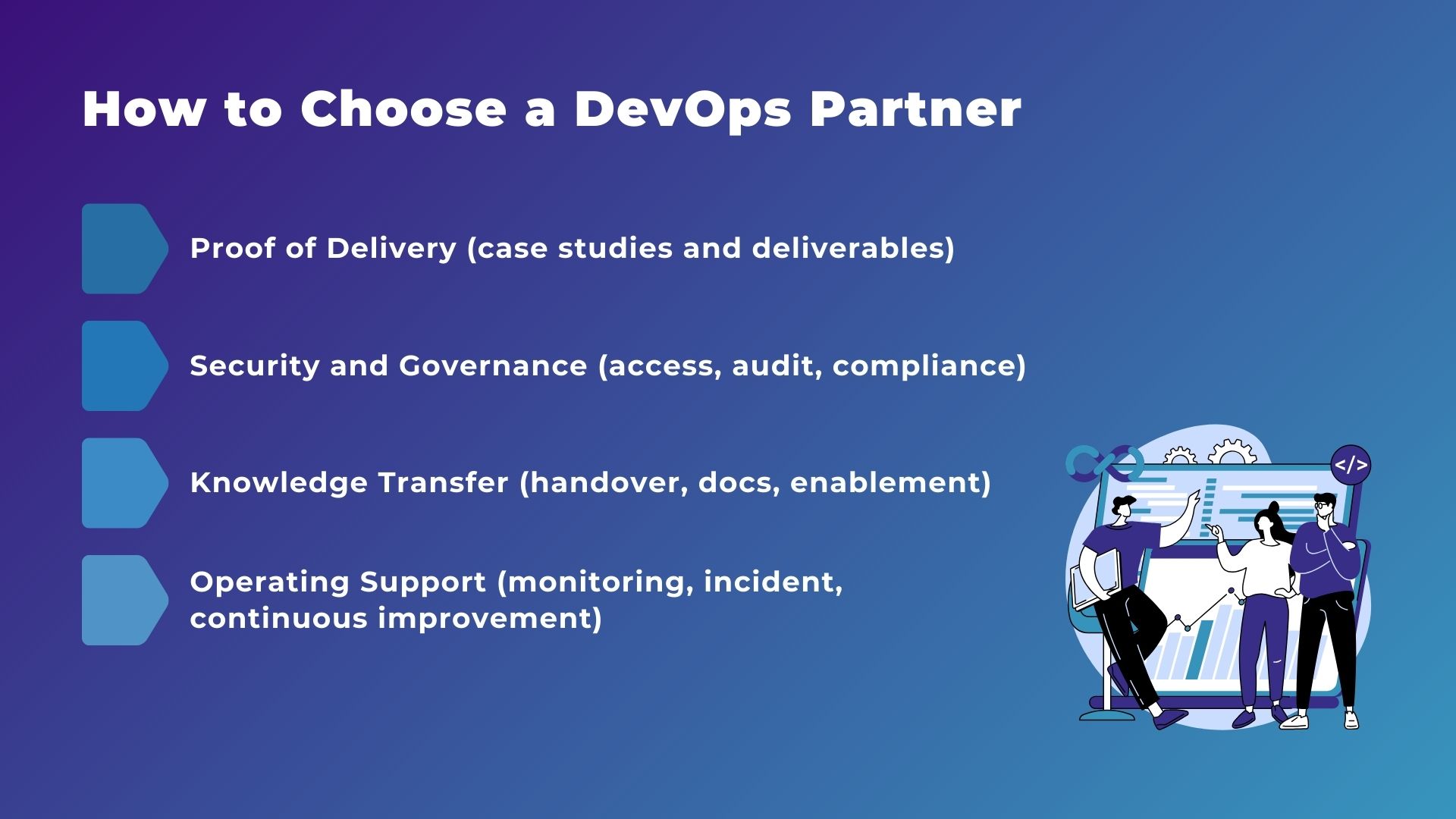
          Choosing the right DevOps partner is about more than just price or reputation. Start by looking for proof of delivery, such as case studies or concrete results like CI/CD pipelines and monitoring systems. It’s also important to make sure they follow strong security and governance practices, including proper access controls, audits, and compliance.

          Equally important is knowledge transfer. Clear documentation and training help your team maintain systems on their own. Finally, consider their operating support. Reliable partners provide ongoing monitoring, incident response, and continuous improvement to keep your systems running smoothly and securely.

          How IVC Can Support

          devops best practices

          ISB Vietnam (IVC) supports mid-sized teams with a structured, practical approach to DevOps implementation.

          Why teams choose IVC

          IVC is especially strong in security-sensitive and high-scale environments. We have experience designing secure systems in domains such as healthcare and logistics, and building low-latency systems that handle large volumes of device or event data. 

          We also emphasize team enablement, including documentation, handover, and cost optimization guidance, so the system remains stable and affordable after launch.

          IVC’s Core DevOps Deliverables

          IVC focuses on a minimum set of deliverables that reduce release risk and operational workload. We implement Infrastructure as Code (Terraform or CloudFormation) to recreate Dev, Test, and Prod environments consistently. 

          We also build automated CI/CD pipelines (for example, GitHub Actions or AWS CodePipeline) with safe release controls, including rollback paths when deployments fail. On the operations side, we set up dashboards and alert rules, and deliver runbooks so teams can handle routine operations and incidents with clear procedures.

          Security is built in through least-privilege IAM, network isolation, and audit-ready access and change logs.

          Operational quality and safeguards

          To keep DevOps reliable after go-live, IVC emphasizes operational controls such as automated rollback design in CI/CD, least-privilege access control, audit-ready logs for access and changes, and runbooks that define how to respond when alerts fire. We also support knowledge transfer so teams can operate confidently without depending on a few key individuals.

          Typical DevOps Implementation Roadmap

          ISB Vietnam (IVC) supports mid-sized teams with a structured, practical approach to DevOps implementation. Below is an illustrative roadmap to give a concrete idea of how a typical initial “Pilot” or single-application project may proceed.

          This example is meant as a reference only. The actual duration and level of effort vary significantly depending on the agreed scope, long-term roadmap, current system complexity, legacy technical debt, and specific security or compliance requirements.

          Phase 1. Assessment & Strategy

          Estimated Duration: 1 to 2 weeks

          IVC begins by auditing the current infrastructure and workflows. The goal is to identify bottlenecks, operational risks, and security gaps, then define clear automation and security objectives aligned with business priorities.

          Key Deliverables:

          • Gap Analysis Report
          • DevOps Roadmap

          Customer's Role: Provide scoped system access and share existing workflow challenges and security concerns.

          Phase 2. Architecture Design

          Estimated Duration: 2 to 4 weeks

          IVC designs the target cloud architecture, CI/CD flow, and infrastructure-level security, including IAM policies and network isolation. The focus is on building a scalable and secure foundation before implementation begins.

          Key Deliverables:

          • Architecture Blueprint
          • Security Policy Draft

          Customer's Role: Define application-level security requirements and data classification, following the shared responsibility model. Review and approve the proposed design to ensure it aligns with business needs.

          Phase 3. Build & Automation

          Estimated Duration: 2 to 4 weeks

          IVC implements Infrastructure as Code using tools such as Terraform or CloudFormation, builds CI/CD pipelines, and configures cloud security controls including VPCs and security groups.

          Key Deliverables:

          • Live Infrastructure
          • Working CI/CD Pipelines

          Customer's Role: Ensure application code security and manage end-user access to the application.

          Phase 4. Handover & Enablement

          Estimated Duration: 1 to 2 weeks

          IVC hands over the system, conducts training sessions, and formalizes the ongoing shared responsibility matrix to clarify operational ownership.

          Key Deliverables:

          • Operation Runbooks
          • Training Sessions

          Customer's Role: Attend training, perform user acceptance testing, and take over daily application-level operations.

          This phased approach allows teams to move from assessment to operational readiness in a structured and transparent way, while clearly defining responsibilities on both sides.

          Ready to build a more reliable DevOps foundation?

          IVC can assess your environment and recommend a phased roadmap that fits your scale and budget.

          Get a Free Consultation

          Conclusion

          devops best practices

          DevOps is not just about tools. It is about building a repeatable operating model that improves delivery speed, strengthens reliability, and reduces operational risk as your systems grow. For many mid-sized teams, the real challenge is knowing where to start, what “good” looks like, and how to balance internal ownership with external expertise.

          With a clear roadmap, defined ownership, and measurable outcomes, DevOps becomes a structured capability instead of an ongoing experiment.

          Ready to move from reactive operations to structured DevOps?

          Let's turn uncertainty into a clear, actionable roadmap grounded in real delivery.

          Contact IVC Today

          Sources / References

          Data and insights in this article are based on the following sources:

          External image links

          • All images featured in this article are provided by Unsplash, a platform for freely usable images.
          • The diagrams used in this article were created using Canva.       
          View More
          TECH

          March 9, 2026

          Data Masking Guide: How to Protect Sensitive Data Before Using AI

          In the era of ChatGPT, Gemini, and Claude, copying and pasting data to solve problems has become a habit. However, behind this convenience is a huge security risk. Data Masking is no longer just an option; it is a vital skill to protect your career and your company’s reputation.

          1. The Temptation and the "AI Trap"

          Many employees copy-paste error logs or customer emails into AI to get fast results. The danger is that AI learns from this data and might accidentally reveal it to other users later.

          According to security experts, the Samsung data leak (where engineers pasted secret code into ChatGPT) is a big lesson. At ISB Vietnam, we believe Data Masking is a mandatory skill before you hit "Enter" on any AI tool.

          2. What is Data Masking?

          Data Masking is the process of hiding sensitive data by changing original letters and numbers.

          The goal is to create a "fake" version of the data that keeps the same structure. This way, the AI can still understand the logic and fix the error, but it won't know the real identity of the person or the business.


          3. The "Danger Zone": 6 Types of Data You Must Never Paste

          Before talking to AI, check this list and mask these items:

          No.

           Data Type

           What’s Included (Examples)

          1

           Personally Identifiable Info (PII)

           Full names, addresses, phone numbers, ID/Passport numbers, personal emails.

          2

           Financial & Banking Data

           Credit card numbers, bank accounts, transaction history, payment credentials.

          3

           Trade Secrets & Business Info

           Proprietary algorithms, strategic plans, upcoming product specifications.

          4

           Biometric Data

           Fingerprints, facial recognition, retina scans, voiceprints.

          5

           Medical & Health Records

           Patient histories, prescriptions, diagnostic details, health insurance info.

          6

           Private Ideas & IP

           Unpublished research, confidential brainstorming, creative intellectual property.


          4. Practical Data Masking Techniques

          A. Popular Data Masking Techniques

           Method

          How it works

          Best used for

           Substitution

           Replaces real data with similar but fake values (e.g., replace a real name with a name from a random list).

           Names, Credit card numbers.

           Randomization

           Replaces sensitive data with totally random values that have no connection to the original.

           Addresses, PII.

           Shuffling

           Mixes the values within the same column. The data is real, but it now belongs to the wrong records.

           Maintaining statistical relationships.

           Encryption

           Uses algorithms to turn data into an unreadable format. Only people with a "key" can read it.

           High-level security (but can slow down analysis).

           Hashing

           Converts data into a fixed-length string of random characters. It cannot be reversed.

           Passwords or data verification.

           Tokenization

           Replaces data with a "token" (reference value). The real data is stored in a separate, secure vault.

           Sensitive production data & Compliance.

           Nulling (Blanking)

           Replaces data with a "null" value or a blank space. It simply removes the information.

           Removing data while keeping the format.


          B. For Tech Staff - Automation

          Developers can use Regex or libraries like Faker (Python/JS) to clean error logs before querying AI. Here is a quick example:


          5. Static vs. Dynamic Masking

          AWS defines two main types of masking:

          • Static Data Masking (SDM): Masking a fixed set of data before it is stored or shared. Ideal for creating Testing environments.
          • Dynamic Data Masking (DDM): Masking data in real-time as it is queried. Perfect for Customer Support systems where access is based on user roles.

          Conclusion

          Think of an AI chat box like a stranger on the street. Would you shout your bank password to them? If not, don't paste it into AI without masking it first.

          At ISB VIETNAM, we follow strict security standards to ensure your code and data are always safe. Are you looking for a trusted outsourcing partner with professional security workflows?

          [Contact ISB VIETNAM today for a secure software solution!]

          Or click here to explore more ISB Vietnam's case studies

          Have you ever accidentally pasted sensitive data into AI? Let us know in the comments how you handled it!


          References

          https://aws.amazon.com/what-is/data-masking/

          https://www.linkedin.com/pulse/6-types-data-you-should-never-mention-ai-mekari-4timc

          Image from Gemini


          View More
          TECH

          February 27, 2026

          How to Optimize jqGrid for Large Datasets

          I. Introduction

          In enterprise systems, displaying large datasets in tables is common. However, performance problems appear when the dataset grows to millions of records. Therefore, without proper optimization, system performance gradually declines.

          This article examines the following aspects:

            • Common performance problems in grid components handling large datasets.
            • The root causes of these issues.
            • Practical optimization strategies for production environments.

          View More
          WEBINAR

          February 25, 2026

          ISB Vietnam Webinar 6: “The Runway Extension Masterclass”

          The Runway Extension Masterclass

          How Australian Startups Extend Runway Without Sacrificing Product Quality

          In 2026, extending runway has become a strategic priority for Australian startups. Funding cycles are longer, investors are more selective, and hiring senior engineers locally remains both slow and expensive.

          For many early-stage teams, runway pressure starts long before product output scales. Hiring senior engineers can take months, while local salary levels make every hiring decision a major capital commitment - and valuable engineering time is often spent on setup and non-MVP work.

          The result is familiar to many founders and CTOs: runway shortens before milestones are reached.

          To address this challenge, ISB Vietnam is hosting The Runway Extension Masterclass - a focused 30-minute session exploring how startups can structure engineering teams more efficiently without sacrificing product quality.

          What You Will Learn

          During this session, we will explore practical approaches that help startups:

          • Extend runway without slowing product development
          • Reduce delivery risk while hitting key milestones
          • Maintain investor-grade engineering quality
          • Structure distributed teams effectively
          • Leverage Vietnam–Australia time zone alignment for real-time collaboration

          Who Should Attend

          This session is designed for:

          • Founders and Co-Founders
          • CTOs and Heads of Engineering
          • Product and Technical Leaders
          • Pre-Seed, Seed, and Series A startups across Australia

          Event Details

          Date: Wednesday, 18 March 2026
          Time: 3:00 - 3:30 PM AEDT
          Platform: Google Meet

          👉 REGISTER NOW

          View More
          TECH

          February 24, 2026

          AWS Certified Cloud Practitioner (CLF-C02) – Domain 1 (Part 1): Understanding AWS Cloud Benefits

          Master the foundational benefits of AWS Cloud. Learn why organizations worldwide choose AWS and how cloud infrastructure transforms business operations.

          Welcome back to our AWS Certified Cloud Practitioner (CLF-C02) exam series! In the first post, we explored the complete exam outline and structure. Today, we're diving into the first part of Domain 1: Cloud Concepts - the foundational domain that represents 24% of your exam score.

          Think of Domain 1 as the "why" of cloud computing. Before you learn about specific AWS services (which we'll cover in later posts), you need to understand why organizations move to the cloud and what principles guide good cloud architecture. This domain ensures you can articulate the value proposition of AWS to stakeholders, whether they're technical or business-focused.

          Domain 1 consists of four task statements. We'll cover these across multiple posts. In this post (Part 1), we'll focus on Task Statement 1.1: The Benefits of AWS Cloud - understanding what makes AWS attractive to organizations.

          Domain 1 Overview: What You Need to Know

          Domain 1 focuses entirely on concepts rather than technical implementation. You won't be asked to configure services or write code. Instead, you'll need to demonstrate understanding of:

          • Why businesses choose AWS - The tangible benefits (This post - Part 1)
          • How to design well - Best practice principles (Part 2)
          • How to migrate effectively - Strategies and frameworks (Part 3)
          • How cloud saves money - Economic advantages (Part 3)

          Let's start with understanding the core benefits that make AWS attractive to organizations worldwide.

          Task Statement 1.1: Define the Benefits of the AWS Cloud

          This task statement focuses on understanding what makes AWS Cloud valuable compared to traditional IT infrastructure.

          Global Infrastructure Benefits

          Speed of Deployment: In traditional data centers, purchasing and setting up new servers could take weeks or months. With AWS, you can provision resources in minutes. For example, if your marketing team suddenly needs a new web application for a campaign launching next week, you can deploy it on AWS EC2 instances within hours, not months.

          Global Reach: AWS operates in multiple geographic regions worldwide, each containing multiple Availability Zones (separate data centers). This means:

          • A company based in the US can easily serve customers in Europe, Asia, or South America with low latency
          • You can deploy applications close to your users without building physical data centers
          • Content can be cached at edge locations (over 400 globally) for faster delivery

          Real-World Example: A streaming service wants to expand from the US to Japan. Instead of building data centers in Tokyo (costing millions and taking years), they can deploy their application to AWS's Tokyo Region in days, instantly providing low-latency service to Japanese users.

          High Availability

          High availability means your applications stay running even when something fails. AWS achieves this through:

          • Multiple Availability Zones: Each AWS Region has at least 3 separate data centers (AZs) with independent power, cooling, and networking
          • Fault isolation: If one AZ experiences issues, your application continues running in other AZs
          • Built-in redundancy: Many AWS services automatically replicate data across multiple locations

          Example: An e-commerce site runs on EC2 instances in 3 different Availability Zones. During a power outage in one AZ, customers continue shopping without interruption because the other 2 AZs handle all traffic seamlessly.

          Elasticity

          Elasticity is the ability to automatically scale resources up or down based on demand. This is one of cloud's most powerful benefits.

          • Scale up: During peak times, automatically add more servers
          • Scale down: During quiet periods, reduce servers to save costs
          • No manual intervention: AWS Auto Scaling handles this automatically

          Real-World Scenario: A tax preparation website sees massive traffic increases in March and April but minimal traffic the rest of the year. With AWS elasticity:

          • In tax season: Automatically scales to 100 servers to handle 1 million daily users
          • In summer: Scales down to 5 servers for the 10,000 daily users
          • Result: Only pay for what you need, when you need it

          Agility

          Agility in cloud means the ability to quickly experiment, innovate, and respond to market changes without large upfront investments.

          • Faster time to market: Launch new products in days instead of months
          • Lower risk of experimentation: Try new ideas with minimal cost; shut them down if they don't work
          • Focus on innovation: Spend time building features, not managing infrastructure

          Example: A startup wants to test if their new AI-powered app will attract users. On AWS, they can:

          1. Deploy a prototype in 2 days
          2. Run it for a month at $100 cost
          3. If it fails, delete everything with no long-term commitment
          4. If it succeeds, scale up immediately

          Compare this to traditional IT: purchasing servers ($50,000+), setting them up (3 months), then being stuck with hardware even if the project fails.

          Key Takeaways

          Understanding AWS Cloud benefits is essential for the CLF-C02 exam. Remember these core advantages:

          • Speed: Deploy resources in minutes, not months
          • Global Reach: Serve users worldwide without building physical infrastructure
          • High Availability: Keep applications running even when failures occur
          • Elasticity: Automatically scale resources to match demand
          • Agility: Experiment quickly and innovate without large upfront costs

          What's Next?

          Now that you understand why organizations choose AWS, the next step is learning how to design cloud systems well.

          In Part 2, we'll explore:

          • The AWS Well-Architected Framework – Six pillars of cloud design excellence
          • Design principles for each pillar with practical examples
          • How to distinguish between pillars in CLF-C02 exam questions
          • Practice questions to reinforce your understanding

          These design principles are essential not only for passing the CLF-C02 exam, but also for building reliable, secure, and cost-effective cloud solutions in real-world scenarios.

          Which AWS Cloud benefit do you find most valuable in your work? Have you experienced any of these benefits firsthand? Share your experience in the comments below!


          Whether you need scalable software solutions, expert IT outsourcing, or a long-term development partner, ISB Vietnam is here to deliver. Let’s build something great together—reach out to us today. Or click here to explore more ISB Vietnam's case studies.


          References

          [1]. AWS Global Infrastructure. Retrieved from https://aws.amazon.com/about-aws/global-infrastructure/

          [2]. AWS Certified Cloud Practitioner Exam Guide (CLF-C02). Retrieved from https://aws.amazon.com/certification/certified-cloud-practitioner/

          View More
          TECH

          February 24, 2026

          Tampermonkey for Developers: Modifying the Web to Suit Your Workflow

          As developers, we spend the majority of our day inside a web browser. We interact with Jira and CI/CD pipelines. We also use cloud consoles and legacy internal tools. Unfortunately, these interfaces are often not optimized for our specific needs. They require excessive clicking and lack essential shortcuts. Moreover, they often hide data we need to access quickly. Consequently, this is where Tampermonkey for developers becomes an indispensable tool.

          View More
          TECH

          February 24, 2026

          Is the Handover Dead? The Ultimate Figma to Code AI Guide

          For as long as web development has existed, the "Design-to-Development Handover" has been a friction point. It is the Bermuda Triangle of software building: designers create pixel-perfect visions, and developers spend hours translating rectangles into <div> tags.

          But the landscape is shifting. With the rise of Figma to Code AI tools, we are entering a new era where the frontend is generated, not just translated.

          Here is how AI is bridging the gap between Figma and production-ready code, and what it means for the future of development.

          The Problem with the "Old Way"

          Traditionally, the workflow looks like this:

          • Designer creates a UI in Figma.

          • Designer annotates margins, padding, and animations.

          • Developer looks at the design and manually types out HTML/CSS/React.

          • QA finds visual discrepancies.

          • Repeat.

          This process is slow, prone to human error, and frankly, a waste of a developer's cognitive load. Developers should be solving logic problems, not measuring pixels.

          How "Figma to Code AI" Changes the Game

          New tools like Locofy.ai, Anima, and Builder.io are not just exporting CSS. They use Figma to Code AI algorithms to understand intent.

          Instead of treating a button as just a rectangle with a hex code background, these AI models recognize it as a <Button> component. They understand that a list of cards is likely a grid that needs to be responsive.

          From Image to Component

          Modern AI tools can scan a Figma frame and output clean, modular code in React, Vue, Svelte, or simple HTML/Tailwind. They don't just dump a blob of code; they attempt to structure it into reusable components.

          Context Awareness

          The AI is getting smarter about responsiveness. If you use Auto Layout correctly, Figma to Code AI tools can generate flexbox and grid layouts that actually work across different screen sizes.

          Logic Integration

          Some tools now allow you to define state and props directly inside Figma. You can tag a button to toggle a specific variable, and the generated code will include the useState and onClick handlers automatically.

          The Top Players in the Field

          If you want to try this today, here are the tools leading the charge:

          • Builder.io (Visual Copilot): Uses AI to convert Figma designs into code that matches your specific styling (e.g., Tailwind) and framework (Next.js, React).

          • Locofy.ai: Focuses heavily on turning Figma into a real app. It enables you to tag layers for interactivity and exports code that is ready for deployment.

          • Anima: One of the veterans in the space, great for high-fidelity prototyping and converting designs to React/Vue code.

          • v0 by Vercel: While not strictly a plugin, v0 allows you to generate UI code instantly from text prompts or screenshots.

          The Reality Check: Is It Perfect?

          If you blindly copy-paste output from a Figma to Code AI generator into production, you will end up with "spaghetti code." Common issues include:

          • Accessibility: AI often forgets semantic HTML (using <div> instead of <article>).

          • Naming Conventions: You might get class names like frame-42-wrapper unless you prompt it correctly.

          • Edge Cases: AI assumes the "Happy Path." It doesn't always know how the UI should look when the data is missing.

          Think of AI as a Junior Frontend Developer. It types incredibly fast, but a Senior Developer still needs to review the PR, refactor the structure, and hook up the business logic.

          How to Prepare Your Workflow

          To get the best results from Figma to Code AI, designers and developers need to align:

          • Embrace Auto Layout: If your Figma file is just groups of rectangles, the code will be garbage. Use Auto Layout strictly.

          • Design Systems are Key: If you use a defined Design System, map it to your code components. This helps the AI generate <PrimaryButton /> instead of generic CSS.

          • Name Your Layers: AI uses layer names to generate class names. "Rectangle 54" creates bad code. "SubmitButton" creates good code.

          Conclusion

          The era of manually coding static UI components is drawing to a close. By adopting Figma to Code AI workflows, teams can ship faster and let developers focus on architecture, data flow, and user experience.

          The question is no longer if you should use AI for frontend, but how fast you can integrate it into your pipeline.

          References

          Builder.io (Visual Copilot): https://www.builder.io/c/visual-copilot

          Locofy.ai: https://www.locofy.ai/

          Anima (Figma to React/Vue): https://www.animaapp.com/figma-to-react

          v0 by Vercel: https://v0.dev/

          Figma Auto Layout Official Guide: https://help.figma.com/hc/en-us/articles/360040451373-Explore-auto-layout-properties

          Thinking in React (React Docs): https://react.dev/learn/thinking-in-react

          Ready to get started?

          Contact IVC for a free consultation and discover how we can help your business grow online.

          Contact IVC for a Free Consultation

          View More
          1 2 3 4 26
          Let's explore a Partnership Opportunity

          CONTACT US


          At ISB Vietnam, we are always open to exploring new partnership opportunities.

          If you're seeking a reliable, long-term partner who values collaboration and shared growth, we'd be happy to connect and discuss how we can work together.

          Add the attachment *Up to 10MB