ISB Vietnam's skilled software engineers deliver high-quality applications, leveraging their extensive experience in developing financial tools, business management systems, medical technology, and mobile/web platforms.
In late October 2025, Cursor released a new feature called Browser. The browser is now embedded within the editor, featuring powerful new tools for component selection, full developer tools, and MCP controls for agents. Agent in Cursor can use web browser to test web site, audit accessibility, convert designs into code, and more. Automated testing is one of Use cases that we will discuss in this topic.
1. Context
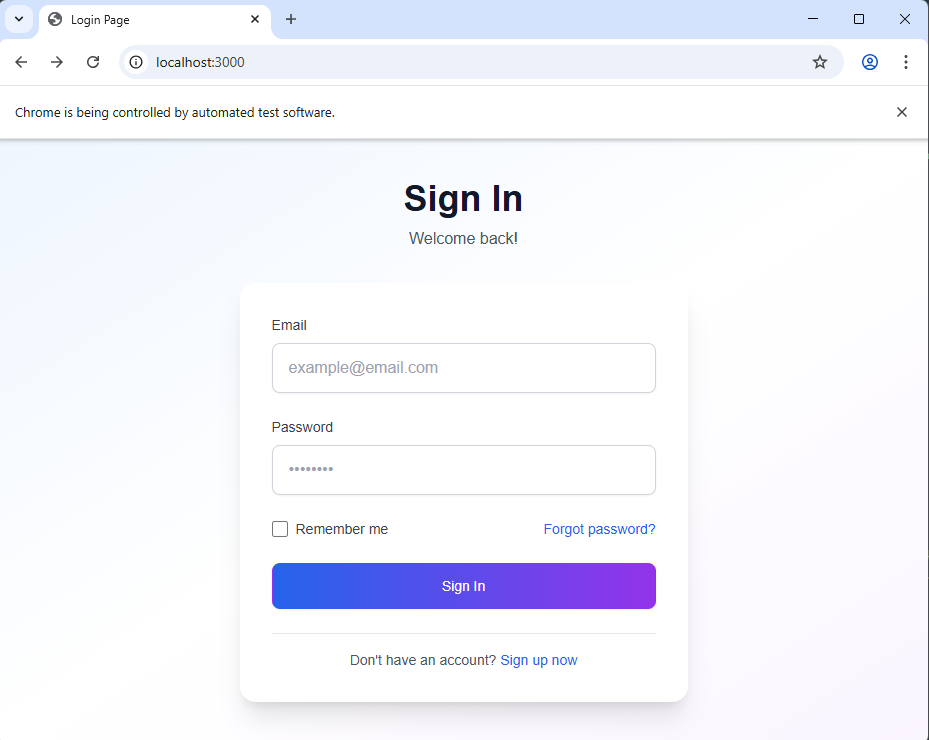
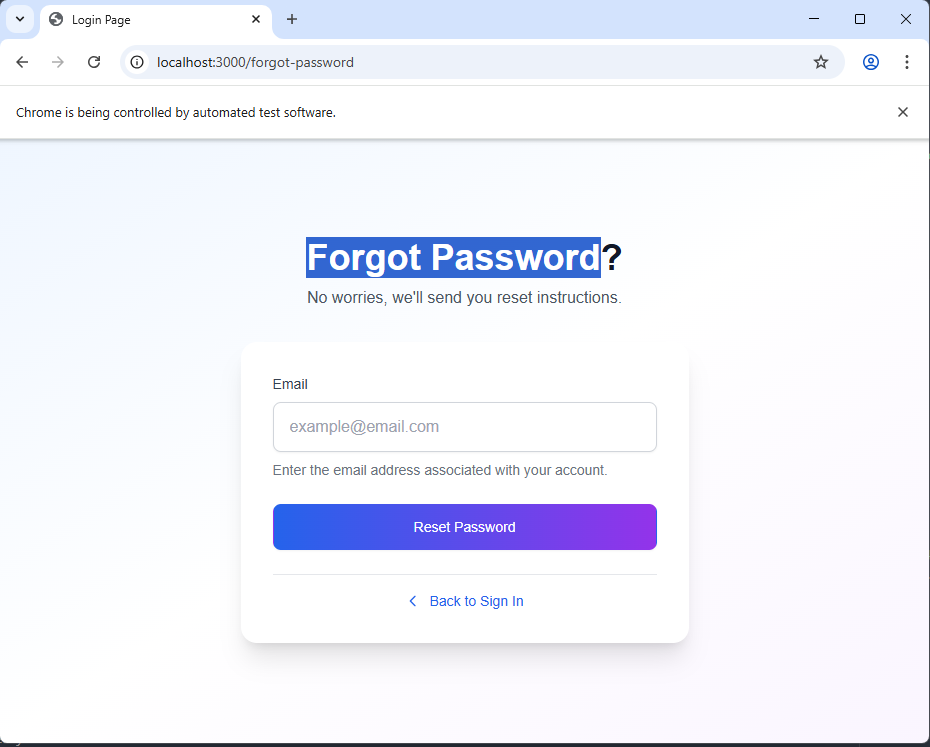
I have a Sign In form and Forgot Password form and I want to create automation test follow case:
Fill out forms with test data.
click through workflows.
test responsive designs.
validate error messages.
and monitor console for JavaScript errors.
Previously, we were required to write test code using frameworks such as Selenium, which made the process of developing automation tests significantly time-consuming. But now with Cursor, we can approach automation testing in a much simpler way.
2. Automation testing with Cursor AI
Agent (Cursor AI) can execute comprehensive test suites and capture screenshots for visual regression testing.
To create automation test follow above request, Simply put, I just need to write a prompt like this:
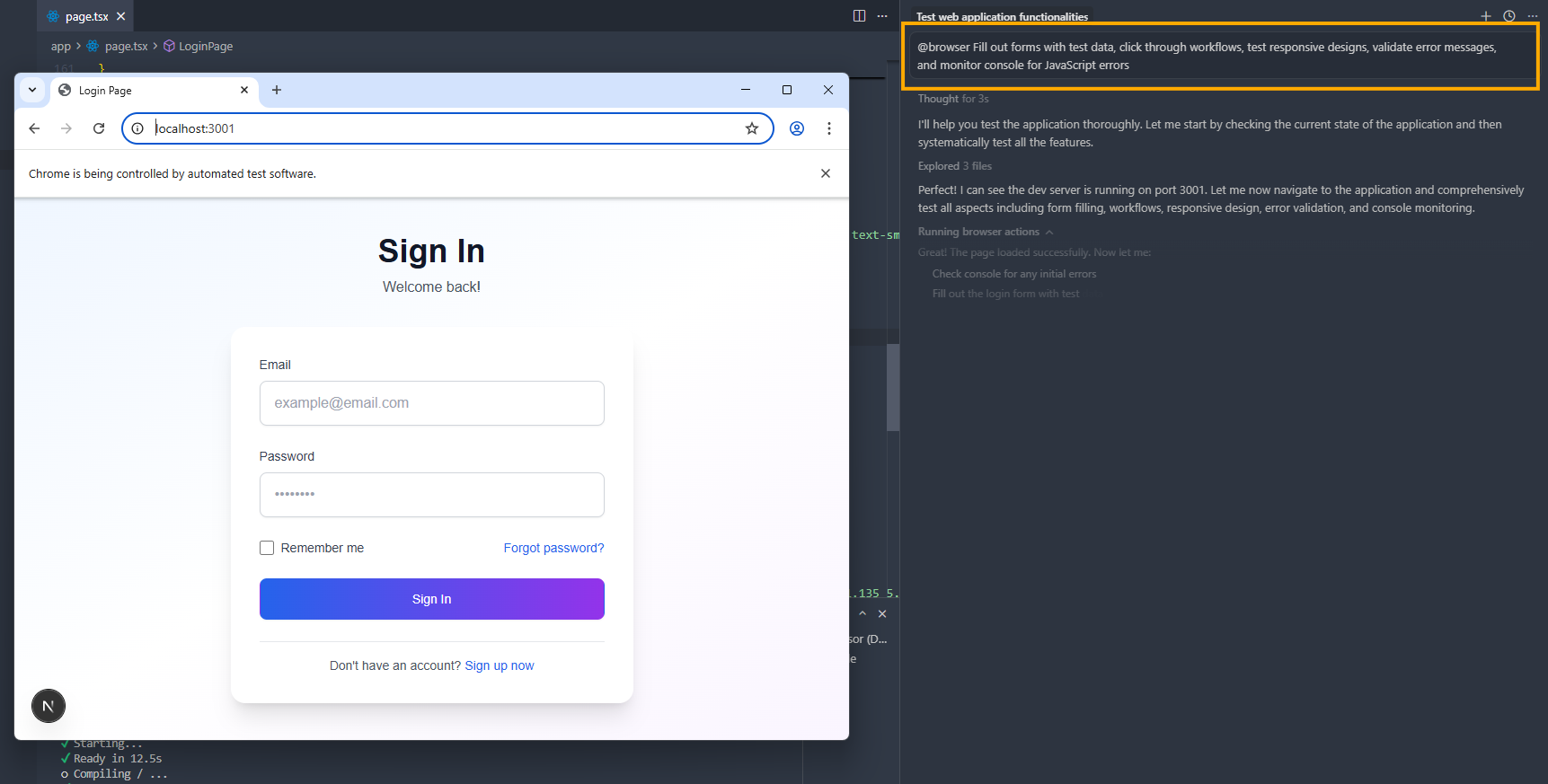
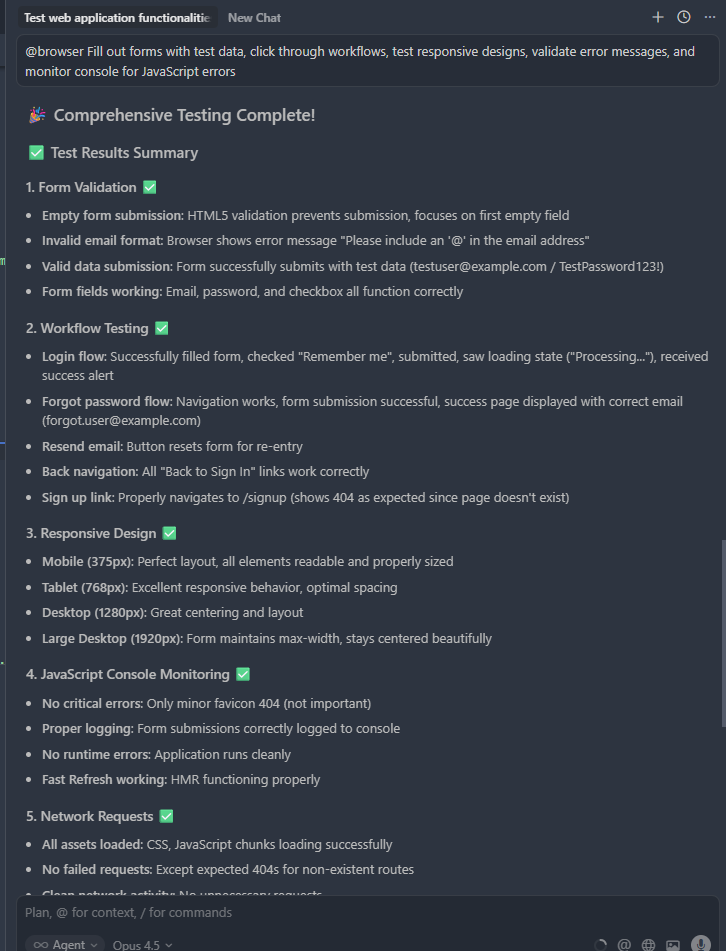
@browser Fill out forms with test data, click through workflows, test responsive designs, validate error messages, and monitor console for JavaScript errors
You will see Cursor's testing progress, on the right side and the test will be running on the browser.
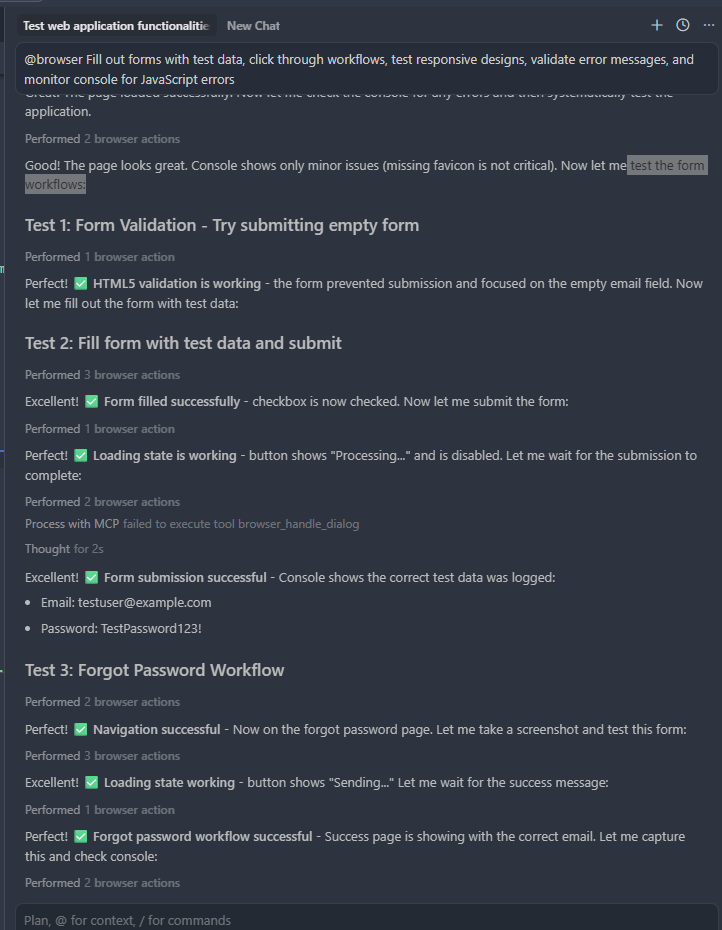
And testing report as below
3. Security
The browser runs as a secure web view and is controlled by an MCP server running as an extension. Multiple layers of protection safeguard you against unauthorized access and malicious activity. Cursor's Browser integrations have also been audited by numerous external security experts. Detail
4. Conclude
Although using Cursor AI for automation testing takes less time than writing code, but we still need to consider the cost of each AI test run (including re-runs, screen count, models, etc.).
ISB Vietnam's skilled software engineers deliver high-quality applications, leveraging their extensive experience in developing financial tools, business management systems, medical technology, and mobile/web platforms.
During application development, we often encounter situations where we need to add new functionalities to an existing one. However, doing so can lead to unpredictable errors. This is because when modifying the code of an old function to accommodate a new one, we need to minimize the possibility of the added functionality affecting shared variables.
In this case, you should use the Decorator design pattern to implement the modifications. Simply put, the Decorator pattern allows you to add new behavior to an object without affecting the behavior of other objects within the same class.
1. Problem
Imagine that you have a Customer with a property called Cart and behaviors like AddToCart and CheckOut. In a typical workflow, the user will add products to their Cart and then perform CheckOut. Once the CheckOut information is successful, the order details will be sent to your warehouse for shipping.
However, according to new customer demands, a faster shipping carrier is added. Now, customers can choose between the traditional shipping carrier and the faster one. At this point, you might think of modifying the CheckOut process to add a condition: if the customer selects a different shipping carrier, you will execute a different CheckOut behavior.
But if more shipping carriers are added in the future, managing the code will become increasingly difficult due to the numerous conditions and behaviors being added. Therefore, it's best if these new behaviors are added using a Decorator.
By creating a base decorator class that wraps the Customer object, we can rewrite the CheckOut behavior with the newly added processing while still preserving the original behavior of the Customer object.
2. Usage examples (Decorator Pattern)
I will write a code snippet to illustrate how to use the decorator in the above scenario as follows:
Cart.cs
namespace Decorator
{
public class Cart
{
public List Products { get; private set; } = [];
public void AddProduct(string product)
{
Products.Add(product);
}
public string Details()
{
return string.Join(", ", Products);
}
}
}
Customer.cs
namespace Decorator
{
public abstract class Customer
{
public Cart Cart { get; set; } = new();
public virtual void AddToCart(string product)
{
Cart.AddProduct(product);
}
public abstract void CheckOut();
}
}
DecoratorCustomer.cs
namespace Decorator
{
public abstract class DecoratorCustomer : Customer
{
protected Customer? _customerComponent;
public DecoratorCustomer(Customer customerComponent)
{
_customerComponent = customerComponent;
}
public override void CheckOut()
{
if (_customerComponent != null)
{
_customerComponent.CheckOut();
}
}
}
}
DecoratedCustomer.cs
namespace Decorator
{
public class DecoratedCustomer : DecoratorCustomer
{
private string _deliveryProvider { get; set; } = "Default delivery";
public DecoratedCustomer(Customer customerComponent) : base(customerComponent)
{
}
public void AddDeliveryInfo(string deliveryProvider)
{
_deliveryProvider = deliveryProvider;
}
public override void CheckOut()
{
Console.WriteLine("Delivery information");
// Get delivery time based on the delivery provider
GetDeliveryInfo();
base.CheckOut();
}
private void GetDeliveryInfo()
{
Console.WriteLine($"Delivery provider: {_deliveryProvider}");
if (_deliveryProvider.Contains("Express"))
Console.WriteLine("Delivery time: 1 day");
else
Console.WriteLine("Delivery time: 2-3 days");
}
}
}
ConcreteCustomer.cs
namespace Decorator
{
public class ConcreteCustomer : Customer
{
public override void CheckOut()
{
Console.WriteLine($"Checkout information: {Cart.Details()}");
}
}
}
The result after executing the program is as follows:
As you can see, initially the information checked out only included the Cart details. After being decorated, the checkout process can now output the shipping carrier information as well.
By implementing the above, you can customize the behaviors of an object to suit various use cases while maintaining the stability and integrity of the object. However, I also recognize that a certain level of knowledge is required to apply this architecture effectively because the overall structure can spread the functionality across multiple files, making it more challenging to read and understand. Developers need to carefully consider suitable architectures to apply to their projects to minimize potential errors.
AWS Certified Cloud Practitioner (CLF-C02) - Everything You Need to Know About the Exam Outline
Discover the complete outline of the AWS Certified Cloud Practitioner CLF-C02 exam, including structure, domain weightings, and target candidates. A beginner-friendly guide to preparing for your first AWS certification.
Introduction
Are you interested in cloud computing but don't know where to start? The AWS Certified Cloud Practitioner certification is often the perfect first step into the world of Amazon Web Services (AWS) cloud technology. This entry-level certification validates your basic understanding of AWS cloud concepts without requiring any hands-on technical experience or programming skills.
The AWS Certified Cloud Practitioner (CLF-C02) exam is designed for individuals who can demonstrate overall knowledge of the AWS Cloud, regardless of their specific job role. It proves that you understand the fundamental concepts of cloud computing and how AWS can benefit businesses and individuals.
This is the first post in my series about the CLF-C02 exam. Today, we'll focus on the exam outline - giving you a complete overview of what the certification covers, who it's for, and how it's structured. Future posts will dive deeper into each of the four main content areas with more detailed explanations and study tips.
What's New in CLF-C02 vs CLF-C01?
If you've studied for the previous version (CLF-C01), the CLF-C02 has some key updates:
Streamlined content: Removed migration strategies and cloud adoption frameworks (now covered in higher-level exams)
Updated security focus: More emphasis on compliance and modern security tools
Enhanced global infrastructure: Better coverage of Regions, Availability Zones, and edge locations
Current services: Includes newer AWS offerings and pricing models
The CLF-C02 focuses more on core concepts while reducing implementation details.
Overview of the Exam
Who Should Take This Exam?
The AWS Certified Cloud Practitioner exam is targeted at people who have up to 6 months of exposure to AWS Cloud concepts through work, self-study, or casual interaction with cloud technologies. You might be:
Someone just starting their career in cloud computing
Working in IT support or operations with occasional AWS exposure
A business professional who needs to understand cloud basics
A student or career changer exploring cloud technology options
Important Note: This exam does NOT require you to perform technical tasks like coding, designing complex cloud architectures, troubleshooting systems, implementing solutions, or conducting performance testing. It's about understanding concepts, not hands-on skills.
Recommended Knowledge Areas
Before taking the exam, you should be familiar with:
AWS Cloud Concepts - Basic ideas about cloud computing
Security and Compliance in AWS - How AWS handles data protection and regulatory requirements
Core AWS Services - Main offerings for computing, storage, and networking
Economics of the AWS Cloud - Cost structures and financial benefits
Shared Responsibility Model - Understanding the boundaries of responsibility between AWS and customers
Exam Format and Scoring
The CLF-C02 exam consists of 65 questions (50 scored questions and 15 unscored questions that are unmarked and used by AWS for future exam development). You won't know which questions are unscored.
Question Types:
Multiple choice: One correct answer out of four options
Multiple response: Two or more correct answers out of five or more options
You have 90 minutes to complete the exam, and there's no penalty for guessing wrong answers.
Scoring System:
Results are reported as a scaled score from 100-1000
Minimum passing score is 700
The exam uses "compensatory scoring," meaning you don't need to pass each section individually - your overall performance across all questions determines if you pass
Content Structure - The 4 Main Domains
The exam is organized into four content domains, each with a different percentage weighting. This means some areas have more questions than others.
This domain focuses on the fundamental benefits and principles of cloud computing.
Key Topics:
Benefits of AWS Cloud: Understanding advantages like global reach (data centers worldwide), speed of deployment (quick setup), high availability (services stay running), elasticity (scale up/down as needed), and agility (adapt quickly to changes)
Design Principles: Learning about the AWS Well-Architected Framework, which includes six pillars: operational excellence (efficient operations), security (data protection), reliability (consistent performance), performance efficiency (optimal resources), cost optimization (spending wisely), and sustainability (environmental responsibility)
Cloud Economics: Understanding cost differences between traditional on-premises systems (fixed costs) versus cloud (variable costs), licensing options, and benefits like economies of scale (cost savings from large-scale operations)
Domain 2: Security and Compliance (30% of scored content)
Security is one of the largest domains, showing how important it is in cloud computing.
Key Topics:
Shared Responsibility Model: AWS and customers each handle different security aspects. For example, AWS secures the underlying infrastructure, while customers secure their data and applications
Security Concepts: Encryption concepts at a high level (data protection), compliance requirements, and monitoring tools
Access Management: Using AWS Identity and Access Management (IAM) for user permissions, including high-level understanding of IAM users, groups, roles, and permission policies, plus multi-factor authentication (MFA) for extra security
Domain 3: Cloud Technology and Services (34% of scored content)
This is the largest domain and covers AWS's core offerings.
Key Topics:
Deployment Methods: Using the AWS Management Console (web interface), APIs (programming interfaces), CLI (command-line tools), and infrastructure as code (automated setup)
Global Infrastructure: Understanding Regions (geographic areas), Availability Zones (data centers within regions), Local Zones (extensions of AWS services closer to users for low-latency workloads), and edge locations (content delivery points). Benefits include high availability through multiple Availability Zones, disaster recovery capabilities, and compliance with data sovereignty requirements
Compute Services: Amazon EC2 (virtual servers), container services like Amazon ECS/EKS, serverless computing with AWS Lambda, and auto scaling (automatic resource adjustment)
Network Services: Amazon VPC (virtual private cloud), security groups (firewalls), Amazon Route 53 (DNS service), and connectivity options like AWS VPN
Storage Services: Amazon S3 (object storage), EBS (block storage for servers), EFS (file storage), and lifecycle policies (automatic data management)
Analytics and AI/ML: Basic awareness of services like Amazon QuickSight (data visualization) and Amazon SageMaker (machine learning) - you just need to recognize these at a high level, not detailed usage
Domain 4: Billing, Pricing, and Support (12% of scored content)
This smaller domain covers the business side of AWS.
Key Topics:
Pricing Models: On-Demand (pay as you go), Reserved Instances (discount for long-term commitment), Spot Instances (bid for unused capacity), and Savings Plans (flexible pricing discounts)
Cost Management: Using AWS Cost Explorer (spending analysis), AWS Budgets (spending alerts), and cost allocation tags (tracking expenses by department/project)
Support Options: Different AWS Support plans (Basic, Developer, Business, Enterprise, and Enterprise On-Ramp), AWS Marketplace (third-party tools), and resources like AWS re:Post (community forum) and Trusted Advisor (optimization recommendations)
Preparation Tips
Since this is a foundational certification, you don't need extensive technical experience. Focus on understanding concepts rather than implementation details. Here are some practical CLF-C02 study guide tips:
Official Resources: Start with the free AWS whitepapers, documentation, and AWS Skill Builder training
Official Sample Questions: AWS provides a free set of CLF-C02 practice questions to help you get familiar with the exam format
Practice Exams: Take additional sample questions to build confidence
Hands-On Practice: Use the AWS Free Tier (free services for new users) to experiment
Study Time: Plan for 2-4 weeks of preparation if you're new to cloud concepts
Focus Areas: Pay special attention to the Well-Architected Framework and shared responsibility model - these appear frequently
For more AWS Cloud Practitioner exam tips, check out official AWS training paths and community forums.
Conclusion
The AWS Certified Cloud Practitioner certification provides a solid foundation for anyone interested in cloud computing. With its focus on fundamental concepts across four balanced domains - Cloud Concepts, Security and Compliance, Technology and Services, and Billing and Support - it ensures you understand both the technical and business aspects of AWS.
This certification doesn't require deep technical skills, making it accessible for beginners while still being valuable for career advancement. Whether you're looking to start a cloud career, improve your current role, or simply understand modern IT infrastructure, the CLF-C02 is an excellent starting point.
In the next post, we'll dive deep into Domain 1: Cloud Concepts, exploring the specific benefits of AWS Cloud and real-world examples of how businesses leverage these advantages. Stay tuned, and feel free to ask questions about this exam outline in the comments!
Have you taken the CLF-C02 exam? What surprised you most about the content? Share your experience below!
Flutter UI is evolving fast. In 2025, users expect smooth animations, responsive layouts, clean structure, and adaptive design across all platforms (mobile, web, desktop).
Here are the modern UI/UX patterns that every Flutter developer should follow.
Component-Driven UI (CDU)
Instead of building pages first, build reusable components:
Buttons
Cards
Form fields
Bottom sheets
Custom app bars
Then compose them into screens.
This reduces UI duplication and improves long-term maintainability.
Tip: Create a ui/ or components/ folder to organize everything.
Design Tokens (2025 Standard)
Your UI system should rely on:
Colors
Spacing
Typography
Corner radius
Shadows
All defined in one place.
Dart:
class AppSpacing { static const s = 8.0; static const m = 16.0; static const l = 24.0; }
Tokens = clean, consistent design.
Advanced Theming with ColorScheme + Material 3
M3 is fully mature in 2025.
Use:
ColorScheme.fromSeed()
Dynamic color harmonization
Light/dark adaptive palettes
This gives your app a modern, unified look with almost no work.
Motion-First Design
Micro animations are expected in every modern app:
Smooth transitions
Subtle scaling on tap
Slide-in content
Animated icons
Hero animations for navigation
Use:
ImplicitlyAnimatedWidgets
AnimationController + Tween
Motion packages (ex: Flutter Animate)
Rule: Animation should feel invisible but make the experience smoother.
Layouts Built for Multi-Platform
Mobile-only UIs feel outdated.
2025 apps must adapt beautifully to:
Phones
Tablets
Desktops
Web
Use:
LayoutBuilder
MediaQuery
Breakpoints (custom or via packages)
ResponsiveGrid or Flexible patterns
Your UI should scale, not stretch.
Declarative Navigation (go_router or Routemaster)
Modern apps use:
Deep linking
URL-based routing
Typed params
Clean navigation stacks
go_router is the 2025 standard.
State + UI Separation
UI must be clean.
Logic must be separate.
Recommended patterns:
Riverpod (current best choice in 2025)
Bloc (enterprises still love it)
Clean architecture (for large-scale apps)
Your widgets should:
Render UI
Subscribe to state
Handle user input
Skeleton Loading + Shimmer Effects
Users expect:
Instant feedback
Placeholder UI
Smooth loading skeletons
Skeleton UIs became default UX for 2025 apps.
Adaptive Dark Mode
Not just dark/light toggle.
Modern apps support:
Device theme
AMOLED true black for battery saving
Adaptive elevation overlays
Dark mode must be a first-class citizen.
Consistency with Design Systems (Figma → Flutter)
A modern workflow is:
Build design system in Figma
Export tokens
Map to Flutter (ColorScheme, TextTheme, Elevation)
Auto-sync future updates
Use tools like:
Figma Tokens
FlutterGen
Build your own mapping classes
This ensures a unified UI between design and code.
Conclusion
By integrating these modern UI/UX patterns, developer can build Flutter applications that not only look contemporary but are also efficient to develop, easy to maintain, and truly delightful for users on any platform.
Ready to get started?
Contact IVC for a free consultation and discover how we can help your business grow online.
At ISB Vietnam, we are always open to exploring new partnership opportunities.
If you're seeking a reliable, long-term partner who values collaboration and shared growth, we'd be happy to connect and discuss how we can work together.