If you come from a web development background, seeing a .ts file extension might immediately make you think of TypeScript. However, in the world of C++ and the Qt Framework, .ts stands for Translation Source.
If you want your application to reach a global audience, you cannot hard-code your strings in just one language. You need Internationalization (i18n).
In this guide, we will walk you through the entire workflow of creating and managing Qt translation files, taking your app from a single language to a multilingual powerhouse.
Prepare Your Code (Marking Strings)
Before generating any files, you must tell Qt which strings in your application need to be translated. Qt doesn't guess; it looks for specific markers.
For C++ Files (.cpp, .h)
// Bad: Hard-coded
QString text = "Hello World";
// Good: Translatable
QString text = QObject::tr("Hello World");
For QML Files (.qml)
Use the qsTr() function.
Text {
// Bad
text: "Hello World"
// Good
text: qsTr("Hello World")
}
Configure the Project File
Next, you need to define where the translation files will be stored. This step differs slightly depending on your build system.
Using qmake (.pro)
Add the TRANSLATIONS variable to your project file. This tells Qt what target languages you plan to support (e.g., Vietnamese and Japanese).
# MyProject.pro
TRANSLATIONS += languages/app_vi.ts \ languages/app_ja.ts
Using CMake (CMakeLists.txt)
If you are using Qt 6 and CMake, the setup is slightly more modern using qt_add_translations:
# CMakeLists.txt
find_package(Qt6 6.5 REQUIRED COMPONENTS Quick LinguistTools)
qt_add_translations(appMyProject
TS_FILES
languages/app_vi.ts
languages/app_ja.ts
)
Generate the .ts Files (The lupdate Step)
This is the core of our tutorial. You don't create .ts files manually; you generate them. The tool lupdate scans your C++ and QML source code, finds every string wrapped in tr() or qsTr(), and extracts them into an XML format.
Via Qt Creator (Only for qmake)
- Open your project in Qt Creator.
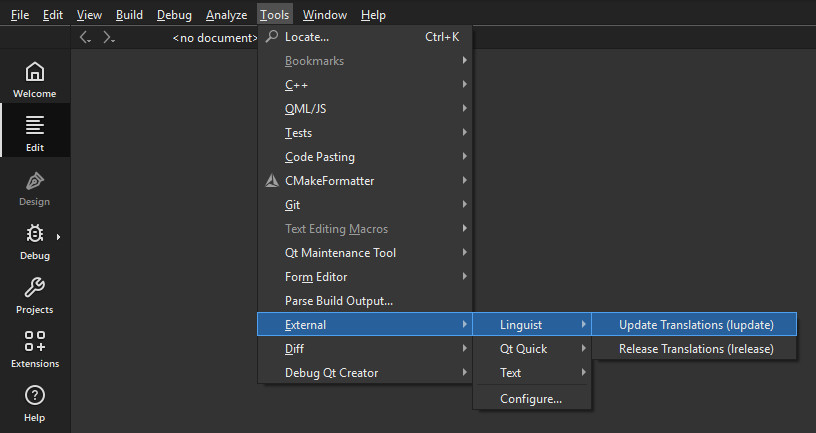
- Go to the menu bar: Tools > External > Linguist > Update Translations (lupdate).
- Qt Creator will scan your code and create the .ts files in your project directory.
-
-
Via Command Line (Terminal)
Navigate to your project folder and run:
# For qmake users
\path\to\Qt\6.8.3\msvc2022_64\bin\lupdate MyProject.pro
# For CMake users, you usually build the 'update_translations' target
rmdir /s /q build
cmake -S . -B build -DCMAKE_PREFIX_PATH="\path\to\Qt\6.8.3\msvc2022_64"
cmake --build build --target update_translations
Translate with Qt Linguist
Now that you have the .ts files, it’s time to translate.
- Open the file (e.g., app_vi.ts) using Qt Linguist (installed with Qt).
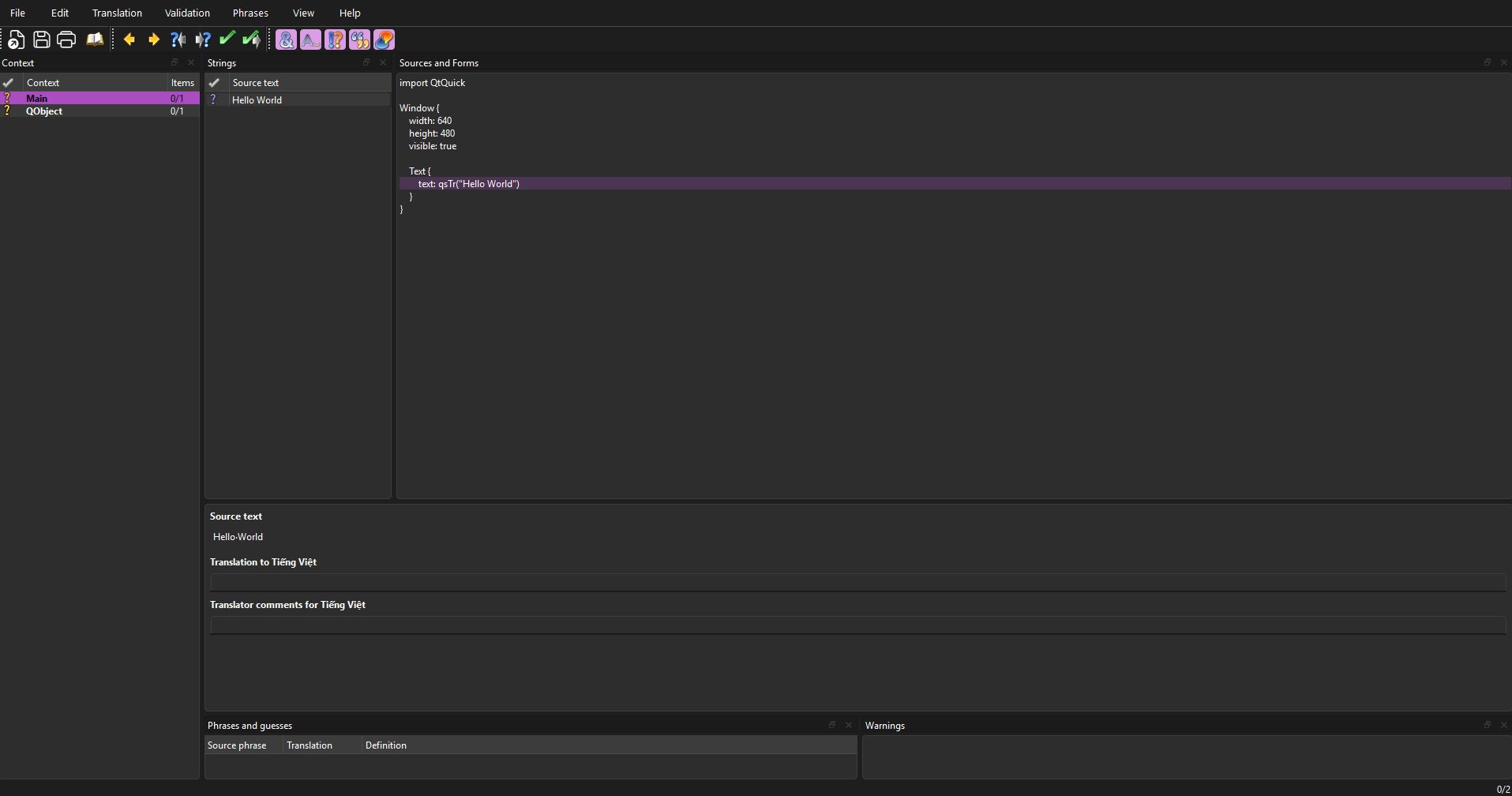
- On the left, you will see a list of strings found in your code.
- Select a string, type the translation in the bottom pane, and mark it as "Done" (click the ? icon to turn it into a green checkmark).
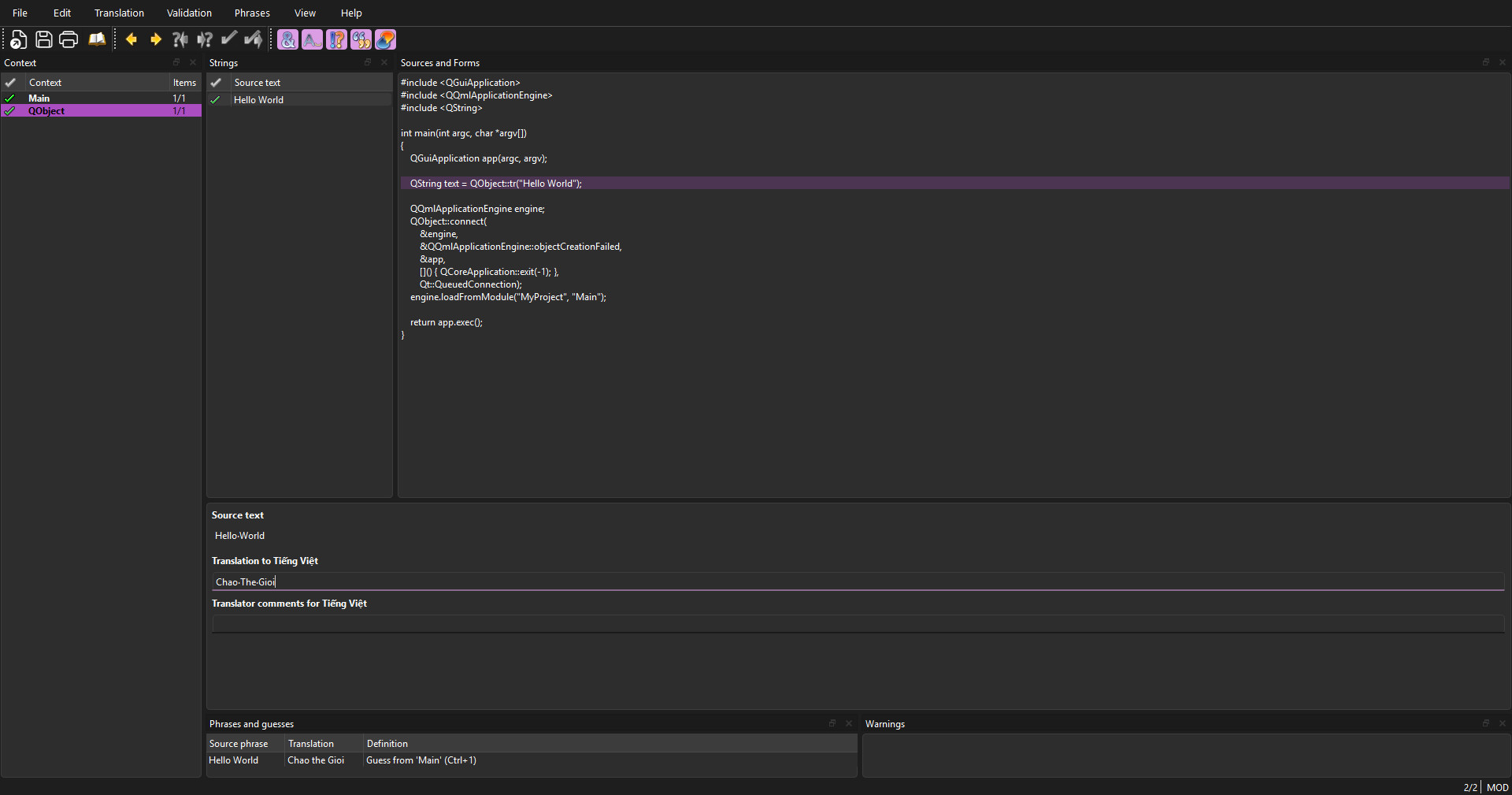
- Save the file.
-
-
Compile to Binary (.qm Files)
Your application does not read .ts files directly because they are text-based (XML) and slow to parse. You must compile them into compact binary files (.qm) .
Using qmake (.pro)
In Qt Creator: Go to Tools > External > Linguist > Release Translations (lrelease).
This will generate app_vi.qm and app_ja.qm. These are the files you will actually deploy with your app.
Using CMake (CMakeLists.txt)
Navigate to your project folder and run:
# For CMake users
cmake --build build --target release_translations
Load the Translation in Your App
Finally, you need to tell your application to load the generated .qm file when it starts.
Add this logic to your code:
QTranslator translator;
// Load the compiled binary translation file
// ideally from the resource system (:/)
if (translator.load(":/app_vi.qm")) {
app.installTranslator(&translator);
}
Conclution
Internationalization (i18n) might seem like a daunting task when you are just starting out, but Qt provides one of the most robust workflows in the C++ ecosystem to handle it.
By following this guide, you have moved away from hard-coding strings and adopted a professional workflow:
- Marking your code with tr().
- Automating extraction with lupdate.
- Compiling efficient binaries with lrelease.
-
-
Ready to get started?
Contact IVC for a free consultation and discover how we can help your business grow online.
Contact IVC for a Free Consultation