Engineering Core
ISB Vietnam's skilled software engineers deliver high-quality applications, leveraging their extensive experience in developing financial tools, business management systems, medical technology, and mobile/web platforms.
Implementing Access Tokens and Refresh Tokens is the gold standard in modern authentication (especially with JWT - JSON Web Tokens). The goal is to balance security and user experience.
Below is a detailed guide on how to use these two token types "correctly" and most securely.
1. Why do we need 2 types of tokens?
Why not use a single token with a permanent expiration? Because if a hacker obtains that token, they gain access forever. We split them into two to minimize risk:
|
Feature
|
Access Token (AT)
|
Refresh Token (RT)
|
|
Purpose
|
Access resources (API)
|
Request a new Access Token
|
|
Lifespan
|
Very short (15 minutes - 1 hour)
|
Long (7 days - 30 days)
|
|
Storage Type
|
Stateless (usually JWT)
|
Stateful (stored in DB/Redis for control)
|
|
Risk
|
If lost, the hacker can only use it for a short time
|
If lost, consequences are more serious (but it can be revoked)
|
2. Standard Workflow (The Flow)
Here is the standard lifecycle of this authentication mechanism:
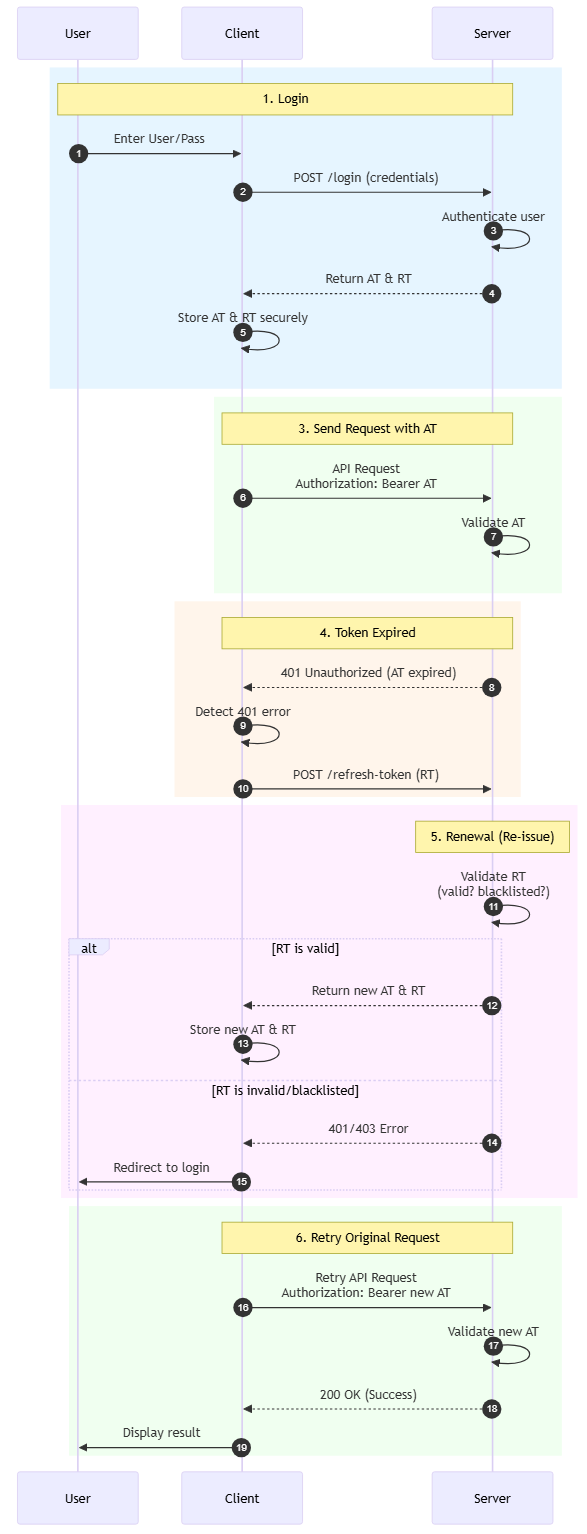
1.Login: User sends User/Pass. Server authenticates and returns an
AT and RT pair.2.Storage: Client stores
AT and RT in a secure place (see section 3).3.Send Request: Client sends a request with
AT in the Header (Authorization: Bearer <token>).4.Expired:
- Server checks
AT. If expired -> Returns 401 Unauthorized error.- Client receives 401 error -> Automatically sends a
/refresh-token request with RT to the Server.5.Renewal:
* Server checks
RT (is it valid? is it blacklisted?).* If valid -> Server returns a new
AT (and usually a new RT - see Token Rotation section).6.Retry: Client uses the new
AT to retry the original request without the user realizing it happened.3. Storage "Best Practices"
This is the most important part to avoid security vulnerabilities (XSS and CSRF).
A. For Web Applications (SPA - React, Vue, Angular)
The common way is to save to `localStorage`, but the safest way is:
Access Token: Store in JavaScript local variable (in-memory).
Pros: XSS attackers cannot read the token (because it is not in storage).
Cons: Token is lost when the page is refreshed (F5) (solved by silently calling a refresh token API immediately upon page load).
Refresh Token: Store in HttpOnly Cookie.
Cookie configuration:
HttpOnly (JS cannot read), Secure (sent only over HTTPS), SameSite=Strict.Pros:* Completely immune to XSS. Hackers cannot copy this token.
B. For Mobile Apps (iOS/Android)
Store both in the operating system's secure storage.
iOS: Keychain.
Android: EncryptedSharedPreferences / Keystore.
4. Token Rotation Mechanism
To enhance security, you should not use the same Refresh Token forever. Use the Refresh Token Rotation technique:
1. Every time the Client uses
Old_RT to request a new token.2. The Server will return
New_AT and New_RT.3. The Server marks
Old_RT as used (or deletes it) in the Database.4.Theft Detection: If a hacker steals
Old_RT and tries to use it to refresh -> The Server sees that Old_RT has already been used -> The Server immediately revokes all RTs related to that user, forcing the user to log in again.Conclusion
1. Access Token short, Refresh Token long.
2. Web: Prioritize
HttpOnly Cookie for Refresh Token, In-memory for Access Token.3. Mobile: Use Keychain/Keystore.
4. Backend: Always validate Refresh Token in the database (to allow revocation/revoke when needed).
5. Rotation: Change to a new Refresh Token after every use.
Whether you need scalable software solutions, expert IT outsourcing, or a long-term development partner, ISB Vietnam is here to deliver. Let’s build something great together—reach out to us today. Or click here to explore more ISB Vietnam's case studies.
[References]