Working with collections in Java used to involve a lot of boilerplate code—loops, conditions, and temporary variables. But with the introduction of Java Streams, developers gained a powerful way to process data in a declarative, readable, and functional style.
In this post, we'll explore how to simplify common tasks using Java Streams, with practical examples you can plug right into your projects.
📚 Understanding Java Streams
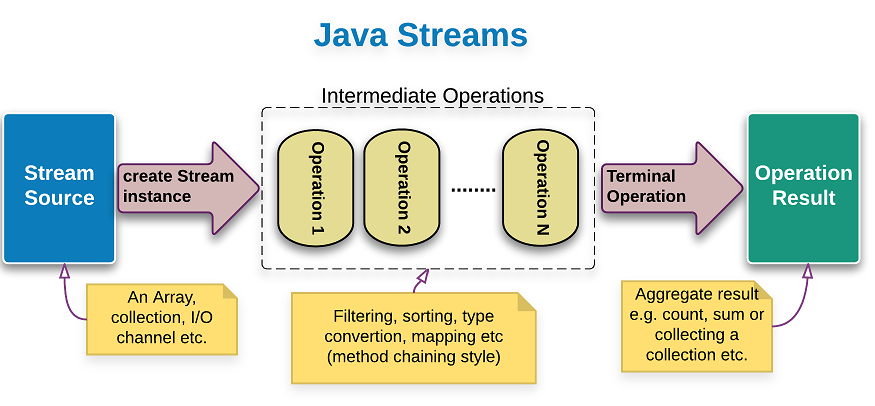
Java Streams are a part of the java.util.stream package introduced in Java 8. They allow you to process collections of data (like Lists, Sets) in a functional programming style. A stream is not a data structure—it doesn’t store data. Instead, it carries values from a source (e.g., a list) through a pipeline of operations, such as filtering, mapping, or reducing.
⚙️ Key Features of Java Streams
✅ Declarative Syntax
Write what you want to do with the data, not how to do it.
✅ Lazy Evaluation
Operations are executed only when a terminal operation is triggered, making them efficient.
✅ Chaining & Fluent API
Streams support method chaining, allowing operations like filter, map, and collect to be easily combined.
✅ Parallel Processing
Use .parallelStream() for multi-threaded data processing with minimal changes.
🛠️ Real Examples Using Java Streams
Let’s see how Java Streams simplify common programming tasks.
1️⃣ Filter Elements from a List
✅ Get all names starting with "C":
    List names = List.of("BackOffice", "CleanRoom", "CreativeSpace", "MultipurposeRoom");

    List result = names.stream()
        .filter(name -> name.startsWith("C"))
        .collect(Collectors.toList());

    // Output: [CleanRoom, CreativeSpace]
2️⃣ Transform Elements with map()
✅ Convert all words to uppercase:
    List words = List.of("hello", "world");

    List upper = words.stream()
        .map(String::toUpperCase)
        .collect(Collectors.toList());

    // Output: [HELLO, WORLD]
3️⃣ Aggregate Data with reduce()
✅ Sum all even numbers in a list:
    List numbers = List.of(1, 2, 3, 4, 5, 6);

    int sum = numbers.stream()
        .filter(n -> n % 2 == 0)
        .mapToInt(Integer::intValue)
        .sum();

    // Output: 12
4️⃣ Convert List to Map
✅ Create a map from a list of strings (key = word, value = length):
    List words = List.of("Java", "Stream", "Example");

    Map map = words.stream()
        .collect(Collectors.toMap(word -> word, word -> word.length()));

    // Output: {Java=4, Stream=6, Example=7}
🎯 Final Thoughts
Java Streams provide a cleaner, more expressive way to process data in Java. Whether you're filtering, transforming, or aggregating data, streams let you write concise and readable code without manual loops.
References
Document Source: Stream (Java Platform SE 8 )
Image Source: t3.ftcdn.net, gpcoder.com