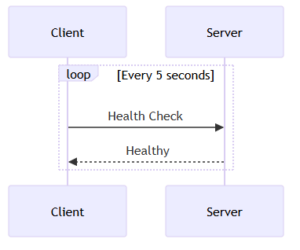
If you want to quickly turn ideas into visual diagrams directly inside your code editor—or illustrate complex system architectures without opening external tools—Mermaid is exactly what you need.
This guide will help you understand what Mermaid is, why it’s useful, and how to use it effectively inside Visual Studio Code (VS Code).
What Is Mermaid?
Mermaid is a JavaScript-based tool that allows you to create diagrams using plain text. Instead of dragging and dropping shapes like traditional diagramming tools, you simply write a concise text description and Mermaid renders it into a complete diagram.
Key Advantages of Mermaid
- Text to Graphics: Write simple syntax and get a visual diagram instantly.
- Diagrams as Code: Your diagrams stay version-controlled along with source code.
- Markdown-Friendly: Works seamlessly with README files, technical documentation, and internal wiki pages.
- No Extra Tools Needed: Everything is generated from text—no manual drawing required.
Think of Mermaid as an “automatic renderer”: you write the script, and it generates the scene for you.
Why Use Mermaid in VS Code?
VS Code is one of the most widely used development environments today. Integrating Mermaid into your workflow brings several benefits:
✔ Faster Workflow
No need to switch between VS Code and external tools like Draw.io or Lucidchart.
✔ Better Visualization
Flowcharts, sequence diagrams, workflows, and architecture diagrams can be previewed directly inside Markdown.
✔ Easy Sharing
Just share your .md or .mmd file—anyone with VS Code can preview the diagram.
How to Use Mermaid in VS Code
Mermaid works in VS Code with the help of a few extensions. Below are the most common and convenient ways to use it.
Install the Required Extension
To render Mermaid diagrams directly inside Markdown (.md) files, you need the extension:
👉 Markdown Preview Mermaid Support
Installation Steps:
- Open VS Code.
- Press Ctrl + Shift + X to open the Extensions panel.
- Search for Markdown Preview Mermaid Support.
- Click Install.
Once installed, you can write Mermaid diagrams in any Markdown file like this:
mermaid
flowchart TD
A[Start] --> B[Process]
B --> C[End]
Open preview using Ctrl + Shift + V.
Use .mmd Files (Optional)
If you prefer to separate diagrams from your documentation, you can use dedicated Mermaid files (.mmd).
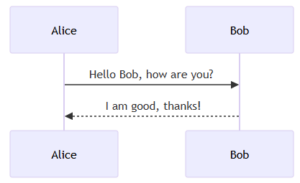
Example diagram.mmd:
sequenceDiagram
    Alice->>Bob: Hello Bob, how are you?
    Bob-->>Alice: I am good, thanks!
To preview .mmd files, you need an additional extension:
👉 Live Preview: Mermaid (or any similar Mermaid preview extension)
After installation:
- Right-click the .mmd file
- Select Open Preview
Use Live Preview (Advanced Option)
For real-time editing and instant visual feedback, use the Live Preview feature:
- Press Ctrl + Shift + P.
- Type Mermaid: Live Preview.
- Select the command to open the preview window.
This is especially useful when designing complex diagrams.
Conclusion
Mermaid streamlines the entire diagramming process by transforming manual drawing into automated, text-based visualization. When combined with VS Code, it allows you to:
- manage diagrams as part of your codebase,
- maintain version history,
- and create clear, maintainable technical documentation.
Start by adding a simple diagram to your project’s README.md. Very quickly, you’ll see how powerful and convenient the diagrams-as-code approach can be.
Ready to get started?
Contact IVC for a free consultation and discover how we can help your business grow online.
Contact IVC for a Free Consultation