TECH

November 28, 2025

Deep Dive into Pattern Matching in ES2015

JavaScript has always been evolving, introducing new features to make coding more expressive, concise, and powerful. One of the most anticipated features slated for ES2025 is Pattern Matching — a powerful tool that enables developers to destructure and analyze data structures more intuitively and declaratively.

In this blog, we will explore what pattern matching is, how it works in ES2025, and walk through practical examples with detailed explanations.

Simple Literal Matching

const result = match ("hello") {
   case "hello" => "Greeting detected!";
   case "bye" => "Farewell detected!";
   default => "Unknown message"; };
console.log(result);
// Output: Greeting detected!

Explanation: The match expression compares the input string against each case. When it matches the string "hello", it returns the corresponding message.

Destructuring Objects

const user = { name: "John", age: 30 };
const greeting = match (user) {
   case { name, age } if age >= 18 => `Hello, ${name}. You are an adult.`;
   case { name } => `Hi, ${name}. You are a minor.`;
};
console.log(greeting);
// Output: Hello, John. You are an adult.

Explanation: Here, pattern matching destructures the object and applies a guard condition (if age >= 18) to decide which branch to execute.

Matching Arrays with Rest Patterns

const numbers = [1, 2, 3, 4];

const description = match (numbers) {
case [first, second, ...rest] => `First two numbers are ${first} and ${second}, rest are ${rest.join(", ")}`;
};
console.log(description);
// Output: First two numbers are 1 and 2, rest are 3, 4

Explanation: This example matches an array, capturing the first two elements into variables and the rest into another array using the rest pattern. It then constructs a descriptive string.

Nested Patterns

const response = {
status: 200,
data: {
   user: {
     id: 101,
     name: "Alice",
     roles: ["admin", "editor"],
   },
  },
};
const message = match(response) {
     case {
       status: 200,
       data: {
            user: {
            name,
            roles: [firstRole, ...restRoles]
           }
       }
     } =>
     `User ${name} has role ${firstRole} and others: ${restRoles.join(", ")}`;
     case {
       status
     } => `Request failed with status ${status}`;
};
console.log(message);
// Output: User Alice has role admin and others: editor


Explanation:
This example demonstrates matching deeply nested objects. The pattern matches a successful HTTP response and destructures nested properties to extract the user's name and roles.

Matching with Type Guards

function process(value) {
  return match (value) {
    case (x) if typeof x === "string" => `String of length ${x.length}`;
    case (x) if typeof x === "number" => `Number with value ${x}`;
    case (x) if Array.isArray(x) => `Array with ${x.length} elements`;
    default => "Unknown type";
  };
}
console.log(process("hello")); // Output: String of length 5
console.log(process(42)); // Output: Number with value 42
console.log(process([1,2,3])); // Output: Array with 3 elements

Explanation: This example uses guards (if conditions) within pattern matching cases to handle different types dynamically.

Matching Enums or Tagged Unions

const shape = { kind: "circle", radius: 10 };
const area = match (shape) {
     case { kind: "circle", radius } => Math.PI * radius * radius;
  case { kind: "square", size } => size * size;
     case { kind: "rectangle", width, height } => width * height;
  default => 0;
};
console.log(area); // Output: 314.1592653589793sfsdfsfsfs


Explanation:
 This example matches on the kind property of a shape object to compute areas for different shapes, demonstrating how pattern matching can elegantly replace switch-case statements handling tagged unions.

Caveats & Current Status

The Pattern Matching proposal is still evolving as part of TC39 discussions. While the syntax and features showcased here reflect the current proposal drafts, they may change before final inclusion in ES2025. Developers should keep an eye on official updates and consider using transpilers or experimental flags if they want to experiment early.

Conclusion

Pattern Matching in ES2025 promises to be a game-changer for handling complex data structures with clarity and brevity. It combines destructuring, conditional logic, and expressive syntax to help developers write cleaner, more maintainable code.

As JavaScript continues to evolve, embracing new paradigms like pattern matching will empower developers to solve problems more elegantly. Keep an eye out for this feature’s release and try experimenting with it once available!

[References]

Ready to get started?

Contact IVC for a free consultation and discover how we can help your business grow online.

Contact IVC for a Free Consultation
View More
TECH

November 26, 2025

AI API – When APIs Start to Think

For the past few weeks, I feel like I'm seeing the term "AI APIs" everywhere.

People are using them to generate content, summarize text, figure out if a customer review is happy or angry, or even... write code. I haven't actually tried one myself yet, but after reading around, I just kept wondering, "Wait, what's the actual difference between these and the traditional APIs I use every day?"

So, I did a little digging, and here's a quick brain dump of what I've learned so far.

I. What is an AI API, Anyway?

As far as I get it, an AI API is basically a hotline to a pre-trained AI brain.

Instead of calling a traditional API to ask, "Hey, give me the JSON for user ID 5," you call an AI API and ask, "Hey, read this paragraph and tell me what it means." It doesn't just return static data; it returns something that has been processed and thought about.

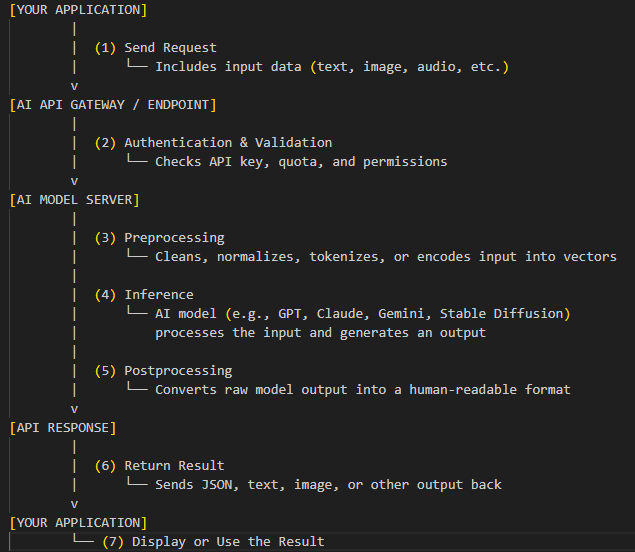
How it works:


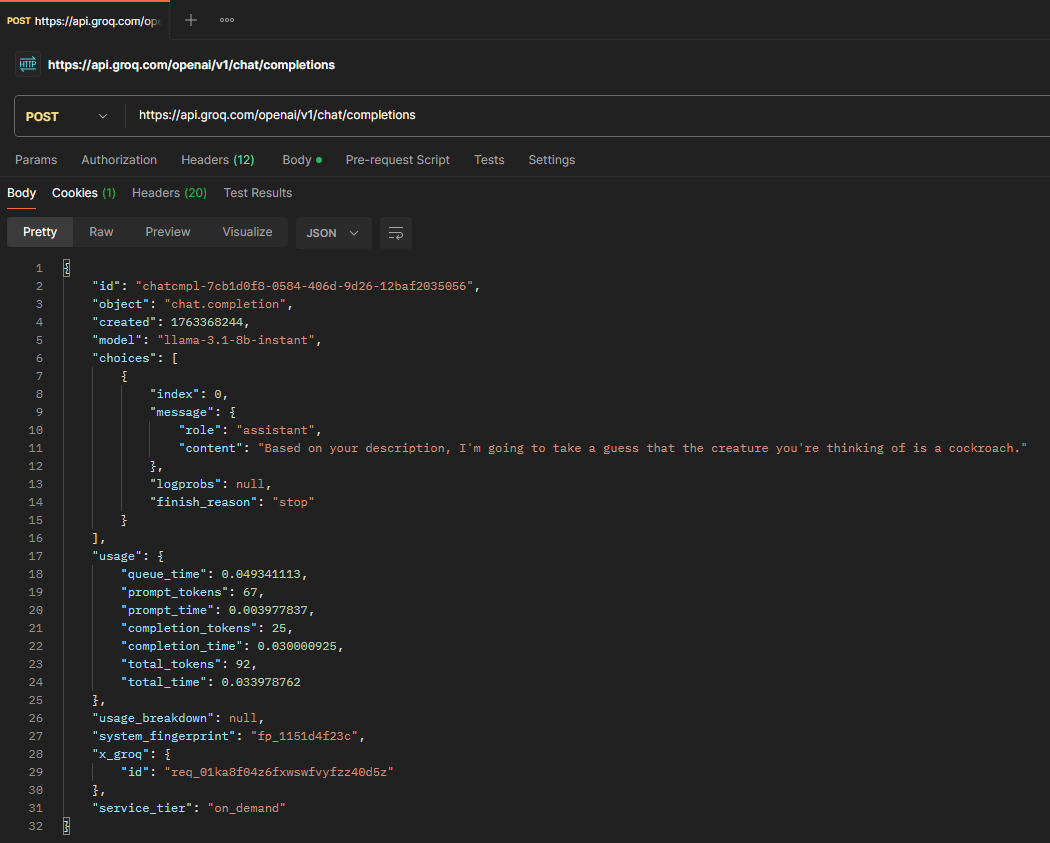
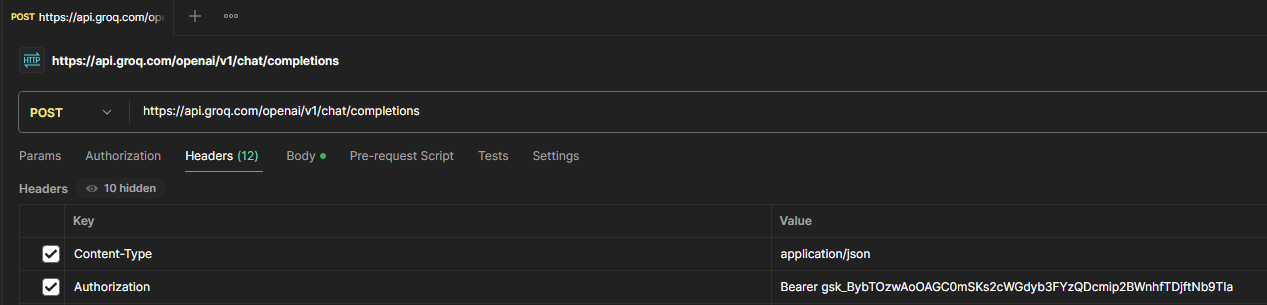
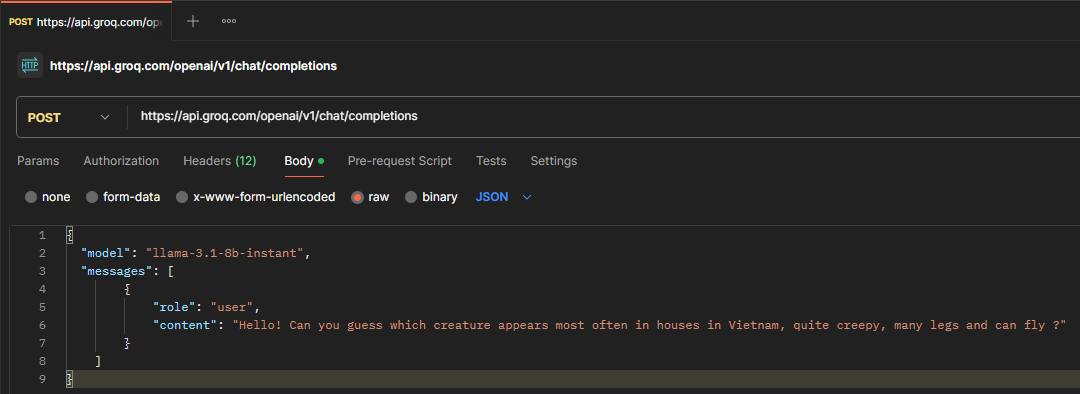
To make this more concrete, I decided to create my own example using Groq’s llama-3.1-8b-instant model and Postman.

  • In Postman, I set up a POST request to: https://api.groq.com/openai/v1/chat/completions
  • Add a header Content-Type with the value application/json and Authorization with the value Bearer YOUR_API_KEY (replace YOUR_API_KEY with your own API key).

  • Then I asked  a question in BODY: "Hello! Can you guess which creature appears most often in houses in Vietnam, quite creepy, many legs and can fly ?"

  • Finally, I received the answer from AI like this "...guess that the creature you're thinking of is a cockroach.". Wow, it’s completely accurate with exactly what I wanted to ask! I really scare this insect.

As you can see, I just need to send a question, and the AI will respond in natural language, making it feel like a conversation rather than a dry query.

II. Advantages of AI APIs

After looking at a few examples, I'm starting to see why people are so hyped:

  • Smarter results: You can give it an instruction like, "Write a friendly email," instead of coding a bunch of templates and rigid rules yourself. It gets your intent.

  • Leaner code: It looks like one good "prompt" could replace hundreds of lines of if-else logic. For example, instead of writing insane regex to parse an address, you just tell the AI, "Get me the address from this text."

  • Super-fast prototyping: I can imagine spinning up a Proof-of-Concept (PoC) in an afternoon instead of spending months trying to train my own model.

  • Natural responses: The text it returns sounds human, not robotic. Users would probably love this for chatbots.

III. Challenges

    Of course, nothing's perfect. Browsing forums, I see other devs seem to complain about the same stuff:

    • Unpredictable results: This is my biggest worry. The same input can give you slightly different results. What if it "gets creative" and just makes something up that's wrong?

    • Slow and expensive: Big AI models need big servers to run. A request can take several seconds (not milliseconds), and the costs can apparently stack up fast if you're not careful.

    • Privacy nightmares: This one's obvious. You're sending your (or your customers) data to a third-party service. You have to be really careful about what you're sending.

    • Debugging sounds awful: If a traditional API gives you a 500 error, you can check the logs. But if an AI gives you an answer that sounds right but is factually wrong, how do you even start to fix that?

    Clearly, there's a trade-off. We're swapping control and reliability for convenience and... well, magic.

    IV. Popular AI APIs to Explore

    If you want to start digging in like me, these are the "hot" names I've seen mentioned most:

    • OpenAI (GPT-4o / GPT-4o-mini): The big one, seems to be the standard for general reasoning.

    • Anthropic (Claude): I hear this one is great for creative writing and handling huge amounts of text.

    • Hugging Face (Inference API): The place to go if you want to tinker with open-source models.

    • Cohere API: Looks like it's more focused on business/enterprise tasks like summarization.

    • Google (Gemini API): Google's model, which is apparently a beast at multimodal stuff (text, images, and audio all at once).

    Most of these have free tiers to play around with, so I'll probably sign up for one soon just to see what it's like.

    V. Conclusion

    I'm still just learning, but one thing is clear: AI APIs mark a major shift in how we think about APIs.

    They don't just deliver data. They interpret it.

    And maybe... just maybe... that's where backend development is quietly heading. A future where logic feels more like conversation than computation.


    Whether you need scalable software solutions, expert IT outsourcing, or a long-term development partner, ISB Vietnam is here to deliver. Let’s build something great together—reach out to us today. Or click here to explore more ISB Vietnam's case studies.

    [References]

     https://treblle.com/blog/best-ai-apis?utm_source=chatgpt.com

    https://www.codiste.com/generative-ai-api-integration-challenges-solutions-real-world-example?utm_source=chatgpt.com

    View More
    TECH

    November 24, 2025

    Windows Message Handling in C++

    What Exactly Are Windows Messages?

    Windows messages are integral to the Windows OS’s event-driven design. The OS communicates with your application by sending messages to your windows. These messages notify your app about everything from user actions (mouse, keyboard, etc) to system events (resize, paint, close, etc).

    Messages are identified by constants like WM_PAINT, WM_KEYDOWN, WM_CLOSE, etc. Each message can carry additional information packed inside two parameters: wParam and lParam.

    How Messages Are Delivered?

    When a user interacts with a window, Windows puts corresponding messages in the message queue for your app's thread. The system only creates a message queue for threads that perform operations needing one, such as creating windows.

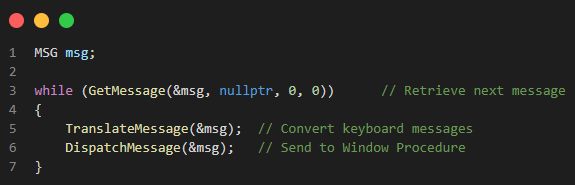
    A thread must create at least one window before starting its message loop, which retrieves and dispatches messages to window procedures. Most applications use a single thread that registers a window class, creates and displays the main window, and then runs the message loop — typically in the WinMain function. The message loop usually uses GetMessage, TranslateMessage, and DispatchMessage to process input and deliver messages to the proper windows.

    • GetMessage waits until a message arrives.
    • TranslateMessage helps convert raw keyboard input into character messages.
    • DispatchMessage sends the message to your WndProc.

    When GetMessage returns 0, it means your app received a WM_QUIT message — time to exit.

    The Window Procedure: Message Handling Core

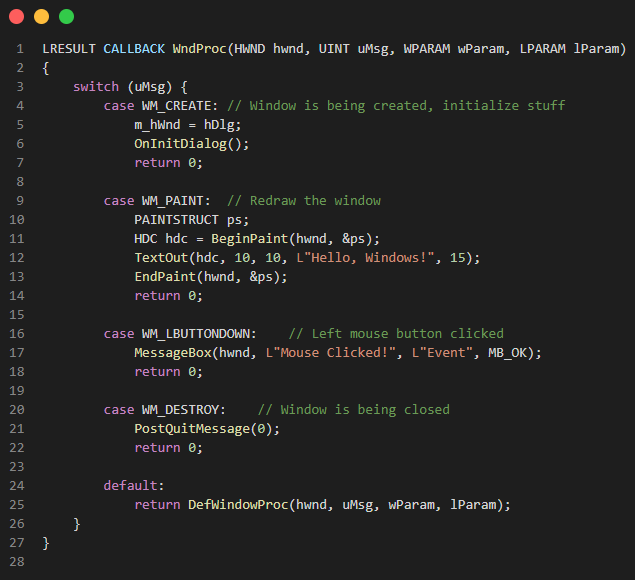
    Once a message is dispatched, it’s handled by a Window Procedure, typically called WndProc. This is a callback function where you handle all kinds of messages.

    A typical WndProc looks like this:

    • WM_CREATE: Sent when the window is being created and initializes stuff.
    • WM_PAINT: Sent when part of the window needs to be redrawn.
    • WM_DESTROY: Sent when the window is being closed. You respond by posting a WM_QUIT message to break the message loop.
    • WM_LBUTTONDOWN: Sent when the user clicks the left mouse button.
    • If your WndProc doesn’t explicitly handle a message, calling DefWindowProc ensures that Windows performs the default processing — like moving, resizing, or closing the window. Skipping this can cause unexpected behavior.

    Understanding wParam and lParam

    These parameters are message-dependent and often require macros or bitwise operations to extract meaningful data.

    For example:

    • WM_MOUSEMOVE: lParam packs mouse coordinates

            int x = GET_X_LPARAM(lParam);

            int y = GET_Y_LPARAM(lParam);

    Handling Custom Messages

    In event-driven programming, the flow of a program is determined by events — user actions, system triggers, or messages passed between components. While frameworks provide predefined messages and events, sometimes you need something more specific: Custom Messages.

    How to define a Custom Message?

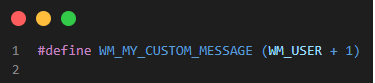
    In native Windows C++, you can define your own message using an offset from WM_USER or WM_APP:

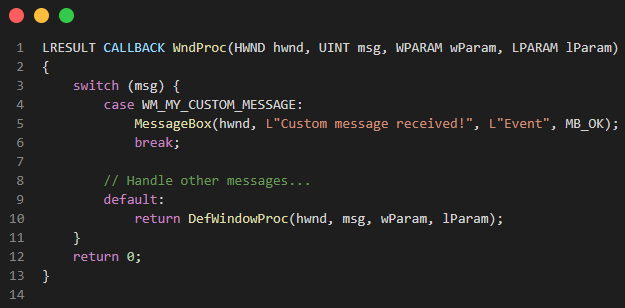
    You then handle it in your window procedure (WndProc):

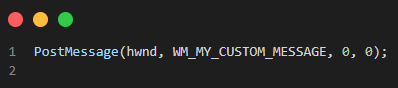
    And to send it:

    The PostMessage call queues the message asynchronously, allowing your main thread to continue processing other events.

    Conclusion

    Understanding the Windows message loop and event handling model is foundational for any Win32 GUI application. While it might feel low-level compared to modern frameworks, it offers fine-grained control and insight into how operating systems interact with software.

    If you're building desktop apps on Windows, mastering this will make you a more capable and versatile developer.

    Ready to get started?

    Contact IVC for a free consultation and discover how we can help your business grow online.

    Contact IVC for a Free Consultation
     

    Reference:

    https://learn.microsoft.com/en-us/windows/win32/winmsg/messages-and-message-queues

    https://learn.microsoft.com/en-us/windows/win32/winmsg/using-messages-and-message-queues

    View More
    TECH

    August 7, 2025

    What is Power Apps? Starting Your Digital Journey from Zero – Part 1

    Welcome to the first part of our blog series: “From Zero to Digital Hero with Power Apps” If you’ve ever thought only programmers can build apps, this post will change your perspective completely.

    View More
    TECH

    August 7, 2025

    The Ultimate Guide to JS String Concatenation

    We've all been there. You need to generate a large report. This might be a massive CSV file, a sprawling JSON for an API, or a huge chunk of HTML. At the heart of these tasks is a simple operation: string concatenation.

    View More
    TECH

    August 7, 2025

    Exploring C# 14: Cleaner Syntax, Smarter Spans, and More Flexible Lambdas

    Released alongside .NET 10 and supported in Visual Studio 2022, C# 14 introduces a set of thoughtful improvements aimed at making your code more concise, efficient, and expressive. Whether you’re maintaining large-scale applications or writing performance-critical components, these enhancements will help streamline your workflow.

    In this article, we’ll explore the standout features of C# 14, explaining their benefits and providing practical examples so you can start using them right away

    View More
    TECH

    July 14, 2025

    Setting Up and Customizing Rules in Cursor AI

    In Cursor AI, Rules are customizable instructions provided to the AI (Agent) model to guide how it handles your requests. Simply put, Rules act as fixed prompts that are always attached to the context whenever the AI executes, helping it remember your principles and preferences consistently. By setting up Rules, you can personalize the AI’s behavior to match your programming style, coding standards, and workflow.

    View More
    TECH

    June 21, 2025

    SOLID DESIGN PRINCIPLES IN SOFTWARE DEVELOPMENT

    SOLID is an acronym for five design principles, coined by the American computer scientist and instructor Robert C. Martin. The goal of these principles is to assist developers in creating a understandable, flexible, and maintainable software or system. So let’s dive in to see what kind of advantage these principles can offer.

    View More
    TECH

    June 20, 2025

    Progressive Web App: A native app experience wrapped in a website

    Have you ever thought that a website could behave like a native app on mobile devices—such as Swift for iOS or Java/Kotlin for Android? Or the possibility of using an application offline while still supporting basic display and interaction features?
    Let me introduce you to a solution for this: it's called a Progressive Web App (PWA).

    View More
    TECH

    June 20, 2025

    Getting Started with GitLab Runner: A Comprehensive Guide to GitLab Runner

    GitLab Runner is an open-source application designed to execute jobs defined in GitLab CI/CD pipelines. Whether you’re building, testing, or deploying code, GitLab Runner acts as the engine driving automation in your development lifecycle.

    1. Key Features of GitLab Runner:

    • Multi-Platform Support: Works across Linux, macOS, Windows, and even Docker containers, providing unmatched versatility.
    • Executor Options: Includes Shell, Docker, and Kubernetes executors to cater to various infrastructure setups.
    • Concurrent Jobs: Allows multiple jobs to run simultaneously, improving pipeline efficiency.
    • Open Source: Being open-source, GitLab Runner offers flexibility for custom configurations.

    2. Installing GitLab Runner on Window:

    For Windows users, download the GitLab Runner binary from the official GitLab website and execute the following commands:

    cd install-folder
    .\gitlab-runner.exe install
    .\gitlab-runner.exe start
    install-folder is the directory without the gitlab-runner.exe file.

    3. Registering GitLab Runner:

    Once installed, GitLab Runner must be registered with a GitLab instance. The registration process links the runner to a GitLab project or instance and specifies how jobs should be executed. Run the following command to start registration:
    gitlab-runner register
    During registration, you will be prompted to enter:
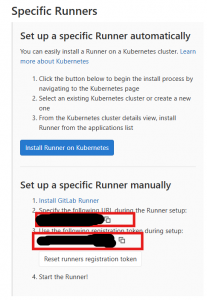
    • GitLab instance URL
    • Registration token (found in GitLab under Settings > CI/CD > Runners)
    • Enter a description for the runner.
    • the job tags, separated by commas
    • an optional maintenance note for the runner.
    • Executor type (Shell, Docker, Kubernetes, etc.)
    Get GitLab instance URL and token
    After successful registration, the runner is ready to execute CI/CD jobs.

    How Does GitLab Runner Work?

    The process revolves around configuring .gitlab-ci.yml, the pipeline definition file, which outlines the stages and jobs to be executed. GitLab Runner fetches jobs from the CI/CD pipeline and performs them within the specified environment (such as a Docker container).

    Example

    stages:
      - build
      - test
      - deploy
    
    build_job:
      stage: build
      script:
        - echo "Building the application..."
    
    test_job:
      stage: test
      script:
        - echo "Running tests..."
    
    deploy_job:
      stage: deploy
      script:
        - echo "Deploying the application..."
    

    4. Conclusion

    GitLab Runner is a powerful tool that enhances GitLab CI/CD by executing jobs efficiently across different environments. By properly installing, configuring, and optimizing GitLab Runner, teams can significantly improve their development workflows and CI/CD performance.

    If you’re looking to automate your builds, tests, and deployments with GitLab, setting up GitLab Runner is a crucial step


    Whether you need scalable software solutions, expert IT outsourcing, or a long-term development partner, ISB Vietnam is here to deliver. Let’s build something great together—reach out to us today. Or click here to explore more ISB Vietnam's case studies.

    Cover image from freepik.com

    View More
    1 8 9 10 11 12 25