TECH

February 24, 2026

AWS Certified Cloud Practitioner (CLF-C02) – Domain 1 (Part 1): Understanding AWS Cloud Benefits

Master the foundational benefits of AWS Cloud. Learn why organizations worldwide choose AWS and how cloud infrastructure transforms business operations.

Welcome back to our AWS Certified Cloud Practitioner (CLF-C02) exam series! In the first post, we explored the complete exam outline and structure. Today, we're diving into the first part of Domain 1: Cloud Concepts - the foundational domain that represents 24% of your exam score.

Think of Domain 1 as the "why" of cloud computing. Before you learn about specific AWS services (which we'll cover in later posts), you need to understand why organizations move to the cloud and what principles guide good cloud architecture. This domain ensures you can articulate the value proposition of AWS to stakeholders, whether they're technical or business-focused.

Domain 1 consists of four task statements. We'll cover these across multiple posts. In this post (Part 1), we'll focus on Task Statement 1.1: The Benefits of AWS Cloud - understanding what makes AWS attractive to organizations.

Domain 1 Overview: What You Need to Know

Domain 1 focuses entirely on concepts rather than technical implementation. You won't be asked to configure services or write code. Instead, you'll need to demonstrate understanding of:

  • Why businesses choose AWS - The tangible benefits (This post - Part 1)
  • How to design well - Best practice principles (Part 2)
  • How to migrate effectively - Strategies and frameworks (Part 3)
  • How cloud saves money - Economic advantages (Part 3)

Let's start with understanding the core benefits that make AWS attractive to organizations worldwide.

Task Statement 1.1: Define the Benefits of the AWS Cloud

This task statement focuses on understanding what makes AWS Cloud valuable compared to traditional IT infrastructure.

Global Infrastructure Benefits

Speed of Deployment: In traditional data centers, purchasing and setting up new servers could take weeks or months. With AWS, you can provision resources in minutes. For example, if your marketing team suddenly needs a new web application for a campaign launching next week, you can deploy it on AWS EC2 instances within hours, not months.

Global Reach: AWS operates in multiple geographic regions worldwide, each containing multiple Availability Zones (separate data centers). This means:

  • A company based in the US can easily serve customers in Europe, Asia, or South America with low latency
  • You can deploy applications close to your users without building physical data centers
  • Content can be cached at edge locations (over 400 globally) for faster delivery

Real-World Example: A streaming service wants to expand from the US to Japan. Instead of building data centers in Tokyo (costing millions and taking years), they can deploy their application to AWS's Tokyo Region in days, instantly providing low-latency service to Japanese users.

High Availability

High availability means your applications stay running even when something fails. AWS achieves this through:

  • Multiple Availability Zones: Each AWS Region has at least 3 separate data centers (AZs) with independent power, cooling, and networking
  • Fault isolation: If one AZ experiences issues, your application continues running in other AZs
  • Built-in redundancy: Many AWS services automatically replicate data across multiple locations

Example: An e-commerce site runs on EC2 instances in 3 different Availability Zones. During a power outage in one AZ, customers continue shopping without interruption because the other 2 AZs handle all traffic seamlessly.

Elasticity

Elasticity is the ability to automatically scale resources up or down based on demand. This is one of cloud's most powerful benefits.

  • Scale up: During peak times, automatically add more servers
  • Scale down: During quiet periods, reduce servers to save costs
  • No manual intervention: AWS Auto Scaling handles this automatically

Real-World Scenario: A tax preparation website sees massive traffic increases in March and April but minimal traffic the rest of the year. With AWS elasticity:

  • In tax season: Automatically scales to 100 servers to handle 1 million daily users
  • In summer: Scales down to 5 servers for the 10,000 daily users
  • Result: Only pay for what you need, when you need it

Agility

Agility in cloud means the ability to quickly experiment, innovate, and respond to market changes without large upfront investments.

  • Faster time to market: Launch new products in days instead of months
  • Lower risk of experimentation: Try new ideas with minimal cost; shut them down if they don't work
  • Focus on innovation: Spend time building features, not managing infrastructure

Example: A startup wants to test if their new AI-powered app will attract users. On AWS, they can:

  1. Deploy a prototype in 2 days
  2. Run it for a month at $100 cost
  3. If it fails, delete everything with no long-term commitment
  4. If it succeeds, scale up immediately

Compare this to traditional IT: purchasing servers ($50,000+), setting them up (3 months), then being stuck with hardware even if the project fails.

Key Takeaways

Understanding AWS Cloud benefits is essential for the CLF-C02 exam. Remember these core advantages:

  • Speed: Deploy resources in minutes, not months
  • Global Reach: Serve users worldwide without building physical infrastructure
  • High Availability: Keep applications running even when failures occur
  • Elasticity: Automatically scale resources to match demand
  • Agility: Experiment quickly and innovate without large upfront costs

What's Next?

Now that you understand why organizations choose AWS, the next step is learning how to design cloud systems well.

In Part 2, we'll explore:

  • The AWS Well-Architected Framework – Six pillars of cloud design excellence
  • Design principles for each pillar with practical examples
  • How to distinguish between pillars in CLF-C02 exam questions
  • Practice questions to reinforce your understanding

These design principles are essential not only for passing the CLF-C02 exam, but also for building reliable, secure, and cost-effective cloud solutions in real-world scenarios.

Which AWS Cloud benefit do you find most valuable in your work? Have you experienced any of these benefits firsthand? Share your experience in the comments below!


Whether you need scalable software solutions, expert IT outsourcing, or a long-term development partner, ISB Vietnam is here to deliver. Let’s build something great together—reach out to us today. Or click here to explore more ISB Vietnam's case studies.


References

[1]. AWS Global Infrastructure. Retrieved from https://aws.amazon.com/about-aws/global-infrastructure/

[2]. AWS Certified Cloud Practitioner Exam Guide (CLF-C02). Retrieved from https://aws.amazon.com/certification/certified-cloud-practitioner/
View More
TECH

February 24, 2026

Tampermonkey for Developers: Modifying the Web to Suit Your Workflow

As developers, we spend the majority of our day inside a web browser. We interact with Jira and CI/CD pipelines. We also use cloud consoles and legacy internal tools. Unfortunately, these interfaces are often not optimized for our specific needs. They require excessive clicking and lack essential shortcuts. Moreover, they often hide data we need to access quickly. Consequently, this is where Tampermonkey for developers becomes an indispensable tool.

View More
TECH

February 24, 2026

Is the Handover Dead? The Ultimate Figma to Code AI Guide

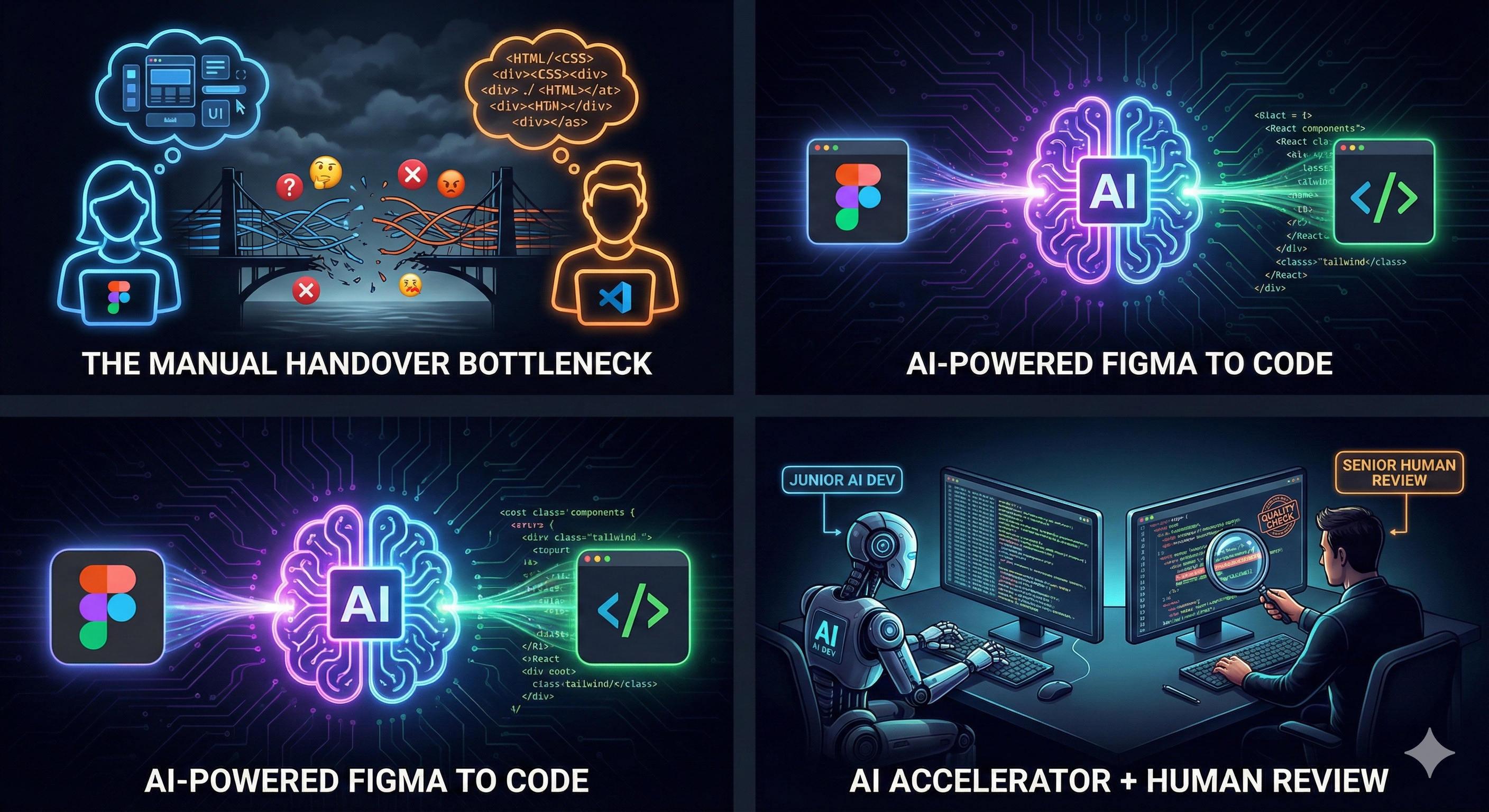
For as long as web development has existed, the "Design-to-Development Handover" has been a friction point. It is the Bermuda Triangle of software building: designers create pixel-perfect visions, and developers spend hours translating rectangles into <div> tags.

But the landscape is shifting. With the rise of Figma to Code AI tools, we are entering a new era where the frontend is generated, not just translated.

Here is how AI is bridging the gap between Figma and production-ready code, and what it means for the future of development.

The Problem with the "Old Way"

Traditionally, the workflow looks like this:

  • Designer creates a UI in Figma.

  • Designer annotates margins, padding, and animations.

  • Developer looks at the design and manually types out HTML/CSS/React.

  • QA finds visual discrepancies.

  • Repeat.

This process is slow, prone to human error, and frankly, a waste of a developer's cognitive load. Developers should be solving logic problems, not measuring pixels.

How "Figma to Code AI" Changes the Game

New tools like Locofy.ai, Anima, and Builder.io are not just exporting CSS. They use Figma to Code AI algorithms to understand intent.

Instead of treating a button as just a rectangle with a hex code background, these AI models recognize it as a <Button> component. They understand that a list of cards is likely a grid that needs to be responsive.

From Image to Component

Modern AI tools can scan a Figma frame and output clean, modular code in React, Vue, Svelte, or simple HTML/Tailwind. They don't just dump a blob of code; they attempt to structure it into reusable components.

Context Awareness

The AI is getting smarter about responsiveness. If you use Auto Layout correctly, Figma to Code AI tools can generate flexbox and grid layouts that actually work across different screen sizes.

Logic Integration

Some tools now allow you to define state and props directly inside Figma. You can tag a button to toggle a specific variable, and the generated code will include the useState and onClick handlers automatically.

The Top Players in the Field

If you want to try this today, here are the tools leading the charge:

  • Builder.io (Visual Copilot): Uses AI to convert Figma designs into code that matches your specific styling (e.g., Tailwind) and framework (Next.js, React).

  • Locofy.ai: Focuses heavily on turning Figma into a real app. It enables you to tag layers for interactivity and exports code that is ready for deployment.

  • Anima: One of the veterans in the space, great for high-fidelity prototyping and converting designs to React/Vue code.

  • v0 by Vercel: While not strictly a plugin, v0 allows you to generate UI code instantly from text prompts or screenshots.

The Reality Check: Is It Perfect?

If you blindly copy-paste output from a Figma to Code AI generator into production, you will end up with "spaghetti code." Common issues include:

  • Accessibility: AI often forgets semantic HTML (using <div> instead of <article>).

  • Naming Conventions: You might get class names like frame-42-wrapper unless you prompt it correctly.

  • Edge Cases: AI assumes the "Happy Path." It doesn't always know how the UI should look when the data is missing.

Think of AI as a Junior Frontend Developer. It types incredibly fast, but a Senior Developer still needs to review the PR, refactor the structure, and hook up the business logic.

How to Prepare Your Workflow

To get the best results from Figma to Code AI, designers and developers need to align:

  • Embrace Auto Layout: If your Figma file is just groups of rectangles, the code will be garbage. Use Auto Layout strictly.

  • Design Systems are Key: If you use a defined Design System, map it to your code components. This helps the AI generate <PrimaryButton /> instead of generic CSS.

  • Name Your Layers: AI uses layer names to generate class names. "Rectangle 54" creates bad code. "SubmitButton" creates good code.

Conclusion

The era of manually coding static UI components is drawing to a close. By adopting Figma to Code AI workflows, teams can ship faster and let developers focus on architecture, data flow, and user experience.

The question is no longer if you should use AI for frontend, but how fast you can integrate it into your pipeline.

References

Builder.io (Visual Copilot): https://www.builder.io/c/visual-copilot

Locofy.ai: https://www.locofy.ai/

Anima (Figma to React/Vue): https://www.animaapp.com/figma-to-react

v0 by Vercel: https://v0.dev/

Figma Auto Layout Official Guide: https://help.figma.com/hc/en-us/articles/360040451373-Explore-auto-layout-properties

Thinking in React (React Docs): https://react.dev/learn/thinking-in-react

Ready to get started?

Contact IVC for a free consultation and discover how we can help your business grow online.

Contact IVC for a Free Consultation

View More
TECH

February 12, 2026

How to Manage Remote Docker with Portainer: A Client-Server Guide

As infrastructure scales, DevOps engineers often face the challenge of maintaining multiple container environments. Logging into individual servers via SSH to check container health is inefficient and error-prone. To solve this, you need a robust solution to manage remote Docker with Portainer.

View More
TECH

February 12, 2026

A Practical Guide to Building Recommender Systems with NMF and Latent Factors

In modern digital content platforms, many systems rely on techniques like Non-Negative Matrix Factorization (NMF) to power their recommendations. At the same time, users are often overwhelmed by a large number of choices. Consequently, most people now prefer scrolling through recommended lists. Instead of actively searching for new content, they simply pick something that catches their eye. As a result, the quality of these recommendations plays a key role in shaping the user experience on the platform.

View More
TECH

February 12, 2026

Understanding Value Types and Reference Types in Programming

When working with languages like JavaScript, Java, C#, Python, and many others, you will always encounter two fundamental concepts: Value Types and Reference Types. They may sound a bit technical, but they simply describe how data is stored in memory and how it behaves when assigned to variables or passed to functions.

Understanding the difference helps you avoid unexpected bugs and write cleaner, more predictable code.
In this post, we’ll explore:
    • What Value Types are
    • What Reference Types are
    • Why the difference matters
  • Common bugs caused by misunderstanding the two
  • Practical examples (JavaScript and C#)

1. What Is a Value Type?

A Value Type stores the actual value directly in memory (typically on the stack).
Key behavior: When you assign a Value Type to another variable, the value is copied. The two variables become completely independent.
Common Value Types
  • Number (int, float…)
  • Boolean
  • Char
  • Struct (C#)
  • Enum
Example (JavaScript)

let a = 10;
let b = a; // b receives a copy
a = 20;

console.log(a); // 20
console.log(b); // 10
Explanation: b holds its own copy of the value, so changes to a do not affect it.

2. What Is a Reference Type?

A Reference Type stores a reference (memory address) that points to data located on the heap.
Key behavior: Assigning a Reference Type to another variable copies the reference, not the actual data. Both variables point to the same object in memory.
Common Value Types
  • Object
  • Array
  • Function
  • Class instances
  • Collections (List, Dictionary, Map…)
Example (JavaScript)

let obj1 = { name: "David" };
let obj2 = obj1; // both point to the same object

obj1.name = "Alex";

console.log(obj1.name); // Alex
console.log(obj2.name); // Alex
Explanation: Both variables refer to the same object in memory.

3. Value Types vs Reference Types: Visual Summary

Feature Value Type Reference Type
Stored in Stack Heap (reference on stack)
What is stored Actual value Address pointing to data
Assignment behavior Copies the value Copies the reference
Independence between variables Yes No
Examples int, float, bool object, array, class

4. Shallow Copy vs Deep Copy

When dealing with Reference Types, copying becomes more complex.

Shallow Copy

Copies only the top-level structure; nested objects still share references.

Deep Copy

Copies all levels of data; nothing is shared.
Example (JavaScript deep copy):

let obj1 = { name: "Dũng", info: { age: 30 }};
let obj2 = structuredClone(obj1);

obj1.info.age = 31;

console.log(obj2.info.age); // 30 (independent)

5. Final Thoughts

Key takeaway
  • Value Types store actual values
  • Reference Types store memory references
  • Copying a Value Type creates an independent variable
  • Copying a Reference Type creates shared memory
  • Copying a Reference Type creates shared memory
Understanding these concepts will help you write more predictable, bug-free code—especially when dealing with objects, arrays, or complex data structures
Whether you need scalable software solutions, expert IT outsourcing, or a long-term development partner, ISB Vietnam is here to deliver. Let’s build something great together—reach out to us today. Or click here to explore more ISB Vietnam's case studies.
View More
TECH

February 12, 2026

Stop Fearing Replacement: Turn AI into Your Powerful QC Assistant

Artificial Intelligence (AI) is no longer a futuristic concept; it is rapidly transforming the IT industry. From assisting developers in writing code to analyzing massive datasets, AI has become an integral part of the Software Development Life Cycle (SDLC).

This rapid evolution raises an important question—especially for Quality Control (QC) professionals:

Will AI replace us? To answer this, we must look beyond the hype and understand the synergy between human intuition and machine efficiency.

1. The True Essence of Quality Control

 QC Working

To understand AI’s impact, we must first redefine what QC actually does. Many believe QC is just about "finding bugs." In reality, even at a junior level, a QC professional is a guardian of quality throughout the SDLC by:

  • Ensuring requirements are clear and testable.
  • Identifying risks early in the design phase.
  • Features work as expected for real users
  • Bridging the gap between business needs and technical execution.
“Quality is not just the absence of bugs; it’s the presence of value. This is where the human element begins.”

2. Where AI Shines: The Ultimate Speed Booster

AI excels in tasks that require high-speed processing and repetitive workflows. It doesn’t get tired, and it doesn’t lose focus.

  • Regression Testing: AI ensures 100% coverage of repetitive scenarios with perfect consistency.
  • Test Data Generation: It can instantly create vast sets of complex edge cases that a human might overlook.
  • Predictive Analytics: By analyzing historical logs, AI can predict which modules are most likely to fail, allowing teams to act proactively.

3. Why AI Can’t (and Won’t) Replace the QC Mindset

While AI is powerful, it lacks the "human touch" required for high-level quality assurance. There are dimensions of testing that code simply cannot reach:

  • Business Context: AI struggles to understand why a feature exists or the complex business rules behind it.
  • Exploratory Testing: Machines follow paths; humans explore. QC professionals use intuition to find issues in illogical flows.
  • User Experience (UX): AI can check if a button works, but it can’t tell you if the interface "feels" frustrating or unintuitive for a real person.
  • Decision Making: When requirements are vague or conflicting, AI stalls. Humans collaborate, communicate, and negotiate.

QC professionals can think like real users, question unclear requirements, and notice subtle issues that don’t “feel right.” This human perspective is something AI cannot replicate.

4. Working Smarter: The "Super-Assistant" in Action

 QC Working with AI

AI isn’t taking your job; it’s upgrading your role. As a Junior QC, you can leverage AI to accelerate your growth:

  • Brainstorming: Use AI to generate initial test case ideas and negative scenarios.
  • Efficiency: Summarize complex test reports and automate documentation.
  • Learning: Review AI-generated suggestions against actual business logic to sharpen your own critical thinking.

Example: When testing a Login feature, let AI suggest the standard cases. You then focus your energy on the complex security redirects or specific localized business rules.

5. Thriving in the AI Era: A Roadmap for Junior QCs

The repetitive parts of testing may be automated, but the Quality Engineer will always be needed. To stay ahead:

  • Embrace AI as a Tool: Use it to handle the "boring" stuff so you can focus on strategy.
  • Deepen Domain Knowledge: Understand your industry (Fintech, E-commerce, etc.) better than any machine.
  • Master Soft Skills: Communication and empathy are your "unfair advantages" over AI.
References & Further Reading
📚

This article was inspired by and references insights from:
Will AI Replace Software Testers? — GeeksforGeeks

Ready to get started?

Ready to elevate your software quality with the perfect blend of AI efficiency and human expertise? Our team is here to help.

Contact Our Experts Today
View More
TECH

February 12, 2026

How IT Comtors Secure Client Approval for AI Tools

In the era of accelerated development, integrating generative AI tools like Google Gemini and GitHub Copilot into our workflow is becoming essential for boosting productivity. However, adopting these tools in client projects, especially in offshore development settings, requires overcoming a critical hurdle: client approval.


The Comtor (Communication Translator) plays a vital role in this process, translating not just language, but also technical necessity into business value that addresses client security and cultural concerns.

Here are specific examples of dialogues a Comtor can use to secure AI tool usage permission.

Phase 1: Acknowledging Concerns and Establishing Trust (Transparency)

Before introducing the solution, the Comtor must first acknowledge the client's perspective, especially their concerns regarding data security, code ownership, and compliance.

Comtor Dialogue:
“We understand that utilizing new AI tools like Gemini/Copilot raises concerns regarding code ownership and data confidentiality. Can you please specify your current security policy regarding the use of external generative AI, and what level of control you require over the data being processed?"

  • Focus: Addressing Transparency/Security. This opens the door to a productive conversation rather than presenting a request as a fait accompli.


Phase 2: Highlighting Value and Mitigating Risk (The Benefit/Risk Trade-off)

The Comtor must shift the focus from "using an AI tool" to "achieving required quality and efficiency." The focus should be on how AI helps solve existing project challenges.

Comtor Dialog:
"Our current project requires extensive unit testing, which is increasing our manual effort. By using Copilot for generating unit test cases, we anticipate a 20% reduction in coding time while ensuring higher test coverage. This allows us to allocate more resources to complex logic.”

  • Focus: Efficiency & Quality. Ties the AI tool directly to solving a known issue (high manual testing effort).

"To mitigate security risks, we propose using the Enterprise version of Gemini/Copilot, which guarantees that our proprietary code is not used for training the model. We can also establish an SLA for data handling."

  • Focus: Risk Mitigation. Directly addresses the "data security" concern by detailing the specific version or agreement that ensures data isolation.


Phase 3: Defining the Scope and Monitoring (Governance)

Once the client is receptive, the Comtor must define the precise scope and establish governance rules, aligning with the project's minimum visibility level.

Comtor Dialog:
"Initially, we only seek permission to apply AI to the Coding and Unit Test phases. We will start by restricting usage to non-critical modules and will document every instance of AI-generated code."

  • Focus: Scope Definition. Sets clear boundaries and allows the client to grant incremental approval.

"We will share a regular report on AI usage, detailing the time saved and any code review findings related to AI-generated snippets, aligning with our agreed minimum visibility level. After three sprints, we can review the results and decide on expansion."

  • Focus: Monitoring & Review. Establishes transparency and a defined review schedule, essential for building long-term trust.


A Comtor's success in gaining AI tool approval hinges on replacing fear with assurance. By being proactive in addressing security, quantifying the efficiency gains, and providing clear governance structures, the Comtor transforms the request from a risk to a strategic productivity gain for the project.

Whether you need scalable software solutions, expert IT outsourcing, or a long-term development partner, ISB Vietnam is here to deliver. Let’s build something great together—reach out to us today. Or click here to explore more ISB Vietnam's case studies.


Refer

https://unsplash.com/s/photos

View More
TECH

February 12, 2026

Mastering Excel in Java with Apache POI

In the Java ecosystem, dealing with Microsoft Office documents is a ubiquitous requirement. Whether you are generating financial reports, exporting data grids, or parsing user uploads, Apache POI is the de facto standard library for the job.

View More
TECH

January 6, 2026

How to Create Professional Sequence Diagrams Using Mermaid.js

If you are a developer or a technical writer, you know the pain of creating sequence diagrams. You open a GUI tool like Visio or Lucidchart, drag a box, drag another box, draw a line, realize the line isn't straight, adjust the line, and then realize you need to move everything to the right to fit a new actor.

It’s tedious. It’s hard to version control. It feels like drawing, not engineering.

Enter Mermaid.js. Mermaid allows you to create diagrams using text and code. It renders Markdown-like syntax into beautiful, professional diagrams. In this guide, we will master the art of writing Sequence Diagrams as code.

What is Mermaid and Why Use It?

Mermaid is a JavaScript-based diagramming and charting tool that renders Markdown-inspired text definitions to create and modify diagrams dynamically.

Why choose Mermaid?

  • Diagrams as Code: You store your diagrams in your Git repository as .md files.

  • Version Control: You can see diffs in your diagrams just like you see changes in your code.

  • Speed: No more pixel-pushing. You focus on the logic; Mermaid handles the layout.

  • Integration: Supported natively by GitHub, GitLab, Notion, Obsidian, and VS Code.

The "Hello World" of Sequence Diagrams

To create a sequence diagram in a Markdown file, you use a code block with the mermaid identifier.

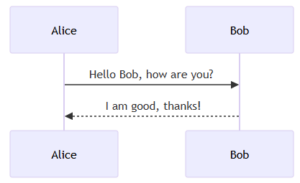
Let's start with the absolute basics: Alice talking to Bob.

Code snippet
sequenceDiagram
    Alice->>Bob: Hello Bob, how are you?
    Bob-->>Alice: I am good, thanks!

The Output: The code above tells Mermaid to draw two participants. The ->> represents a solid arrow (request), and -->> represents a dotted arrow (response).

Defining Participants and Actors

By default, Mermaid creates participants in the order they appear. However, for complex diagrams, you often want to define them explicitly to control the order or use aliases.

  • participant: Renders as a rectangle (default).

  • actor: Renders as a stick figure.

  • as: Allows you to use short aliases in your code.

Code snippet
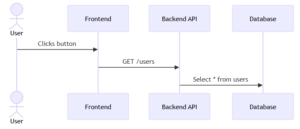
sequenceDiagram
    actor U as User
    participant FE as Frontend
    participant API as Backend API
    participant DB as Database

    U->>FE: Clicks button
    FE->>API: GET /users
    API->>DB: Select * from users

The Output: Notice how we used U, FE, and API in the code, but the diagram renders the full names.

Activations (Lifelines)

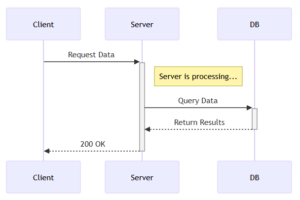
In a real system, a service takes time to process a request. We visualize this using "activation bars" (the vertical rectangles on the lifeline).

  • Long way: activate Alice / deactivate Alice

  • Short way (Recommended): Add + to the end of the arrow to activate, and - to deactivate.

Code snippet
sequenceDiagram
    participant Client
    participant Server
    participant DB

    Client->>+Server: Request Data
    Note right of Server: Server is processing...
    Server->>+DB: Query Data
    DB-->>-Server: Return Results
    Server-->>-Client: 200 OK

The Output: The grey bars indicate that the Server and Database are "busy" processing the request. This is crucial for analyzing performance bottlenecks.

Advanced Logic: Loops and Alternatives

Software isn't linear; it has loops and if/else conditions. Mermaid handles this with loop, alt (alternative), and opt (optional).

The alt Block (If / Else)

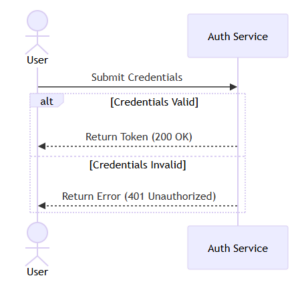
This is used to show mutually exclusive paths, such as a successful login vs. a failed login.

Code snippet
sequenceDiagram
    actor User
    participant Auth as Auth Service
    
    User->>Auth: Submit Credentials

    alt Credentials Valid
        Auth-->>User: Return Token (200 OK)
    else Credentials Invalid
        Auth-->>User: Return Error (401 Unauthorized)
    end

The loop Block

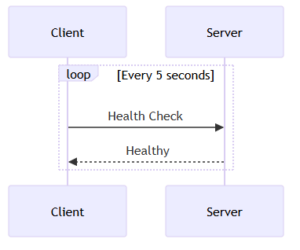
Used for repeated actions, such as polling or retries.

Code snippet
sequenceDiagram
    participant Client
    participant Server

    loop Every 5 seconds
        Client->>Server: Health Check
        Server-->>Client: Healthy
    end

The Output (Complex Logic): Here is a visualization of how these logical blocks appear in a rendered diagram.

Pro Tips for Clean Diagrams

  1. Use Notes: You can add notes to clarify specific steps using Note right of [Actor] or Note over [Actor1],[Actor2].

  2. Keep it Simple: If your sequence diagram is getting too wide or too long, consider breaking it into two separate diagrams.

  3. Use the Live Editor: When learning, use the Mermaid Live Editor. It gives you instant feedback as you type.

Conclusion

Switching to "Diagrams as Code" with Mermaid is a game-changer for developer productivity. It keeps your documentation close to your code, makes updates trivial, and ensures your diagrams always look consistent.

Next time you need to document an API flow, close Visio and open your Markdown editor. Your future self (and your team) will thank you.

Ready to get started?

Contact IVC for a free consultation and discover how we can help your business grow online.

Contact IVC for a Free Consultation

View More
1 2 3 4 5 25