

As developers, we spend the majority of our day inside a web browser. We interact with Jira and CI/CD pipelines. We also use cloud consoles and legacy internal tools. Unfortunately, these interfaces are often not optimized for our specific needs. They require excessive clicking and lack essential shortcuts. Moreover, they often hide data we need to access quickly. Consequently, this is where Tampermonkey for developers becomes an indispensable tool.
Don't wait for a vendor or an internal team to update a UI. Instead, you can take control immediately. Tampermonkey allows you to inject custom JavaScript into any webpage. This effectively turns the "read-only" web into a programmable environment.
Below is how you can use UserScripts to automate tedious tasks. Furthermore, you can supercharge your development workflow.
What is Tampermonkey?
From a technical standpoint, Tampermonkey is a Userscript Manager extension. It is available for all major browsers. For a typical user, it might be used to enable dark mode on sites that do not support it. However, Tampermonkey for developers represents a localized runtime environment.
Specifically, it allows you to manipulate the DOM (Document Object Model) and hook into network requests (XHR/Fetch). Additionally, it lets you store local data across sessions.
1. Automating Form Filling for QA/Testing
For instance, one of the most repetitive tasks during frontend development is filling out forms to test validation logic. Typing "qc.test@company.com" and "password1234" fifty times a day is a waste of cognitive resources.
With a simple script, you can create a hotkey (e.g., Alt + 1). This script detects the current domain (e.g., localhost:3000) and populates all input fields with valid dummy data instantly.
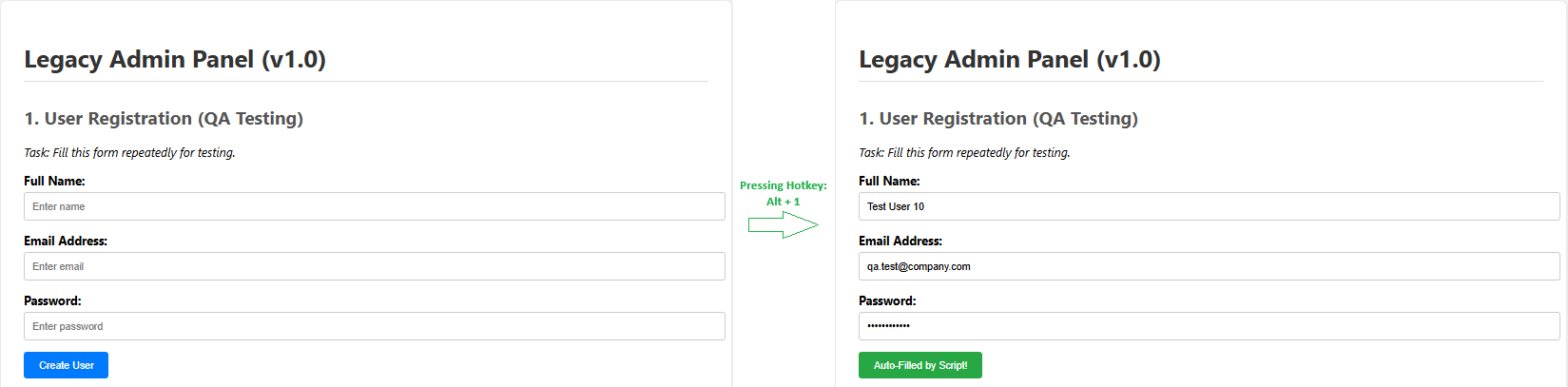
(Fig 1. Using a generic Userscript to auto-populate test data instantly with a keyboard shortcut)
2. Fixing "Bad" Internal Tools
Every company has that one legacy internal admin panel. It is the one built ten years ago that lacks search functionality. Or, it requires five clicks to reach the logs.
Alternatively, instead of refactoring the legacy codebase, you can write a script to:
- Inject a "Search" bar that filters a table using client-side JS.
- Add "Quick Links" to the sidebar for deep navigation.
- Color-code rows based on status (e.g., highlight "Errors" in red) for better visibility.

(Fig 2. Injecting CSS styles to highlight critical errors in a legacy admin panel that lacks visual cues)
3. Extracting Hidden Data (JWT/IDs)
For example, modern single-page applications (SPAs) often store crucial data like JWT tokens or User IDs in localStorage. Sometimes, they use session cookies. During debugging, inspecting the Application tab in DevTools can be slow.
To solve this, you can create an overlay that displays the current environment's Auth Token in a discreet corner of the screen. It also includes a "Click to Copy" function. This reduces the friction of grabbing tokens for Postman or curl requests.
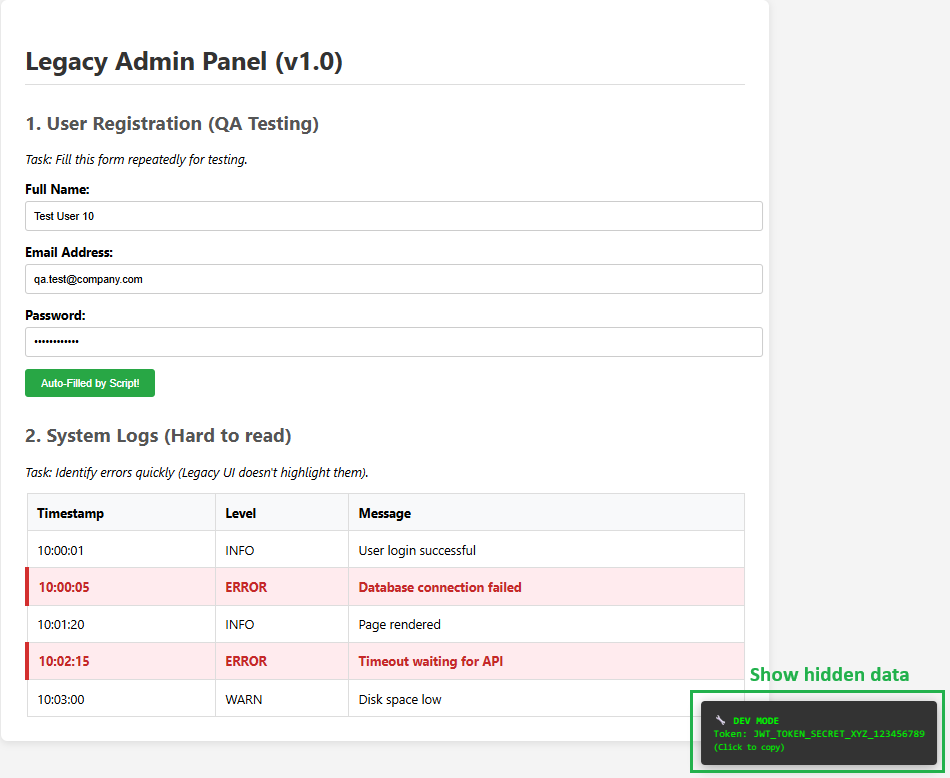
(Fig 3. Exposing hidden session tokens securely on the UI for easier API debugging)
Practical Example: The Localhost Auto-Filler
Below is a basic example of how a developer might use Tampermonkey to speed up local testing.
Disclaimer: Technical review required by a qualified individual before use.
// ==UserScript==
// @name         Supercharge Workflow demo
// @namespace    http://tampermonkey.net/
// @version      1.0
// @description  Demo for Blog: Auto-fill, UI Fix, and Data Extraction
// @author       ISB Vietnam
// @match        http://localhost:3000/*
// @match        file:///*
// @grant        none
// ==/UserScript==

(function() {
    'use strict';

    // --- FEATURE 1: AUTO-FILL FORM (Hotkeys: Alt + 1) ---
    document.addEventListener('keydown', function(e) {
        if (e.altKey && e.key === '1') {
            document.getElementById('fullname').value = "Test User " + Math.floor(Math.random() * 100);
            document.getElementById('email').value = "qa.test@company.com";
            document.getElementById('password').value = "Password1234";

            // Visual feedback for screenshot
            const btn = document.querySelector('button');
            btn.innerText = "Auto-Filled by Script!";
            btn.style.backgroundColor = "#28a745";
        }
    });

    // --- FEATURE 2: FIX BAD UI (Highlight Errors) ---
    // Automatically runs when the page loads.
    const rows = document.querySelectorAll('#log-table tbody tr');
    rows.forEach(row => {
        if (row.innerText.includes('ERROR')) {
            row.style.backgroundColor = '#ffebee';
            row.style.color = '#c62828'; // Dark Red Text
            row.style.fontWeight = 'bold';
            row.style.borderLeft = '5px solid #d32f2f';
        }
    });

    // --- FEATURE 3: EXTRACT HIDDEN TOKEN ---
    // Display the hidden token in the corner of the screen.
    const hiddenToken = document.getElementById('hidden-token-area').innerText.trim();

    const debugBox = document.createElement('div');
    debugBox.style.position = 'fixed';
    debugBox.style.bottom = '20px';
    debugBox.style.right = '20px';
    debugBox.style.padding = '15px';
    debugBox.style.background = '#333';
    debugBox.style.color = '#00ff00';
    debugBox.style.fontFamily = 'monospace';
    debugBox.style.borderRadius = '5px';
    debugBox.style.boxShadow = '0 4px 15px rgba(0,0,0,0.3)';
    debugBox.style.zIndex = '9999';
    debugBox.innerHTML = `🔧 DEV MODE
Token: ${hiddenToken}
(Click to copy)`;

    debugBox.onclick = () => {
        navigator.clipboard.writeText(hiddenToken);
        alert('Token copied to clipboard!');
    };

    document.body.appendChild(debugBox);

})();
4. Bypassing Client-Side Validations
In some cases, during API development, you might need to send "illegal" data to the backend. This helps to test error handling (e.g., sending a string where a number is expected). Yet, frontend validation often blocks this.
Fortunately, a Userscript can remove maxlength, required, or pattern attributes from HTML inputs. This allows you to submit raw data to the server to verify backend resilience.
Security Considerations
Although Tampermonkey for developers is powerful, it carries risks.
- Audit External Scripts: Never install a script from a public repository without reading the source code. Malicious scripts can steal cookies and tokens.
- Scope Your Scripts: Always use the @match header strictly. Do not allow a script meant for localhost to run on your production banking site.
Conclusion
In conclusion, the web browser should not limit your productivity. By leveraging Tampermonkey for developers, you shift from being a passive user to an active architect of your tools. Whether it is automating form entry or enhancing legacy dashboards, Userscripts offer a high-leverage way to optimize your daily tasks.
Are you looking to streamline your team's development processes? Contact ISB Vietnam today to discuss how we can help optimize your engineering workflow. Or click here to explore more ISB Vietnam's case studies.


