

Have you heard about the Year 2038 problem? This time-related issue could affect many computer systems in the future. This is because it causes systems to process dates incorrectly, which can lead to errors, unpredictable behavior, system failures or data loss.
The cause of Y2K and the Year 2038 Problem
More than 20 years ago, there was another time-related computer event that caused widespread concern: the Y2K bug.
The Y2K bug was caused by the way computer systems stored years. They typically stored only the last two digits of a year. Consequently, when the date changed from 31 December 1999 to 1 January 2000, systems interpreted '00' as 1900 rather than 2000.
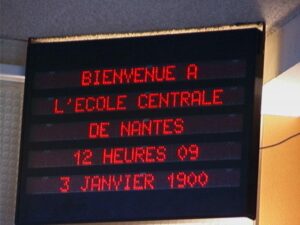
An electronic sign displaying year 1900 instead of 2000 due to a Y2K bug
The Year 2038 problem (Y2K38) is similar to Y2K. It is caused by the way some software systems store the date and time. After 03:14:07 UTC on 19 January 2038, the system time will 'wrap around' to 13 December 1901. This is because the time data type on 32-bit systems is implemented as a 32-bit signed integer.
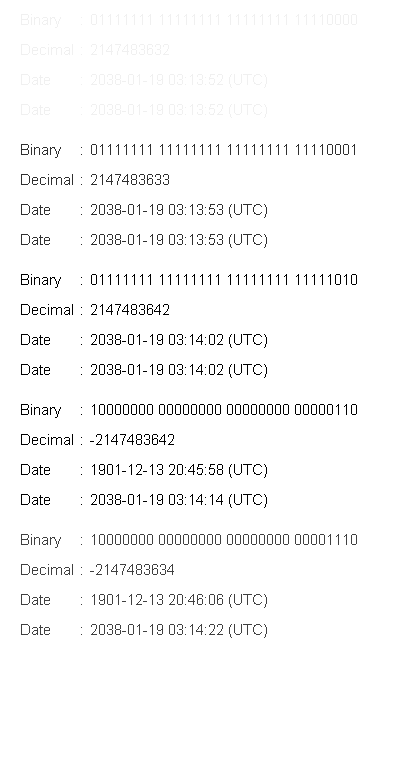
An animated visual of the bug in action
A 32-bit signed integer can store values ranging from -2,147,483,648 to 2,147,483,647. At exactly 03:14:07 UTC on 19 January 2038, the total number of seconds will exceed this maximum value. This causes an 'integer overflow', whereby the value wraps around to its minimum negative number.
Why Y2K38 matters now
Although both problems involve time rolling back to the past, the Y2K issue received widespread global media attention, leading to extensive and proactive fixing efforts. In contrast, the Y2K38 problem is not widely known. This may be because Y2K38 still seems far away and mainly affects systems that store time as a 32-bit signed integer.
However, if you ignore this problem, your system could fail. The cost to fix it then would be extremely high. In today's interconnected ecosystem, a single bug is a major threat. A failure in one piece of software can affect the entire network and cause serious issues.
Therefore, this blog serves as an early warning. It aims to help you review your software and immediately address any potential risks.
Systems Affected by the Y2K38 Bug
The following types of systems can be affected by the Y2K38 error:
- Embedded systems that store time using a 32-bit signed integer.
- Hardware running 32-bit software or operating systems.
- Databases that store time as a 32-bit signed integer.
- Code containing logic that compares dates and times or calculates time intervals.
How to prevent the Y2K38 problem
To prevent the Y2K38 problem in your system, you should take the following actions:
- Audit your entire existing system to identify any components using 32-bit signed time.
- Review all time-related source code and databases.
- Upgrade to a 64-bit system if possible, or update the source code to use a 64-bit format for storing time.
- Even if you are using a 64-bit system, you still need to carefully assess whether any modules or components connect to 32-bit systems.
- Once you have analyzed and made changes, you must perform the necessary tests to check the limits around the minimum and maximum dates.
Example: A simple fix on Unix
To illustrate this, I will introduce a simple method of fixing the Y2K38 bug in source code on a Unix system that uses the glibc library. Applications built with this library use a 32-bit encoded time by default, unless specified otherwise.
First, download and install version Kirkstone of the Yocto Project.
In your configuration file, under the 'target architecture' (MACHINE) section, change it to 'qemuarm' and then build the image.

After starting the QEMU emulator, use the BusyBox 'date' command to set the current date to '2038-01-19 03:14:07'.

Next, try increasing the time by one second to '2038-01-19 03:14:08'.

As you can see, it is not possible to set the date and time after '2038-01-19 03:14:07'.
Now, add the following configuration for the BusyBox package to your config file:

Then run the following commands to rebuild BusyBox:

Restart QEMU and try setting the date and time to after "2038-01-19 03:14:07" again. You will see that the result is now successful.

By changing the flag as shown above, I was able to fix the Y2K38 bug on a hypothetical 32-bit ARM system. You can use this method for your system if you have a similar issue. However, as mentioned earlier, different fixes will be required for each case.
By now, I hope that you now have a clearer understanding of the Y2K38 problem and its impact on software systems. Through careful checking and testing, I believe that potential risks can be resolved properly.
Whether you need scalable software solutions, expert IT outsourcing, or a long-term development partner, ISB Vietnam is here to deliver. Let’s build something great together—reach out to us today. Or click here to explore more ISB Vietnam's case studies.
References
[1]. https://en.wikipedia.org/wiki/Year_2038_problem
[2]. https://theyear2038problem.com
[3]. https://www.tanium.com/blog/2038-bug-survival-guide
External image links
[1]. Feature image designed by Freepik
[2]. An electronic sign displaying year 1900 instead of 2000 due to a Y2K bug




