

In software development, writing unit tests is an effective technique for developers to ensure the quality of their source code. There are many popular testing frameworks, such as Cypress, Vitest, Jest, Mocha, etc. In this article, I will guide you through writing unit tests using Vitest, a modern framework that leverages the speed of Vite.
This guide will walk you through, step-by-step, how to write robust unit tests for quite common scenarios in a modern Vue 3 + TypeScript application: get data from API and fetching data to populate a table. Finally, we'll learn how to measure the effectiveness of our tests using Code Coverage.
Assume that we have a page that displays a list of users when opened. The data is fetched from an API.
During the data fetching process, a loading icon is displayed and is hidden once the data retrieval is complete.
The example source code is as follows:
The content of the component that displays the user list. To keep this article from being too long, you are free to define the CSS yourself.
<template>
<div class="user-table-container"> <h2>User List</h2> <divv-if="loading"class="loading-message"> <div class="spinner"></div> <span>Loading users...</span> </div> <div v-if="error" class="error-message"> <p>Error: {{ error }}</p> <p>Please try again later.</p> </div> <table v-if="users.length > 0" class="user-table"> <thead> <tr> <th>ID</th> <th>Name</th> <th>Email</th> </tr> </thead> <tbody> <tr v-for="user in users" :key="user.id"> <td>{{ user.id }}</td> <td>{{ user.name }}</td> <td>{{ user.email }}</td> </tr> </tbody> </table> <p v-else-if="!loading && !error" class="no-users-message">No users found.</p> </div></template>
<script setup lang="ts">import { fetchUsers, type User } from '@/services/userService';import { ref, onMounted } from 'vue';const users = ref<User[]>([]);const loading = ref(true);const error = ref<string | null>(null);onMounted(async () => { error.value = null; try { users.value = await fetchUsers(); } catch (e: any) { error.value = e.message; } finally { loading.value = false; }});</script>export interface User { id: number; name: string; email: string;}export async function fetchUsers(): Promise<User[]> { if (!response.ok) { throw new Error('Failed to fetch users from JSONPlaceholder'); } return response.json();}Setting up the environment for unit testing
npm install -D vitest @vue/test-utils jsdomimport { defineConfig } from 'vitest/config'import { fileURLToPath, URL } from 'node:url'import vue from "@vitejs/plugin-vue";export default defineConfig({ plugins: [vue()], resolve: { alias: { '@': fileURLToPath(new URL('./src', import.meta.url)) }, }, test: { coverage: { reporter: ['text', 'json', 'html'], }, globals: true, environment: 'jsdom', },})package.json{ "scripts": {......................................................... "test:unit": "vitest", "test:unit:coverage": "vitest run --coverage", "test:unit:ui": "vitest --ui --coverage" }}npm install -D @vitest/uiCreate and implement tests for UserTable.vue and userService.ts.
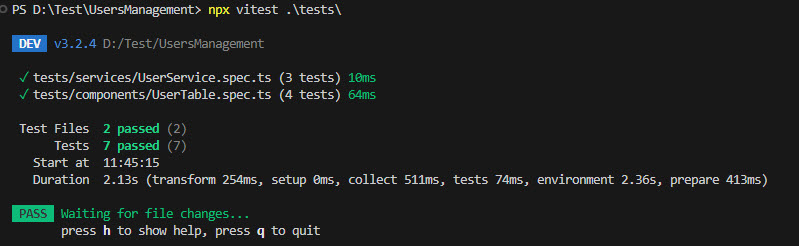
tests folder alongside the src directory that mirrors its structure.import { mount, flushPromises } from '@vue/test-utils';import UserTable from '../../src/components/UserTable.vue';import * as userService from '../../src/services/UserService';import type { User } from '../../src/services/UserService';import { beforeEach, afterEach, describe, expect, it, vi } from 'vitest'; describe('UserTable.vue', () => { // Declare global variables to control the Promise let resolveFetchUsers: (value: User[]) => void; let rejectFetchUsers: (reason?: any) => void; // Configure mock before each test beforeEach(() => { vi.restoreAllMocks(); // Ensure a clean state before each test // Create a pending promise and store its resolve/reject functions. // `fetchUsers` will be mocked to return this promise. const pendingPromise = new Promise<User[]>((resolve, reject) => { resolveFetchUsers = resolve; // Store the resolve function rejectFetchUsers = reject; // Store the reject function }); vi.spyOn(userService, 'fetchUsers').mockImplementation(() => pendingPromise); }); // Test Case 1: Initial loading state it('should display a loading state initially', () => { // Since loading.value is true from the start in the component, // the loading state will appear immediately after mount. const wrapper = mount(UserTable); // Now, the loading state should be present for us to assert expect(wrapper.find('.loading-message').exists()).toBe(true); expect(wrapper.text()).toContain('Loading users...'); // Ensure other sections are not displayed expect(wrapper.find('table').exists()).toBe(false); expect(wrapper.find('.error-message').exists()).toBe(false); }); // Test Case 2: Successful API call and rendering of user data it('should render a table of users on a successful API call', async () => { const mockUsers: User[] = [ { id: 1, name: 'Alice Smith', email: 'alice@example.com' }, { id: 2, name: 'Bob Johnson', email: 'bob@example.com' }, { id: 3, name: 'Charlie Brown', email: 'charlie@example.com' }, ]; const wrapper = mount(UserTable); // Component mounts and fetchUsers starts (pending) // Trigger the Promise to resolve successfully with mock data resolveFetchUsers(mockUsers); // Wait for all Promises to resolve and the component to update the DOM await flushPromises(); // Assert successful outcome expect(wrapper.find('.loading-message').exists()).toBe(false); expect(wrapper.find('.error-message').exists()).toBe(false); const table = wrapper.find('table.user-table'); expect(table.exists()).toBe(true); const rows = wrapper.findAll('tbody tr'); expect(rows).toHaveLength(mockUsers.length); expect(rows[0].text()).toContain('Alice Smith'); expect(rows[0].text()).toContain('alice@example.com'); }); // Test Case 3: Handling API call failure it('should display an error message on a failed API call', async () => { const errorMessage = 'Failed to connect to server'; const wrapper = mount(UserTable); // Component mounts and fetchUsers starts (pending) // Trigger the Promise to be rejected rejectFetchUsers(new Error(errorMessage)); // Wait for the Promise to be rejected and the component to update the DOM await flushPromises(); // Assert error outcome expect(wrapper.find('.loading-message').exists()).toBe(false); expect(wrapper.find('table').exists()).toBe(false); const errorDiv = wrapper.find('.error-message'); expect(errorDiv.exists()).toBe(true); expect(errorDiv.text()).toContain('Error: ' + errorMessage); }); // Test Case 4: Handling an empty array from API it('should display "No users found" if API returns an empty array', async () => { const wrapper = mount(UserTable); // Component mounts and fetchUsers starts (pending) // Trigger the Promise to resolve with an empty array resolveFetchUsers([]); // Wait for the Promise to resolve and the component to update the DOM await flushPromises(); // Assert no user found outcome expect(wrapper.find('.loading-message').exists()).toBe(false); expect(wrapper.find('.error-message').exists()).toBe(false); expect(wrapper.find('table').exists()).toBe(false); expect(wrapper.text()).toContain('No users found.'); expect(wrapper.find('.no-users-message').exists()).toBe(true); }); });import { fetchUsers, type User } from '../../src/services/UserService'; // Adjust path if neededimport { beforeEach, afterEach, describe, expect, it, vi } from 'vitest'; describe('userService', () => { // Variable to store the Spy object for the global fetch function let fetchSpy: vi.SpyInstance; // Runs before each test case beforeEach(() => { // Reset all mocks and spies to ensure each test case is independent vi.restoreAllMocks(); // Create a spy on the global `fetch` function. This allows us to control its behavior. fetchSpy = vi.spyOn(global, 'fetch'); }); // Runs after each test case (vi.restoreAllMocks is already in beforeEach, but can be kept for robustness) afterEach(() => { // Restore the original `fetch` function after the test is done vi.restoreAllMocks(); }); // Test Case 1: Check fetch users successfully it('should fetch users successfully', async () => { // 1. Prepare mock data that `fetchUsers` should return const mockUsers: User[] = [ { id: 1, name: 'Alice Smith', email: 'alice@example.com' }, { id: 2, name: 'Bob Johnson', email: 'bob@example.com' }, ]; // 2. Mock the `fetch` response // `mockResolvedValueOnce` will make this `fetch` call return a successful Promise // with a simulated Response object. fetchSpy.mockResolvedValueOnce({ ok: true, // `response.ok` will be true json: () => Promise.resolve(mockUsers), // The json() function will return the mockUsers data status: 200, statusText: 'OK', } as Response); // Type assertion for Response properties // 3. Call the `fetchUsers` function to be tested const users = await fetchUsers(); // 4. Assertions // Check if `fetch` was called exactly once expect(fetchSpy).toHaveBeenCalledTimes(1); // Check if `fetch` was called with the correct URL expect(fetchSpy).toHaveBeenCalledWith('https://jsonplaceholder.typicode.com/users'); // Check if `fetchUsers`'s return value matches the mock data expect(users).toEqual(mockUsers); }); // Test Case 2: Check throw an error if fetching users fails it('should throw an error if fetching users fails (e.g., HTTP 404/500)', async () => { const errorMessage = 'Failed to fetch users from JSONPlaceholder'; // 1. Mock the `fetch` response to indicate an error (response.ok is false) fetchSpy.mockResolvedValueOnce({ ok: false, // `response.ok` will be false status: 404, statusText: 'Not Found', json: () => Promise.resolve({ message: 'Resource not found' }), // Return JSON for the error } as Response); // 2. Assert that the function throws the expected error await expect(fetchUsers()).rejects.toThrow(errorMessage); // Still check if `fetch` was called expect(fetchSpy).toHaveBeenCalledTimes(1); }); // Test Case 3: Check throw an error if there is a network issue it('should throw an error if there is a network issue (fetch itself fails)', async () => { const networkError = new Error('Network request failed'); // 1. Mock `fetch` to throw an error directly (simulating a network error) fetchSpy.mockRejectedValueOnce(networkError); // 2. Assert that the function throws that network error await expect(fetchUsers()).rejects.toThrow(networkError); // Still check if `fetch` was called expect(fetchSpy).toHaveBeenCalledTimes(1); });});npx vitest .\tests\The test results for the two files are shown in the image below:
Measuring Your Test Coverage
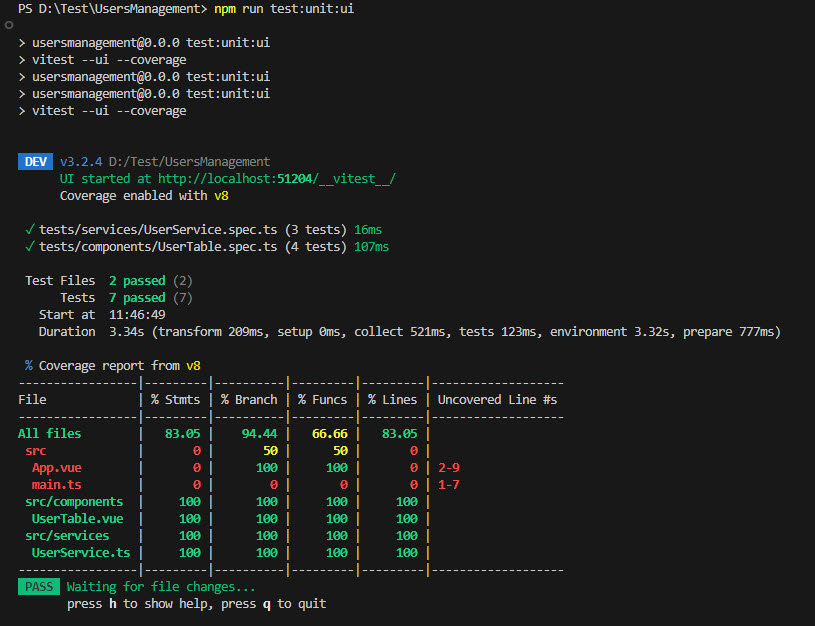
npm run test:unit:uinpx vitest .\tests\The coverage results for the two source files are shown in the image below:
Conclusion
References
Ready to get started?
Contact IVC for a free consultation and discover how we can help your business grow online.
Contact IVC for a Free Consultation


