

I. What is Terraform?
Terraform is an Infrastructure as Code (IaC) tool by HashiCorp that allows you to manage infrastructure (such as virtual machines, networks, databases, etc.) by writing code instead of performing manual operations. You write configuration files—typically in HashiCorp Configuration Language (HCL)—and run Terraform commands to create, modify, or destroy resources across various cloud platforms (like AWS, Azure, GCP).
II. Basic Terraform Workflow.
The core Terraform workflow typically consists of 4 main steps:
1. Write Configuration.
- You create files with the
.tfextension (e.g.,main.tf,variables.tf). - In these files, you declare Providers (service providers, e.g.,
aws,azurerm) and Resources (infrastructure objects, e.g., EC2 instances, VPC networks).
2. Initialization.
- This command is run the first time within a Terraform project directory.
- It downloads the necessary Providers so that Terraform can communicate with your cloud services.
3. Planning.
- This command reads the configuration files (
.tf) and compares the desired state with the actual state of the current infrastructure (which is stored in the State File –terraform.tfstate). - It displays a detailed execution plan showing exactly what will be added, changed, or destroyed.
4. Applying.
- After you review and approve the plan, this command executes the changes on the cloud provider's actual infrastructure.
- It updates the State File to reflect the new state of the infrastructure.
III. Basic Terraform Commands.
| Command | Purpose |
terraform init |
Initialize the working directory, download Providers. |
terraform validate |
Check the syntax of configuration files. |
terraform plan |
Show the plan of changes (what will happen). |
terraform apply |
Execute the plan, create/update resources. |
terraform destroy |
Destroy all resources managed by Terraform. |
terraform fmt |
Reformat configuration files to HCL standards. |
IV. State File.
The State File is a critically important component of Terraform.
- It records the current state of the infrastructure that Terraform has created and is managing.
- It enables Terraform to determine the difference between your configuration (.tf files) and the actual state of resources in the cloud.
- In a team environment, this file is typically stored remotely (e.g., in an S3 Bucket or Terraform Cloud) to avoid conflicts and ensure consistency.
V. Simple Code Example: Creating an EC2 Instance on AWS.
File: main.tf
provider "aws" {
 region = "us-east-1"
}

resource "aws_instance" "hello" {
 ami           = "ami-0fa3fe0fa7920f68e"
 instance_type = "t3.micro"
 tags = {
   Name = "terraform1"
 }
}
- Run the terraform init command to initialize the working directory and download providers.
taipham@Tais terraform % terraform init
Initializing the backend...
Initializing provider plugins...
- Finding latest version of hashicorp/aws...
- Installing hashicorp/aws v6.23.0...
- Installed hashicorp/aws v6.23.0 (signed by HashiCorp)
Terraform has created a lock file .terraform.lock.hcl to record the provider
selections it made above. Include this file in your version control repository
so that Terraform can guarantee to make the same selections by default when
you run "terraform init" in the future.
Terraform has been successfully initialized!
You may now begin working with Terraform. Try running "terraform plan" to see
any changes that are required for your infrastructure. All Terraform commands
should now work.
If you ever set or change modules or backend configuration for Terraform,
rerun this command to reinitialize your working directory. If you forget, other
commands will detect it and remind you to do so if necessary.
- Run the terraform apply -auto-approve command to provision an EC2 instance named 'terraform1'.
taipham@Tais terraform % terraform apply -auto-approve
Terraform used the selected providers to generate the following execution plan. Resource actions are indicated with the following
symbols:
  + create
Terraform will perform the following actions:
  # aws_instance.hello will be created
  + resource "aws_instance" "hello" {
      + ami                                  = "ami-0fa3fe0fa7920f68e"
      + arn                                  = (known after apply)
      + associate_public_ip_address          = (known after apply)
      + availability_zone                    = (known after apply)
      + disable_api_stop                     = (known after apply)
      + disable_api_termination              = (known after apply)
      + ebs_optimized                        = (known after apply)
      + enable_primary_ipv6                  = (known after apply)
      + force_destroy                        = false
      + get_password_data                    = false
      + host_id                              = (known after apply)
      + host_resource_group_arn              = (known after apply)
      + iam_instance_profile                 = (known after apply)
      + id                                   = (known after apply)
      + instance_initiated_shutdown_behavior = (known after apply)
      + instance_lifecycle                   = (known after apply)
      + instance_state                       = (known after apply)
      + instance_type                        = "t3.micro"
      + ipv6_address_count                   = (known after apply)
      + ipv6_addresses                       = (known after apply)
      + key_name                             = (known after apply)
      + monitoring                           = (known after apply)
      + outpost_arn                          = (known after apply)
      + password_data                        = (known after apply)
      + placement_group                      = (known after apply)
      + placement_group_id                   = (known after apply)
      + placement_partition_number           = (known after apply)
      + primary_network_interface_id         = (known after apply)
      + private_dns                          = (known after apply)
      + private_ip                           = (known after apply)
      + public_dns                           = (known after apply)
      + public_ip                            = (known after apply)
      + region                               = "us-east-1"
      + secondary_private_ips                = (known after apply)
      + security_groups                      = (known after apply)
      + source_dest_check                    = true
      + spot_instance_request_id             = (known after apply)
      + subnet_id                            = (known after apply)
      + tags                                 = {
          + "Name" = "terraform1"
        }
      + tags_all                             = {
          + "Name" = "terraform1"
        }
      + tenancy                              = (known after apply)
      + user_data_base64                     = (known after apply)
      + user_data_replace_on_change          = false
      + vpc_security_group_ids               = (known after apply)
      + capacity_reservation_specification (known after apply)
      + cpu_options (known after apply)
      + ebs_block_device (known after apply)
      + enclave_options (known after apply)
      + ephemeral_block_device (known after apply)
      + instance_market_options (known after apply)
      + maintenance_options (known after apply)
      + metadata_options (known after apply)
      + network_interface (known after apply)
      + primary_network_interface (known after apply)
      + private_dns_name_options (known after apply)
      + root_block_device (known after apply)
    }
Plan: 1 to add, 0 to change, 0 to destroy.
aws_instance.hello: Creating...
aws_instance.hello: Still creating... [00m10s elapsed]
aws_instance.hello: Creation complete after 18s [id=i-09233298b048820fa]
Apply complete! Resources: 1 added, 0 changed, 0 destroyed.
taipham@Tais terraform %
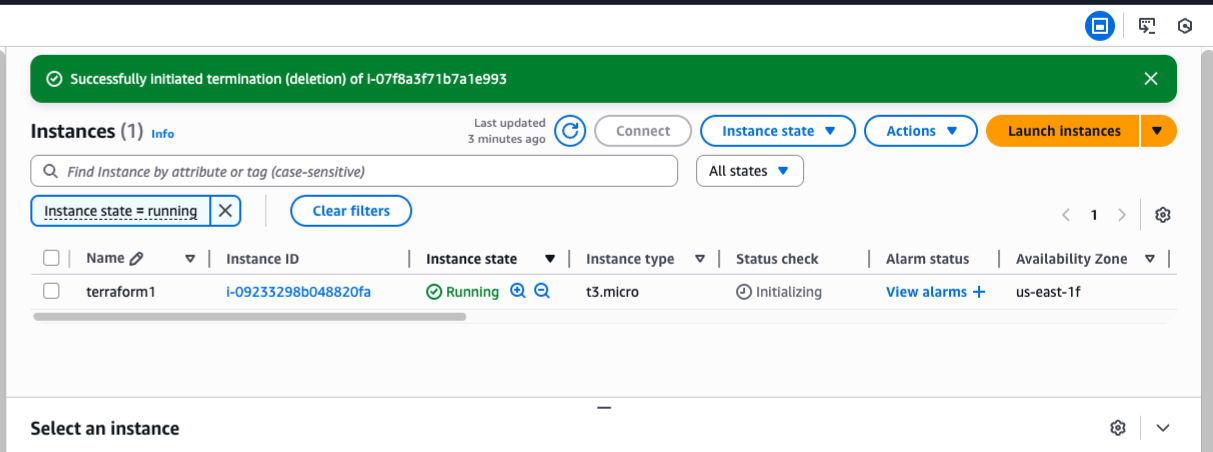
- Verify on AWS that an instance named 'terraform1' has been successfully launched.
- Delete the resources using the terraform destroy command.
taipham@Tais-MacBook-Pro terraform % terraform destroy
aws_instance.hello: Refreshing state... [id=i-09233298b048820fa]
Terraform used the selected providers to generate the following execution plan. Resource actions are indicated with the following
symbols:
  - destroy
Terraform will perform the following actions:
  # aws_instance.hello will be destroyed
  - resource "aws_instance" "hello" {
      - ami                                  = "ami-0fa3fe0fa7920f68e" -> null
      - arn                                  = "arn:aws:ec2:us-east-1:075134876480:instance/i-09233298b048820fa" -> null
      - associate_public_ip_address          = true -> null
      - availability_zone                    = "us-east-1f" -> null
      - disable_api_stop                     = false -> null
      - disable_api_termination              = false -> null
      - ebs_optimized                        = false -> null
      - force_destroy                        = false -> null
      - get_password_data                    = false -> null
      - hibernation                          = false -> null
      - id                                   = "i-09233298b048820fa" -> null
      - instance_initiated_shutdown_behavior = "stop" -> null
      - instance_state                       = "running" -> null
      - instance_type                        = "t3.micro" -> null
      - ipv6_address_count                   = 0 -> null
      - ipv6_addresses                       = [] -> null
      - monitoring                           = false -> null
      - placement_partition_number           = 0 -> null
      - primary_network_interface_id         = "eni-0a9eef084942a77ad" -> null
      - private_dns                          = "ip-172-31-64-53.ec2.internal" -> null
      - private_ip                           = "172.31.64.53" -> null
      - public_dns                           = "ec2-13-220-15-145.compute-1.amazonaws.com" -> null
      - public_ip                            = "13.220.15.145" -> null
      - region                               = "us-east-1" -> null
      - secondary_private_ips                = [] -> null
      - security_groups                      = [
          - "default",
        ] -> null
      - source_dest_check                    = true -> null
      - subnet_id                            = "subnet-0cc7a1fa7009a4c48" -> null
      - tags                                 = {
          - "Name" = "terraform1"
        } -> null
      - tags_all                             = {
          - "Name" = "terraform1"
        } -> null
      - tenancy                              = "default" -> null
      - user_data_replace_on_change          = false -> null
      - vpc_security_group_ids               = [
          - "sg-067709313e763db77",
        ] -> null
        # (9 unchanged attributes hidden)
      - capacity_reservation_specification {
          - capacity_reservation_preference = "open" -> null
        }
      - cpu_options {
          - core_count       = 1 -> null
          - threads_per_core = 2 -> null
            # (1 unchanged attribute hidden)
        }
      - credit_specification {
          - cpu_credits = "unlimited" -> null
        }
      - enclave_options {
          - enabled = false -> null
        }
      - maintenance_options {
          - auto_recovery = "default" -> null
        }
      - metadata_options {
          - http_endpoint               = "enabled" -> null
          - http_protocol_ipv6          = "disabled" -> null
          - http_put_response_hop_limit = 2 -> null
          - http_tokens                 = "required" -> null
          - instance_metadata_tags      = "disabled" -> null
        }
      - primary_network_interface {
          - delete_on_termination = true -> null
          - network_interface_id  = "eni-0a9eef084942a77ad" -> null
        }
      - private_dns_name_options {
          - enable_resource_name_dns_a_record    = false -> null
          - enable_resource_name_dns_aaaa_record = false -> null
          - hostname_type                        = "ip-name" -> null
        }
      - root_block_device {
          - delete_on_termination = true -> null
          - device_name           = "/dev/xvda" -> null
          - encrypted             = false -> null
          - iops                  = 3000 -> null
          - tags                  = {} -> null
          - tags_all              = {} -> null
          - throughput            = 125 -> null
          - volume_id             = "vol-0cf12ff2a72cff8c0" -> null
          - volume_size           = 8 -> null
          - volume_type           = "gp3" -> null
            # (1 unchanged attribute hidden)
        }
    }
Plan: 0 to add, 0 to change, 1 to destroy.
Do you really want to destroy all resources?
  Terraform will destroy all your managed infrastructure, as shown above.
  There is no undo. Only 'yes' will be accepted to confirm.
  Enter a value: yes
aws_instance.hello: Destroying... [id=i-09233298b048820fa]
aws_instance.hello: Still destroying... [id=i-09233298b048820fa, 00m10s elapsed]
aws_instance.hello: Still destroying... [id=i-09233298b048820fa, 00m20s elapsed]
aws_instance.hello: Still destroying... [id=i-09233298b048820fa, 00m30s elapsed]
aws_instance.hello: Destruction complete after 32s
Destroy complete! Resources: 1 destroyed.
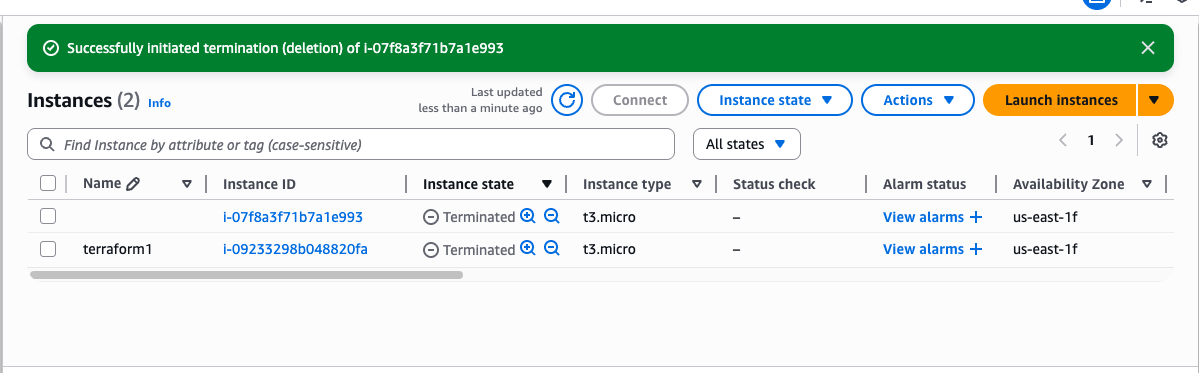
- The instance named 'terraform1' has been terminated.
Conclusion
In summary, Terraform is a powerful Infrastructure as Code (IaC) tool by HashiCorp that enables users to manage multi-cloud infrastructure (such as AWS, Azure, and GCP) through declarative HCL code rather than manual operations. Its core workflow revolves around four main steps: Writing Configuration, Initialization (terraform init), Planning (terraform plan), and Applying (terraform apply).
A critical component of this process is the State File, which records the current status of the infrastructure to track differences between the code and the actual environment, ensuring consistency especially in team settings. As demonstrated in the practical AWS example, Terraform allows for the complete lifecycle management of resources—from provisioning an EC2 instance with terraform apply to removing it with terraform destroy—ensuring automation and precision.
Whether you need scalable software solutions, expert IT outsourcing, or a long-term development partner, ISB Vietnam is here to deliver. Let’s build something great together—reach out to us today. Or click here to explore more ISB Vietnam's case studies.
[References]
https://developer.hashicorp.com/terraform
https://www.sudeepa.com/?p=382 [Image link]


