

What Exactly Are Windows Messages?
Windows messages are integral to the Windows OS’s event-driven design. The OS communicates with your application by sending messages to your windows. These messages notify your app about everything from user actions (mouse, keyboard, etc) to system events (resize, paint, close, etc).
Messages are identified by constants like WM_PAINT, WM_KEYDOWN, WM_CLOSE, etc. Each message can carry additional information packed inside two parameters: wParam and lParam.
How Messages Are Delivered?
When a user interacts with a window, Windows puts corresponding messages in the message queue for your app's thread. The system only creates a message queue for threads that perform operations needing one, such as creating windows.
A thread must create at least one window before starting its message loop, which retrieves and dispatches messages to window procedures. Most applications use a single thread that registers a window class, creates and displays the main window, and then runs the message loop — typically in the WinMain function. The message loop usually uses GetMessage, TranslateMessage, and DispatchMessage to process input and deliver messages to the proper windows.
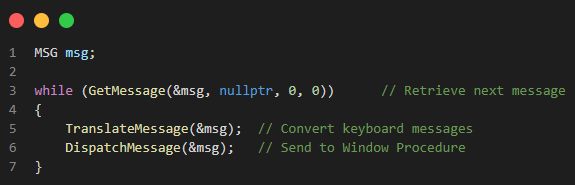
- GetMessage waits until a message arrives.
- TranslateMessage helps convert raw keyboard input into character messages.
- DispatchMessage sends the message to your WndProc.
When GetMessage returns 0, it means your app received a WM_QUIT message — time to exit.
The Window Procedure: Message Handling Core
Once a message is dispatched, it’s handled by a Window Procedure, typically called WndProc. This is a callback function where you handle all kinds of messages.
A typical WndProc looks like this:
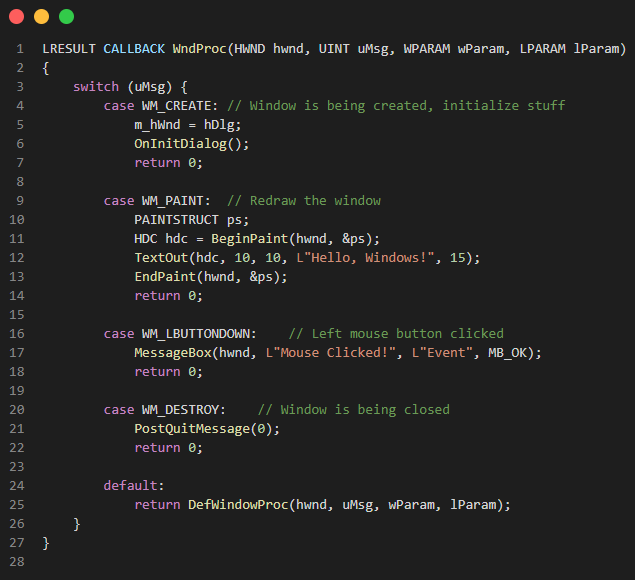
- WM_CREATE: Sent when the window is being created and initializes stuff.
- WM_PAINT: Sent when part of the window needs to be redrawn.
- WM_DESTROY: Sent when the window is being closed. You respond by posting a
WM_QUITmessage to break the message loop. - WM_LBUTTONDOWN: Sent when the user clicks the left mouse button.
-
If your
WndProcdoesn’t explicitly handle a message, calling DefWindowProc ensures that Windows performs the default processing — like moving, resizing, or closing the window. Skipping this can cause unexpected behavior.
Understanding wParam and lParam
These parameters are message-dependent and often require macros or bitwise operations to extract meaningful data.
For example:
- WM_MOUSEMOVE: lParam packs mouse coordinates
int x = GET_X_LPARAM(lParam);
int y = GET_Y_LPARAM(lParam);
Handling Custom Messages
In event-driven programming, the flow of a program is determined by events — user actions, system triggers, or messages passed between components. While frameworks provide predefined messages and events, sometimes you need something more specific: Custom Messages.
How to define a Custom Message?
In native Windows C++, you can define your own message using an offset from WM_USER or WM_APP:
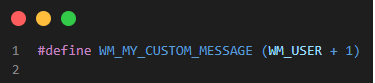
You then handle it in your window procedure (WndProc):
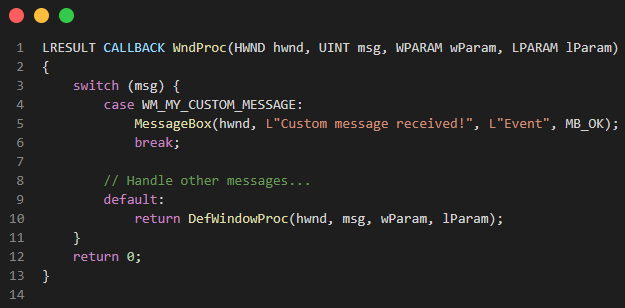
And to send it:
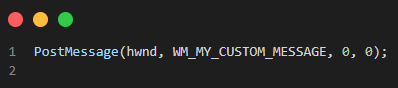
The PostMessage call queues the message asynchronously, allowing your main thread to continue processing other events.
Conclusion
Understanding the Windows message loop and event handling model is foundational for any Win32 GUI application. While it might feel low-level compared to modern frameworks, it offers fine-grained control and insight into how operating systems interact with software.
If you're building desktop apps on Windows, mastering this will make you a more capable and versatile developer.
Ready to get started?
Contact IVC for a free consultation and discover how we can help your business grow online.
Contact IVC for a Free ConsultationReference:
https://learn.microsoft.com/en-us/windows/win32/winmsg/messages-and-message-queues
https://learn.microsoft.com/en-us/windows/win32/winmsg/using-messages-and-message-queues


