...

What We Think

Blog

Keep up with the latest in technological advancements and business strategies, with thought leadership articles contributed by our staff.
OUTSOURCING

June 4, 2026

What Is Adaptive Software Development (ASD)? A Practical Guide for Modern Engineering Teams

Deadlines shift. Requirements change. Markets move faster than roadmaps.

For engineering teams working in complex, unpredictable environments, traditional plan-driven development often creates more friction than it solves. That's where Adaptive Software Development (ASD) comes in.

Introduced by Jim Highsmith and Sam Bayer in the mid-1990s, ASD was built on a simple premise: embrace change, don't fight it. Instead of locking in requirements upfront, ASD teams operate in short cycles of speculation, collaboration, and learning. They continuously adapt based on real feedback.

In this guide, we break down what ASD is, how it works, how it compares to Agile and Waterfall, and how modern engineering teams, including distributed and offshore teams, are applying it in practice.

What Is Adaptive Software Development (ASD)?

what is adaptive software development

Adaptive Software Development (ASD) is an iterative software development methodology in which teams work in repeating cycles of Speculate, Collaborate, and Learn to build complex systems while continuously responding to change. It was introduced by Jim Highsmith and Sam Bayer and helped shape the principles later formalized in the Agile Manifesto.

Unlike methodologies that attempt to eliminate uncertainty, ASD treats uncertainty as a given, and designs the process around it.

The ASD Market: Why This Methodology Is Growing

what is adaptive software development

Adaptive Software Development is gaining momentum as both engineering practices and the market itself demand more flexibility.

According to Gartner, the custom software development services market is growing at a compound annual growth rate of 8.9% and is expected to exceed $283 billion by 2028. This trend suggests that demand for software continues to expand, along with the complexity of building it.

As the market grows, so does the pressure on engineering teams. Products evolve mid-cycle, customer expectations shift, and new technologies continuously reshape development. In this context, rigid, plan-driven models can struggle to keep up, which is where ASD becomes increasingly relevant.

Insights from Forrester's The State Of Agile Development, 2025 also point in a similar direction. 95% of professionals say Agile remains critical to their operations, and 58% of business and technology leaders are prioritizing it in 2025. In addition, 61% of organizations have been using Agile for more than five years. This suggests that iterative and adaptive ways of working are now widely established.

At the same time, there appears to be a shift in focus. As Agile matures, teams are placing more emphasis on adaptability itself rather than strictly following predefined frameworks. ASD builds on this foundation by treating change and uncertainty as core conditions to design for.

What's driving adoption?

Three key factors are accelerating ASD adoption:

  • The rise of distributed teams. As organizations become more global, coordination can no longer rely on rigid processes or constant real-time communication. Flexible frameworks help teams stay aligned while working asynchronously.
  • The acceleration of product cycles. Teams are expected to release, test, and iterate much faster than before. Requirements often change during development, and methodologies that assume stability can struggle in this environment. ASD is designed to absorb and respond to that kind of change.
  • The growth of offshore development. Working across regions introduces challenges in communication and alignment, and overly prescriptive processes tend to break down. ASD provides a balance by offering enough structure to maintain alignment while remaining flexible enough for distributed collaboration.

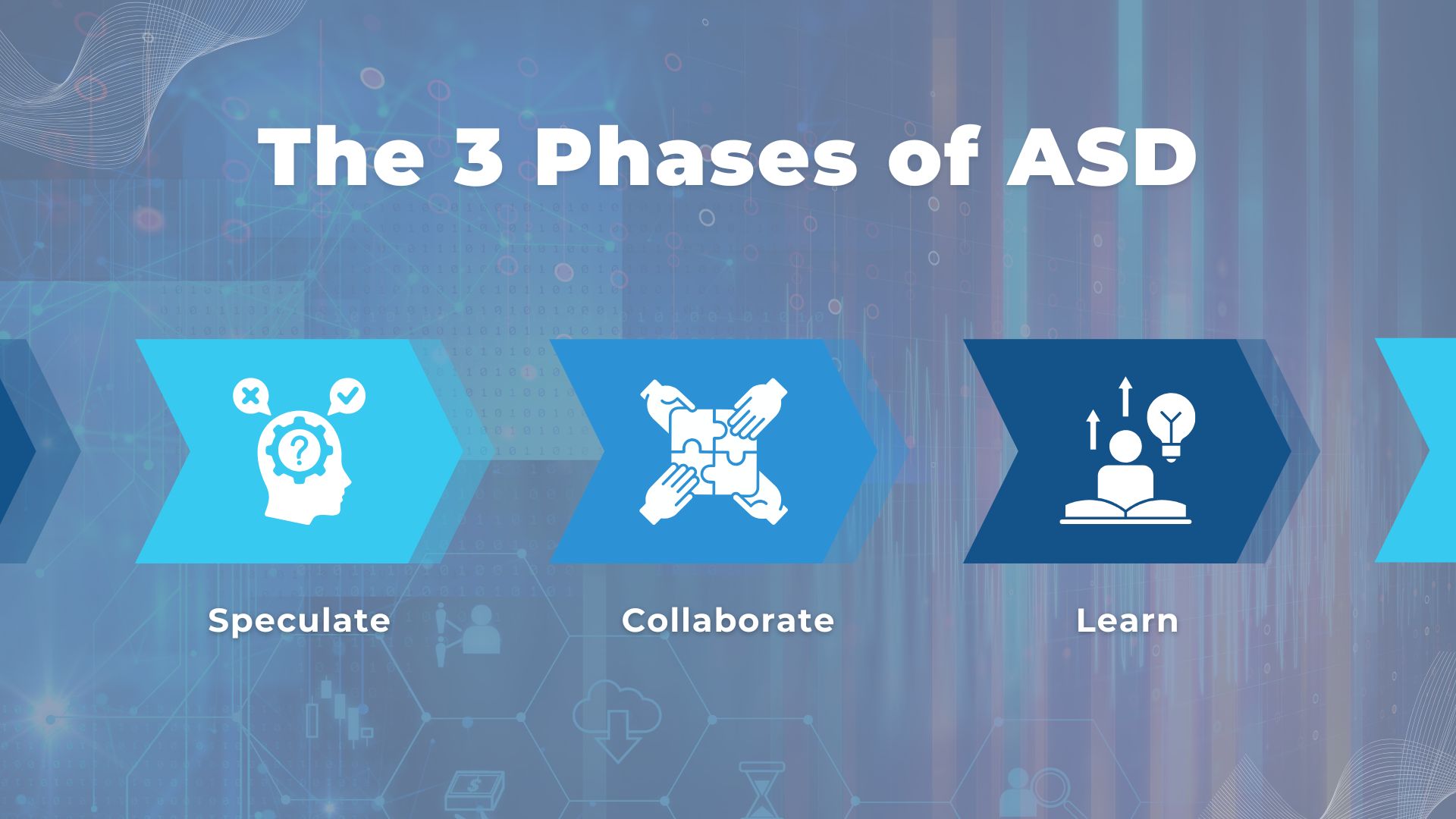
The 3 Phases of ASD
what is adaptive software development

Adaptive Software Development is built around a simple but powerful cycle of Speculate, Collaborate, and Learn. Instead of following a fixed sequence, teams repeat these three phases continuously, using each iteration to refine both the product and the process based on real-world feedback.

Phase 1: Speculate

In ASD, planning starts with speculation rather than prediction. Teams define a clear direction and set of goals, but they avoid locking themselves into detailed, long-term plans that assume certainty. Instead, they identify key assumptions, risks, and unknowns, then create a flexible roadmap that can evolve as new information emerges. This approach allows teams to move forward with intent while staying open to change, which is critical in fast-moving or unclear environments.

Phase 2: Collaborate

Collaboration is where execution happens, and in ASD it is treated as a core capability rather than a supporting activity. Cross-functional teams work closely together, sharing context, solving problems in real time, and maintaining continuous communication with stakeholders. The focus is on collective ownership, not isolated roles, which helps reduce misalignment and accelerates decision-making. This becomes especially important in distributed or offshore setups, where strong collaboration practices are the difference between progress and friction.

Phase 3: Learn

Every iteration ends with deliberate learning. Teams gather feedback from users, stakeholders, and internal reviews, then use those insights to refine both the product and the way they work. This phase is not just about identifying what went wrong, but also about reinforcing what worked and why. Over time, this continuous learning loop helps teams make better decisions, reduce risk, and adapt more effectively to changing conditions.

ASD vs. Agile vs. Waterfall: Key Differences

what is adaptive software development

Each methodology approaches planning, change, and execution differently. Understanding these differences helps you choose the right model based on your project's level of uncertainty, speed requirements, and team structure.

Aspect ASD Agile Waterfall
Core Approach Fully adaptive and change-driven Iterative with structured cycles Linear and plan-driven
Planning Style High-level, speculative planning Sprint-based planning Detailed upfront planning
Handling Change Change is expected and embraced continuously Managed within sprint boundaries Difficult and costly to implement
Development Cycle Continuous phases (speculate, collaborate, learn) Time-boxed iterations (sprints) Sequential phases (design, build, test)
Collaboration Deep, ongoing collaboration across all roles Strong within teams, structured ceremonies Limited, often siloed by phase
Feedback Timing Continuous and integrated into each cycle Regular, typically at sprint reviews Late-stage, often after development
Risk Management Addressed early and revisited continuously Managed per iteration Identified early but often revisited late
Best Fit Complex, uncertain, fast-changing projects Product-focused teams needing flexibility Stable, predictable projects with fixed scope

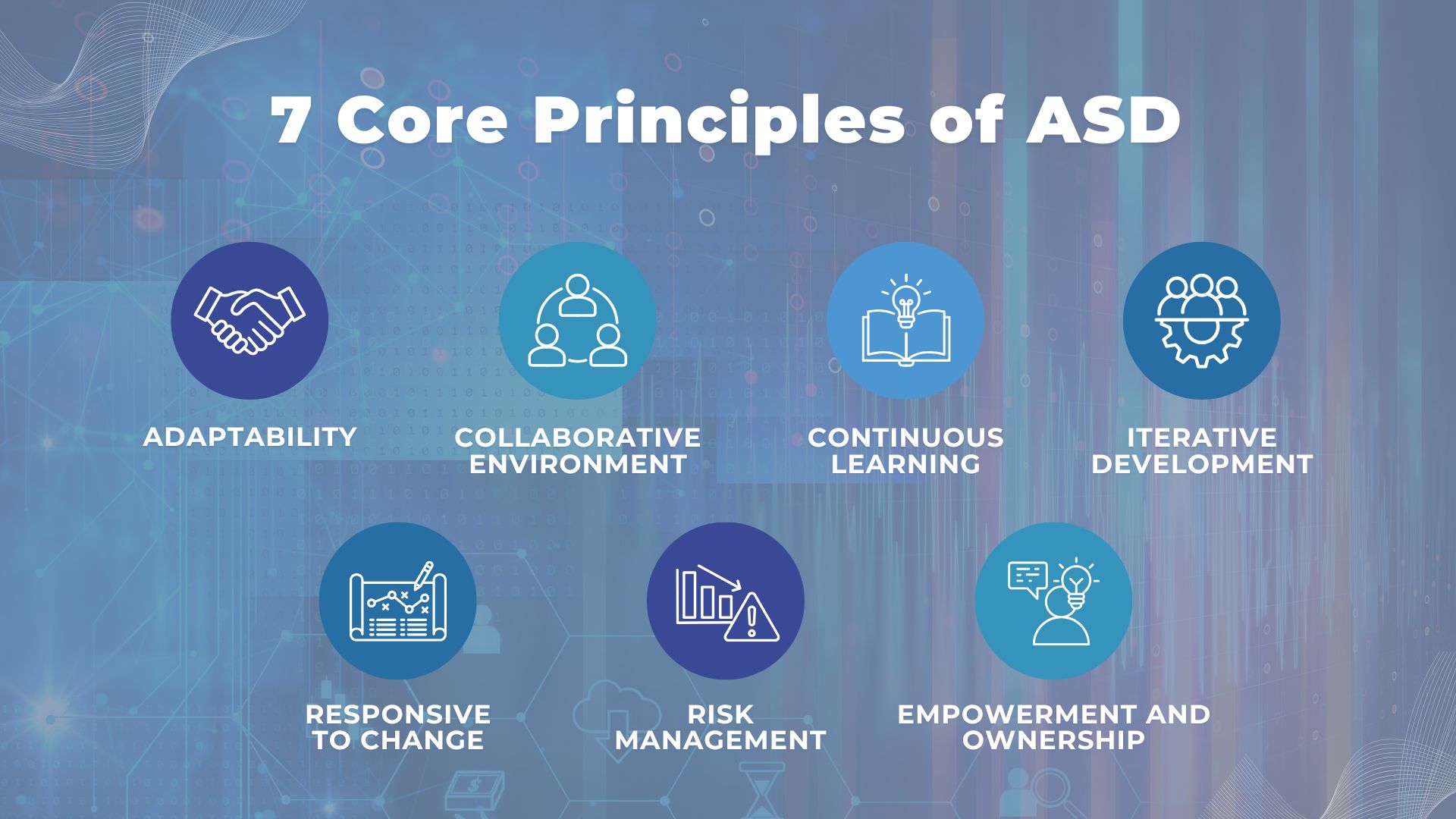
7 Core Principles of Adaptive Software Development
what is adaptive software development

Adaptive Software Development is built on a set of principles that prioritize flexibility, collaboration, and continuous improvement in fast-changing environments.

  • 1. Adaptability
    ASD emphasizes adaptive, high-level planning over rigid, detailed roadmaps. Teams focus on direction rather than fixed outcomes, allowing them to adjust quickly as requirements or market conditions evolve.
  • 2. Collaborative Environment
    Open communication and strong teamwork are central to ASD. Teams are encouraged to share ideas, align frequently, and build a culture where collaboration drives better outcomes.
  • 3. Continuous Learning
    Each iteration is an opportunity to learn. Feedback from users, stakeholders, and internal reviews is continuously incorporated to improve both the product and the development process.
  • 4. Iterative Development
    Development is broken into small, manageable increments. Each cycle delivers working software, making it easier to validate progress and adapt without large-scale disruption.
  • 5. Responsive to Change
    ASD is designed to handle change at any stage. Teams are structured to respond quickly to new requirements, technologies, or market shifts without slowing down delivery.
  • 6. Risk Management
    Risks are identified early and addressed continuously. Instead of avoiding uncertainty, teams actively manage it as part of the development process.
  • 7. Empowerment and Ownership
    Teams are trusted to make decisions and take responsibility for outcomes. This sense of ownership improves accountability, speed, and overall execution quality.

When Should You Use ASD?

what is adaptive software development

ASD is a powerful methodology, but it works best in environments where change is constant and feedback can be acted on quickly. The key is knowing whether your project actually needs that level of flexibility.

The Best Use Cases for ASD

ASD is well suited for projects where requirements evolve over time, such as startups or new product development. It works best when teams can operate autonomously and make decisions without heavy approval layers. Active stakeholder involvement is also important, since continuous feedback drives progress. ASD is a strong fit for complex systems that need to be built incrementally, and for offshore or distributed teams that require a flexible way to stay aligned across locations.

When ASD Is Not the Right Choice

ASD is less effective when requirements are fixed from the start, such as in regulated or compliance-heavy projects. It also breaks down when stakeholders cannot provide ongoing feedback. Teams that are new to adaptive ways of working may struggle without proper support. For small, stable projects with minimal change, a simpler approach is often more efficient.

ASD and Offshore Teams: What to Look For

Using ASD with offshore teams requires more than adopting a framework. Strong communication habits are essential to keep everyone aligned across time zones. Teams need engineers who can work independently and take ownership, along with a culture of transparency where issues are surfaced early.

This is where many offshore partnerships fail. The challenge is not skill, but execution and alignment.

If you are evaluating an offshore partner, focus on whether they can operate in an adaptive, feedback-driven model in a distributed environment.

At ISB Vietnam (IVC), this is where the difference becomes clear. By combining ASD with Japanese-quality disciplined communication practices, teams stay aligned without losing flexibility. More importantly, the focus is not just on delivering a single project, but on building a process that continuously improves over time.

If you are looking for a long-term offshore partner that can evolve with your product, not just execute tasks, contact IVC to explore how we can support your next phase of growth.

Contact IVC Today

How ASD Works in Offshore Development Teams

what is adaptive software development

Applying ASD in offshore environments is not just about adopting a methodology. It requires aligning process, communication, and team structure to handle distance, time zones, and evolving requirements.

Why ASD suits offshore partnerships

Offshore development introduces natural complexity. Time zone gaps, communication delays, and cultural differences can quickly create misalignment. ASD helps reduce this risk by working in short cycles, emphasizing continuous feedback, and encouraging close collaboration. Instead of relying on fixed plans, teams adjust frequently, which makes it easier to stay aligned even when conditions change.

How IVC applies ASD principles in client projects

At ISB Vietnam (IVC), ASD is applied with a focus on execution discipline. "Speculate" is guided by real business context rather than assumptions. "Collaborate" is supported by structured communication practices, ensuring transparency across teams. "Learn" is treated as an operational process, where insights from each cycle are documented and reflected in both product and workflow improvements. This approach allows projects to stay flexible without losing control.

Communication cadence for distributed ASD teams

For ASD to work in distributed teams, communication needs to be intentional:

  • Daily asynchronous updates help maintain visibility without slowing teams down.
  • Weekly syncs are used for decision-making rather than status reporting.
  • Iteration reviews provide real stakeholder feedback.
  • Retrospectives are used to improve how the team works. This cadence creates alignment without relying on constant real-time interaction.

ASD and Japanese Quality Standards: A Natural Fit

what is adaptive software development

In the unpredictable world of R&D, rigid plans are the enemy of innovation. At IVC, we navigate the "unknowns" of our clients' most ambitious projects by combining the rapid flexibility of Adaptive Software Development (ASD) with the uncompromising discipline of Japanese Quality Management. Here's how this unique synergy transforms shifting requirements into high-quality results.

The "Soul" of the Sprint: Why ASD and Japanese Quality are a Perfect Match

When a client approaches us with an R&D project, the requirements are rarely set in stone. In our AI-powered VR Chat tool project, the goals shifted every time the client saw a new prototype.

While others might struggle with "scope creep", we use it as fuel. We've found a natural harmony between the three phases of ASD and the foundational principles of Japanese Quality Management. In our workflow, Japanese values aren't just cultural additions, they are the "engine" driving each phase.

Speculate: Staying Agile Through Shifting Requirements

In the Speculate phase, we don't lock ourselves into a rigid, year-long plan. Because the client's priorities changed weekly, we updated our roadmap every cycle. This allowed us to treat the client's evolving vision as a strength rather than a distraction, ensuring the project always moved toward their latest goal.

Collaborate: Horenso as the Communication Engine

In a fast-paced AI project, doing is not enough. We have to communicate. This is where Horenso (Report, Update, Consult) becomes vital during the Collaborate phase.

Strategic Soudan (Consultation):

During this project, we were under immense pressure to deliver measurable results in only one month. When the AI analyzed meeting notes and suggested a massive wish list of features, the easiest path would have been to try and build them all poorly.

The "One-Month Quality" Logic:

Instead, we used Soudan to advise the client to focus on just two core features. Why? Because in a high-speed R&D environment, it is better to have two features that are fully functional, tested, and integrated than ten features that crash. This narrow focus allowed us to run the entire flow from AI coding to rigorous manual testing, maintaining Japanese quality standards even under a tight deadline.

Learn: Kaizen as a Feedback Engine

The Learn phase aligns closely with Kaizen (continuous improvement). We review not only what was built, but how it was built.

When issues occurred, such as logic errors from AI outputs, we addressed root causes by refining prompts rather than applying temporary fixes. We also measured AI productivity against human benchmarks to identify inefficiencies. These insights were fed into the next cycle, improving both speed and reliability over time.

The IVC Advantage

For our clients, this means an R&D project doesn't just adapt to their changing ideas. It gets smarter and more reliable with every iteration. We don't just build software. We refine a living process through the PDCA (Plan-Do-Check-Act) cycle.

ASD's Speculate-Collaborate-Learn framework gives us the flexibility to pivot, but Japanese Horenso and Kaizen give us the engine to deliver excellence. That is the IVC promise.

FAQ: Adaptive Software Development

what is adaptive software development

Below are answers to questions we hear most often from CTOs and engineering leads evaluating adaptive methodologies for their offshore projects.

Q: What is the difference between ASD and Agile?

ASD is closely related to Agile but places a stronger emphasis on continuous adaptation in uncertain environments. While Agile typically organizes work into structured sprints, ASD focuses on an ongoing cycle of Speculate, Collaborate, and Learn, allowing teams to adjust more fluidly as conditions change.

Q: What are the three phases of Adaptive Software Development?

The three phases are Speculate, Collaborate, and Learn. Teams first set direction and assumptions, then execute through close collaboration, and finally gather feedback to refine both the product and the process.

Q: Is Adaptive Software Development suitable for offshore teams?

Yes, ASD can work very well with offshore teams when supported by strong communication practices, clear ownership, and continuous feedback loops. It is particularly effective in distributed environments where flexibility and alignment are both required.

Q: Who created Adaptive Software Development?

ASD was introduced by Jim Highsmith and Sam Bayer in the 1990s.

Q: What types of projects benefit most from ASD?

ASD is best suited for projects with high uncertainty, evolving requirements, and complex systems. It is commonly used in startup environments, new product development, and situations where continuous stakeholder feedback is available.

Conclusion

what is adaptive software development

Adaptive Software Development (ASD) gives modern engineering teams a practical way to operate in uncertainty. Instead of trying to predict everything upfront, ASD allows teams to move forward with direction, adapt through collaboration, and improve continuously through learning. This makes it especially valuable for fast-moving products, evolving requirements, and distributed development environments.

For CTOs and engineering leaders, the takeaway is straightforward. The challenge is no longer choosing between speed and quality. The real challenge is building a system that can deliver both, even as conditions change.

If you are scaling your product and considering offshore development, the methodology alone is not enough. Execution, communication, and long-term alignment are what make the difference.

Contact IVC to see how we apply ASD in real-world offshore projects and build partnerships that evolve with your business.

Contact IVC Today

Sources / References

Data and insights in this article are based on the following sources:

External Image Links

  • All images featured in this article are provided by Unsplash, a platform for freely usable images.
  • The diagrams used in this article were created using Canva.
View More
TECH

May 29, 2026

My First Steps from Manual to Automation QC

After more than 1.5 years working in Manual Testing, I realized that for large-scale systems with long-term development cycles, Regression Testing is a major bottleneck. Manually re-executing test cases is not only repetitive and time-consuming but also highly prone to human error. That is when I knew Automation Testing was the inevitable next step.

If you are also starting as a Manual QC like me, don't worry—it is actually a huge advantage. Here is my journey and some tips from when I first started learning Automation with Playwright using Python.

1. What to Prepare Before Starting

Test Case Writing Skills (The Foundation)

This is an essential skill that every QC needs, whether you do manual or automation testing.

  • Proactiveness: If you write your own Test Cases, you will have a better grasp of the requirements (specs). When converting them into scripts, you might discover inconsistencies or gaps in the test cases, allowing you to optimize and update them quickly. If you rely solely on existing Test Cases to write scripts, you might spend too much time trying to understand them. Also, you can't be sure if those Test Cases are still accurate according to the design specs. This makes your scripting process quite passive.
  • Know what to automate: Not everything should be automated. Deep business understanding helps in deciding which cases to automate (high repetition, stable) and which to test manually (frequent UI changes, overly complex logic). This saves a lot of wasted effort.

Basic Knowledge

  • Programming Language: You don't need to be an expert developer. Start with the core concepts: variables, data types, operators, loops, conditional statements (if/else), and functions. Additionally, grasping basic Object-Oriented Programming (OOP) concepts (like Classes and Objects) is highly recommended. Having basic knowledge of a programming language will make the learning curve smoother when approaching a new test scripting language. You can start with Python because its syntax is very close to natural language, making it extremely easy for beginners to learn.
  • Web Knowledge: Explore the HTML/DOM structure and various element attributes to craft effective locators (such as CSS Selectors and XPath). Master the use of browser DevTools (F12) to inspect elements, debug, and monitor Network requests. Additionally, understanding asynchronous mechanisms (Promises, Async/Await) and element states (e.g., visible, enabled) is crucial for leveraging the Auto-wait feature, ensuring that scripts run stably.
  • Version Control (Git): Automation test code is as important as the application's source code. Knowing how to use a Version Control System is a must. You don't need to memorize advanced commands right away. Instead, just get used to basic daily tasks: cloning a repository, creating branches for new test cases, saving your changes (commit), and syncing (pull/push) with platforms like GitHub or GitLab. Knowing these basics will make sure you can manage your script versions safely, track your own changes, and work smoothly with other QCs and Developers without code conflicts.

2. Learning Playwright: Key Concepts

When I started with Playwright, these were the most important things I learned:

Project Setup Commands

Before writing any code, you need to install the Playwright library and the browsers it uses to run the tests. In Python, you just need to type these two simple commands into the terminal:

  • pip install pytest-playwright: This command installs the Playwright framework along with pytest (a very popular testing tool in Python).

  • playwright install: This command downloads the necessary browser engines (like Chromium, Firefox, and WebKit) so Playwright can open them and simulate user actions.

Test Execution Commands 

After writing your test scripts, you need to run them to see if they Pass or Fail. Here are the commands you might use every day:

  • pytest: This command runs all your test files silently in the background (this is called Headless mode - no UI is shown, and it is the default setting).

  • pytest --headed: This command runs the tests and actually opens the browser window for you to see. This is super helpful for beginners, as it lets you watch the bot clicking and typing on the screen with your own eyes.

  • pytest test_login.py: This command only runs one specific test file (for example, the test_login.py file) instead of making the computer run all the files.

Locators (How to find elements)

In the past, QC engineers heavily relied on XPath or CSS Selectors, which can break easily if the DOM structure changes. While Playwright still supports them, it strongly recommends using User-facing Locators—finding elements based on how a user actually perceives them on the screen:

  • get_by_role: Locates elements by their implicit role (e.g., button, input) and display name.

    Python example: page.get_by_role("button", name="Submit").click()

  • get_by_text: Locates elements by the exact text displayed on the screen.

    Python example: page.get_by_text("Forgot password").click()

  • get_by_label: Locates input fields based on their associated Label (for example, an "Email" field).

    Python example: page.get_by_label("Email").fill("test@example.com")

Auto-waiting

This is a "magic" feature. Playwright automatically waits for a button to appear or be ready before clicking it. You don't have to manually write "wait 5 seconds" anymore, which makes your tests much more stable.

Assertions (Checking the results)

To check if a test Passed or Failed, we use expect function.

One of the most powerful features here is auto-retrying assertions. You don't need to write complex code to wait for an element to load. Playwright is smart enough to automatically wait and retry the check until the condition becomes true (or until the timeout is reached).

For example:  

  • Checking if a success message is visible on the screen:

    Python example: expect(page.get_by_text("Login Successful")).to_be_visible() 

  • Checking if an input field contains exactly the expected value:

    Python example: expect(page.get_by_label("Email Address")).to_have_value("test@example.com")

  • Checking if a specific element is disabled (cannot be clicked):

    Python example: expect(page.get_by_role("button", name="Submit")).to_be_disabled()

Read more at: https://playwright.dev/python/docs/test-assertions

3. Automation Support Tools - Work Smarter

Below are the tools that will help you work faster when coding automation test scripts:

  • Codegen: This is a "magical" tool for automatic code generation. You simply interact with the web interface, and Playwright automatically records and converts your actions into source code. It is an excellent way to learn syntax during the early stages.
  • AI Tools (like Cursor): AI is a powerful asset that can speed up code writing based on Test Cases. By crafting a precise prompt in your desired format and providing the Test Case for reference, the AI will quickly generate the test script. Your remaining tasks are to review, run it with Pytest, and refine the logic, saving you the time of coding line by line.
  • UI Mode & Trace Viewer: Don't panic when a script fails. UI Mode and Trace Viewer allow you to replay the "movie" of your test process, inspecting exactly where it failed and seeing the UI state at that moment to find clues for a faster fix.
  • Reports: After running tests, Playwright automatically creates a professional HTML report with full statistics: Passed, Failed, Flaky (intermittent)... and can even include screenshots for each case if configured.

4. Next Steps

Once you master these basics, the next challenge is organizing your code. I highly recommend looking into the Page Object Model (POM)—a design pattern that will make your scripts scalable, readable, and much easier to maintain as your project grows.

Final Thoughts

And that’s everything I’ve learned and prepared while getting started with automation testing.

The journey from Manual to Automation isn’t as scary as I first thought. As long as you have a solid foundation in Manual testing, plus a bit of patience with modern tools like Playwright, you’ll find the work becomes much more exciting and rewarding.

Good luck to you (and to me too!) as we push further on this Automation QC path!

Ready to get started?

Contact IVC for a free consultation and discover how we can help your business grow online.

Contact IVC for a Free Consultation
View More
TECH

April 23, 2026

Understanding AI Terminology (Part 1)

In today’s IT world, we are surrounded by AI talk. Whether you are a developer, a project manager, or a IT translator, understanding these concepts is no longer optional—it is essential. However, the technical jargon can be overwhelming. Let’s break down the most important AI terms into simple, real-world ideas.

The Big Picture: AI, ML, and Deep Learning

AI, ML, and Deep Learning1

To understand how AI is built, imagine a set of Russian Dolls (Matryoshka) where one sits inside the other. (Read more about the AI hierarchy).

The largest, outermost doll is Artificial Intelligence (AI). This is the broad goal of creating machines that can mimic human intelligence. In the early days, this was done using fixed rules. Think of a chess-playing robot from the 90s; it didn't "learn" anything, it just followed a long list of "If-Then" instructions written by a human.

Inside that is the middle doll: Machine Learning (ML). This is a smarter way to reach the goal of AI. Instead of writing every rule, we give the machine a massive amount of data and let it find patterns on its own. A classic example is a Spam Filter. You show the system 10,000 "Spam" emails and 10,000 "Real" emails. The machine eventually notices that spam often contains words like "FREE" or "WINNER" and starts blocking them automatically without being told exactly what to look for.

Finally, the smallest doll at the center is Deep Learning (DL). This is the most advanced type of ML, using "Neural Networks" that act like a human brain to handle very messy data. This technology is what powers the Face-Unlock feature on your phone. To recognize your face—even if you grow a beard, wear glasses, or get older—the AI needs the deep, brain-like power of DL to analyze thousands of tiny details in your features.

Moving to language, we often hear about Large Language Models (LLMs). These are specific types of AI, like ChatGPT or Gemini, that are trained on almost everything written on the internet. You can think of an LLM as a super-advanced "Auto-complete." If you type "The capital of France is...", it predicts the next word is "Paris" simply because it has seen that pattern millions of times before.

How AI Goes to School

How AI Goes to School

Before an AI can work, it must undergo a rigorous learning process. This starts with Annotation (or Data Labeling), which we can think of as the "Teacher Phase." AI doesn't inherently understand the world; it needs to be told exactly what it’s looking at. Humans, known as Annotators, must look at thousands of data points and "tag" them.

For example, for a Self-Driving Car to function, humans must manually draw boxes around objects in street photos, labeling them as "Tree," "Stop Sign," or "Pedestrian." This provides the AI with "Ground Truth"—the factual foundation it needs to perceive reality. Without this meticulous human help, the AI is essentially blind.

Once an AI has gained general intelligence, we can give it "extra lessons" through a process called Fine-tuning. Instead of building a new model from scratch, we take a pre-trained general AI and show it a specific dataset—like 5,000 legal contracts. Through this specialization, it stops being a general chatbot and evolves into a Legal AI Specialist that masters the complex nuances of law. This approach is highly efficient, saving both time and massive computing costs.

However, the biggest challenge in AI is a problem called Overfitting. This happens when an AI learns the training data too perfectly—it memorizes the specific examples instead of learning the logic.

To understand this, let’s look at a simple example: Teaching an AI to recognize a "Bird."

Imagine you give the AI thousands of photos of birds to study. However, there is a small problem: every bird in your photos is red.

  • Balanced Learning (Correct): The AI looks at the wings, the beak, and the feathers. It understands that a bird is a creature with these specific features.
  • Overfitting (The Trap): The AI looks at the color and concludes: "Anything that is red is a bird."

When you test the AI with a photo of a blue bird, the AI will say: "This is NOT a bird" because it isn't red. The AI failed because it didn't learn the "logic" of what a bird is; it only memorized the "color" from your specific photos.

In the IT world, we want our AI to have Generalization—the ability to handle new, unseen situations correctly, rather than just memorizing old data.

Tokens, Memory, and the Art of "Confident Lying"

Tokens, Context Window, and Hallucination

Once we understand how AI learns, we need to look at how it actually "reads" our instructions. While we see words and sentences, the AI sees the world through Tokens. Think of tokens as the "atoms" of language—small fragments that the AI uses to turn our text into numbers it can calculate. A common word like "apple" might be just one token, but a complex one like "terminology" gets chopped into pieces: termin, olo, and gy.

This isn't just a technical detail; it’s the "currency" of AI. Most AI companies charge you based on how many tokens you send in and how many the AI spits out. Interestingly, for us in the IT world, this means language matters. Because of how AI is built, languages like Vietnamese often require more tokens than English to say the same thing, making the "cost" of a conversation slightly different depending on the language you use.

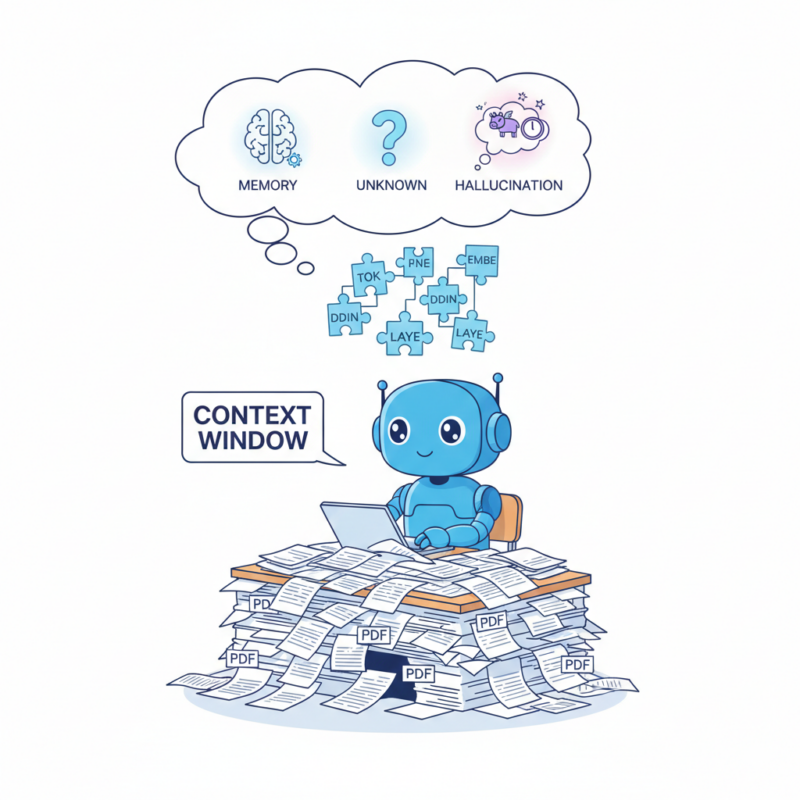
But these tokens don't just cost money; they also take up space. Every AI model works at what I like to call a Context Window—or its short-term memory. Imagine the AI is a brilliant employee sitting at a very small desk. Every PDF you upload, every old message in the chat, and every instruction you give must fit on that desk for the AI to "see" it.

If your conversation gets too long and exceeds the "desk space," the AI has to start throwing the oldest papers into the trash to make room for new ones. This is exactly why, after a long brainstorming session, the AI might suddenly forget your name or the very first rule you set—it simply ran out of room on its desk.

Nowadays, tech giants are racing to build "giant desks," expanding these context windows so AI can "read" an entire book series in one go. But even with a massive memory, AI has a famous flaw: it loves to tell "confident lies," a phenomenon we call Hallucination.

You see, at its heart, an AI is a high-speed probability engine. It doesn't actually check a "truth database" to see if a fact is real. Instead, it asks itself: "Given the words I've seen so far, what is the most likely next word?" If it doesn't have the exact answer, it won't simply say "I don't know" (unless we tell it to). Instead, it will keep predicting the next word to finish the sentence.

This is how you get professional-sounding answers about non-existent coding functions that look perfect but return an undefined error the moment you run them. The AI prioritizes sounding logical and grammatically perfect over being factually true. For those of us working as Developers or PMs, this is the ultimate reminder: never trust numbers or specific names 100%. Always cross-reference and fact-check.

How do we fix this?

To stop these lies, we use RAG (Retrieval-Augmented Generation). AWS provides a great deep dive into this architecture. Think of this as an "Open Book Exam." Instead of letting the AI guess, a RAG system first searches a reliable source—like your company's handbook—and tells the AI: "Only answer based on this text." We also use Prompt Engineering (giving clear, detailed instructions) and Guardrails (safety fences that block dangerous or wrong answers) to keep the AI on the right track.

Quick Advice for IT Professionals

  • Don't trust, verify: Always fact-check names, dates, and code. AI is a master of sounding professional even when it’s wrong.
  • Be specific: Treat AI like a smart intern. The more context you give in your prompt, the better the result.
  • Watch the tokens: Keep your inputs clean to save costs and avoid hitting the memory limit.

Join the AI Revolution with ISB Vietnam

At ISB Vietnam, we are not just watching the AI revolution—we are leading it. We believe that AI is most powerful when handled by experts who understand its strengths and its "hallucinations." That’s why we are constantly training our developers to master AI tools, ensuring that our software solutions are not just fast, but smart and secure.

Whether you need scalable software solutions, expert IT outsourcing, or a long-term development partner, ISB Vietnam is here to deliver.

Are you a tech talent looking to work in an environment that embraces AI? We are always looking for passionate people to join our team and push the boundaries of what's possible.

Let’s build something great together—reach out to us today!

Image source: Generated by Gemini

View More
TECH

April 23, 2026

File Handling in C++ via MapViewOfFile

Memory-mapped files are one of the most powerful features available to Windows C++ developers. At the center of this mechanism is MapViewOfFile, a function that allows you to treat file contents as if they were part of your program’s memory.

In this blog post, we’ll walk through a complete example and explain every handle involved — what it represents, why it exists, and how it fits into the Windows memory model.

What Exactly Is MapViewOfFile?

Memory-mapped files are a core part of the Windows memory management system. Instead of manually reading file data into buffers, Windows allows you to map a file directly into your process’s virtual memory. The function responsible for this is MapViewOfFile.

In simple terms:

MapViewOfFile lets you treat a file on disk as if it were an array in memory.

Once mapped, you can read (or write) file contents using normal pointer operations — no repeated calls to ReadFile, no manual buffering.

This mechanism is part of the Win32 API and works together with:

  • CreateFile
  • CreateFileMapping
  • UnmapViewOfFile

Why Memory-Mapped Files Exist

Traditional file I/O works like this:

  1. Request data from the OS
  2. OS copies file data into a buffer
  3. Your program reads from that buffer

Memory mapping removes extra copying. The operating system:

  • Maps file data into virtual memory
  • Loads pages only when accessed (on demand)
  • Uses the system cache efficiently
  • Allows sharing between processes

This makes memory mapping ideal for:

  • Large files
  • High-performance systems
  • Random file access
  • Inter-process communication

How Mapping a File Works

Mapping a file involves three important objects:

  1. hFile — File Handle
  2. hMapping — File Mapping Handle
  3. pView — Mapped Memory Pointer

Let’s walk through each one conceptually.

hFile — The File Handle

We start by calling CreateFile.

        HANDLE hFile = CreateFile(...);

What It Represents?

hFile is a handle to a file object managed by the Windows kernel. It does not contain the file data. Instead, it represents:

  • A reference to an open file
  • Access permissions
  • File metadata
  • A kernel-managed file object

Think of it as your program’s official permission slip to access the file

Why It’s Needed?

The file handle tells Windows: “I want to work with this file, and here are my access rights.” Without this handle, you cannot create a file mapping.

When It’s Released?

        CloseHandle(hFile);

Once closed, the program no longer has access to the file.

 hMapping — The File Mapping Handle

We start by calling CreateFileMapping.

        HANDLE hMapping = CreateFileMapping(hFile, ...);

What It Represents?

This handle represents a file mapping object, which is a kernel object describing:

  • How the file will be mapped
  • Protection flags (read-only, read/write, etc.)
  • Maximum size of the mapping

Important:
This still does not map the file into memory. Instead, it creates a blueprint for mapping.

Conceptually:

If hFile is the permission slip to the file, hMapping is the architectural plan for how the file will appear in memory.

Why It Exists Separately?

Windows utilizes a structured approach by separating file access into three distinct layers: the file object, the mapping object (configuration), and the view (the actual memory mapping).

This decoupled architecture provides significant flexibility, enabling developers to create multiple mappings with varying protection levels and facilitate seamless shared memory between processes.

Furthermore, this separation offers granular control over advanced memory management tasks.

When It’s Released?

        CloseHandle(hMapping);

This removes the mapping object from the system.

pView — The Mapped View Pointer

We start by calling MapViewOfFile.

        LPVOID pView = MapViewOfFile(hMapping, ...);

This is where the file actually becomes accessible as memory.

What It Represents?

This is not a handle. It is a pointer to virtual memory inside your process. This is where the magic happens.

When you invoke the MapViewOfFile function, Windows performs a sophisticated memory orchestration.

First, it reserves a specific range of address space within your process. It then creates a direct link between this space and the file's data.

Rather than loading the entire file at once, the OS intelligently loads data pages into physical memory only when they are accessed—a process known as 'on-demand paging.'

Consequently, the file ceases to be a distant object on the disk and begins to behave like a standard in-memory array.

You can now do:

        char* data = static_cast<char*>(pView);

        std::cout << data[0];

No ReadFile, no buffers — just pointer access.

When It’s Released?

        UnmapViewOfFile(pView);

This removes the file from your process’s address space.

How the OS Delivers the Data

Unlike ReadFile, the OS does not immediately load the entire file. Instead, it will do the following actions:

  • Accessing memory triggers a page fault
  • The OS loads the required page from disk
  • The system cache keeps it in memory
  • Future accesses are fast

This mechanism is extremely efficient and is one reason memory-mapped files scale well for large datasets.

Cleaning Up Properly

Each object must be released in reverse order:

  • UnmapViewOfFile(pView);
  • CloseHandle(hMapping);
  • CloseHandle(hFile);

Why this order?

It's important to remember that these elements are interconnected. Because the view is tied to the mapping object, and the mapping object is tied to the file handle, they must be released in a specific order. Failing to do so can lead to unexpected crashes or unstable application behavior.

Sharing Memory Between Processes

One powerful feature of file mappings:

If multiple processes open the same-named mapping object, they can share memory.

Instead of mapping a disk file, you can even pass INVALID_HANDLE_VALUE to CreateFileMapping to create shared memory backed by the system paging file.

This is a common IPC (Inter-Process Communication) technique in Win32.

Conclusion

MapViewOfFile is not just a function — it’s a gateway into Windows’ virtual memory system.

The process involves:

  1. Opening a file (CreateFile)
  2. Creating a mapping object (CreateFileMapping)
  3. Mapping a view into memory (MapViewOfFile)
  4. Accessing file data through a pointer
  5. Cleaning up with UnmapViewOfFile

While it may feel lower-level compared to C++ standard streams, it provides unmatched control and performance.

If you're building performance-critical Windows applications — such as game engines, database systems, or file-processing tools — understanding memory-mapped files will make you a significantly stronger systems developer.

Reference:

https://learn.microsoft.com/en-us/windows/win32/api/memoryapi/nf-memoryapi-mapviewoffile

https://learn.microsoft.com/en-us/windows/win32/memory/file-mapping

Ready to get started?

Contact IVC for a free consultation and discover how we can help your business grow online.

Contact IVC for a Free Consultation
View More
TECH

April 23, 2026

Mendix & Agile: When Low-code is More Than Just "Drag-and-Drop"

In the development world, Mendix is often discussed as a tool for rapid application building. However, that speed doesn't just come from reducing lines of code; it stems from its perfect integration with the Agile methodology. If you consider Low-code the engine, then Agile is the steering system that keeps the project on track.

1. Breaking the "Waterfall" Prejudice

source: https://academy.mendix.com/index3.html#/lectures/3136

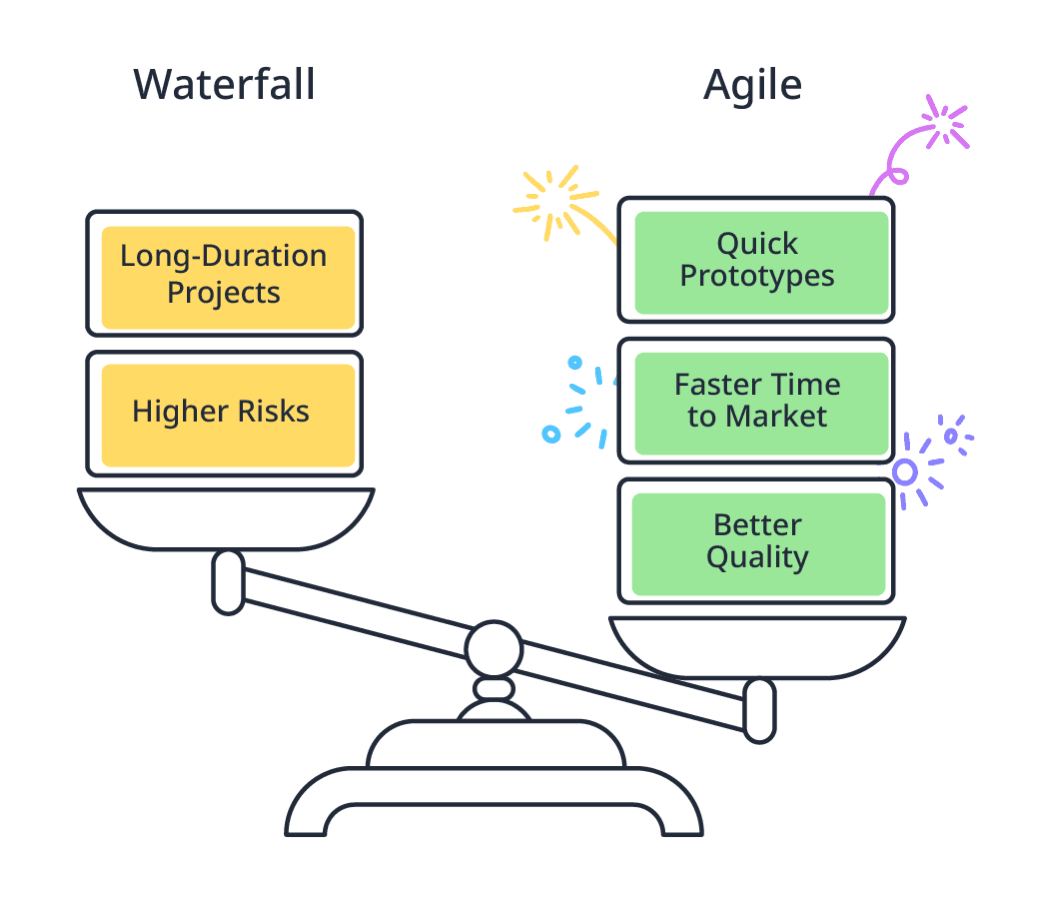
Many software projects fail not because of poor code, but due to the rigidity of the Waterfall process. In a rapidly changing market, fixing the scope at the very beginning is a massive risk.

Agile in Mendix inverts the traditional project management triangle:

  • Fixed Resources and Time: You know exactly what you have and how long a Sprint lasts—typically two weeks.

  • Flexible Scope: Instead of doing everything halfway, the team focuses on completing the most valuable features to deliver a working product after every cycle.

2. Agile Mindset: Living with Change

Being Agile is less about the mechanics and more about the Agile Mindset. For a Mendix Developer, this mindset boils down to three principles:

  • Small and Focused: Breaking work into smaller pieces (User Stories) increases focus and enables quick results.

  • Feedback is a Gift: It is better to fail early and fix early than to receive negative feedback after the project has ended.

  • Ownership: In an Agile team, there is no "micro-manager." Every member takes initiative and responsibility for their own tasks.

3. Team Structure: Core Team and Experts

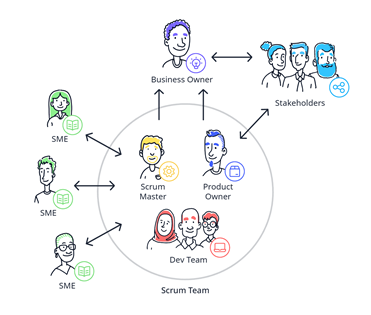
Mendix optimizes development through cross-functional teams:

source:https://academy.mendix.com/link/modules/390/The-Agile-Methodology

    • Core Team: Consists of the Product Owner (vision manager), Scrum Master (process guardian), and 2-3 Business Engineers (the ones building the app).

    • Subject Matter Experts (SMEs): Experts in UX/UI, Security, or Integration "fly in" when a Sprint requires deep specialized knowledge and leave once the task is complete.

4. Realizing Agile with Mendix Tools

Mendix doesn't just keep Agile on paper; the platform provides powerful execution tools:

source: https://academy.mendix.com/link/modules/390/The-Agile-Methodology

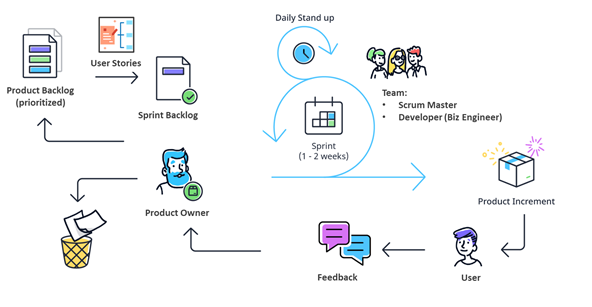
  • Epics & User Stories: Manage the backlog and roadmap directly on the Portal using the standard structure: "As a... I want... so that...".

  • Feedback Widget: This is the direct bridge between users and developers. Feedback is sent straight to the Portal for the PO to evaluate and include in the next Sprint.

  • Lean Thinking: Leveraging Reusable Components reduces waste and allows the team to focus on creating new value.

5. The Roadmap to Digital Execution Success

To maximize the effectiveness of a Mendix project, you should follow a 5-step roadmap:

  1. Understand the Context: Know exactly why the project needs Agile.

  2. Establish the Mindset: Build trust and transparency within the team.

  3. Define Roles Clearly: Ensure everyone understands their authority and responsibilities.

  4. Sprint 0: Prepare infrastructure, design wireframes, and align goals before coding begins.

  5. Execute and Improve: Build while reflecting to optimize performance continuously.

Conclusion: Developing on Mendix without Agile is like having a supercar but driving it on a road full of potholes. Combine the power of Low-code with the flexibility of Agile to create truly breakthrough products.

Whether you need scalable software solutions, expert IT outsourcing, or a long-term development partner, ISB Vietnam is here to deliver. Let’s build something great together—reach out to us today. Or click here to explore more ISB Vietnam's case studies.

View More
TECH

April 23, 2026

ECR, ECS, vs EKS: Understanding AWS Containers

In the era of modern software development, packaging applications with Docker is just the beginning. When you have dozens or even hundreds of Microservices that need to run concurrently, auto-recover from failures, and scale in an instant, you need Container Orchestration tools.

In the AWS ecosystem, this challenge is perfectly solved by a trio of services: Amazon ECR (Storage), alongside two orchestration options, Amazon ECS and Amazon EKS. Understanding and choosing the right "conductor" will determine the success of your infrastructure architecture.

1. Amazon ECR (Elastic Container Registry): The Secure "Vault"

Before containers can run, they need a secure place to be stored. ECR is a fully managed container registry by AWS, similar to Docker Hub but tailored for the enterprise ecosystem.

  • Enterprise-Grade Security: Deeply integrated with AWS IAM. You can grant granular permissions down to each repository (e.g., Server A can only "pull", Developer B can "push").

  • Automated Image Scanning: ECR automatically scans for software vulnerabilities (CVEs) whenever a new image is pushed—a mandatory feature for healthcare (HIPAA compliant) or financial systems (PCI-DSS compliant).

  • Speed & Optimization: Thanks to AWS's internal network infrastructure, pulling images from ECR to ECS or EKS happens with near-zero latency.

Once images are ready on ECR, we face a crossroads: Should we choose ECS or EKS to run them?

2. Amazon ECS (Elastic Container Service): Simple, Fast & Optimized for AWS

ECS is the "native" container orchestration solution developed by AWS. The philosophy of ECS is to deliver maximum simplicity for users operating within the AWS ecosystem.

  • Low Learning Curve: If your team lacks Kubernetes experience, ECS is the perfect choice. Concepts like Task Definitions and Services in ECS are very straightforward to grasp.

  • Deep Integration: The biggest strength of ECS is its seamless cohesion with other AWS services (ALB, Route 53, CloudWatch, IAM).

  • The Power of AWS Fargate: Both ECS and EKS support Fargate (Serverless compute for containers), but the Fargate experience on ECS is significantly smoother and more seamless. You simply deploy the container, and AWS handles the entire underlying infrastructure.

3. Amazon EKS (Elastic Kubernetes Service): Unmatched Power & Industry Standard

If ECS is an easy-to-drive automatic car, EKS is an F1 racing car with countless customizable buttons. EKS is a managed Kubernetes (K8s) service—the open-source platform that currently serves as the global "gold standard" for container orchestration.

  • Massive Ecosystem: K8s boasts the largest open-source community. Thousands of tools (Helm, Prometheus, Istio, ArgoCD) are natively designed to run on K8s.

  • No Vendor Lock-in: Because EKS is fundamentally standard Kubernetes, you can easily "lift and shift" your entire system from AWS to Google Cloud (GKE), Azure (AKS), or even run it on physical servers (On-premise) without rewriting extensive configurations.

  • Maximum Flexibility: EKS allows you to deeply customize network configurations (Custom CNI), schedule containers (Advanced Scheduling), and manage complex resources.

4. Comparison Table: ECS vs. EKS

To easily visualize the differences, here is a quick comparison between the two services:

 Criteria  Amazon ECS  Amazon EKS
 Core Technology  AWS Proprietary  Open-source platform (Kubernetes)
 Complexity  Low - Easy to learn and operate  Very High - Requires specialized DevOps team
 Ecosystem  Integrated with AWS native tools  Massive open-source ecosystem (CNCF)
 Vendor Lock-in  High (Hard to migrate to other clouds)  Low (Easy to migrate across Multi-cloud/On-premise)
 Control Plane Cost  Free (Pay only for compute resources used)  ~$73/month per EKS Cluster
 Best Suited For  Startups, fast-to-market projects, AWS-centric teams  Large enterprises, Hybrid Cloud, Multi-cloud systems


5. Real-World Scenarios from ISB Vietnam

At ISB Vietnam, choosing an architecture depends entirely on the client's business problem:

  • Scenario 1 (Choosing ECS): An internal Business Management System needs rapid modernization from legacy to Cloud. The client wants the lowest maintenance costs, and their IT team has no K8s experts. Solution: ISB Vietnam consults using ECR + ECS Fargate. The infrastructure is spun up in days, auto-scales during business hours, and scales to zero at night to save costs.

  • Scenario 2 (Choosing EKS): A MedTech corporation needs to build a global wearable device data collection platform. A strict requirement is that the system must run partly on AWS and partly on the hospital's physical Data Center to comply with local data residency laws. Solution: ISB Vietnam utilizes EKS combined with Amazon EKS Anywhere. Kubernetes provides absolute consistency between Cloud and On-premise environments, while allowing the deployment of complex Service Mesh tools to encrypt healthcare data.

Key Takeaways

  • ECR: The secure vault for your Docker Images with built-in vulnerability scanning.

  • ECS: Optimized for speed and simplicity. Choose ECS if you want to focus on application code rather than managing infrastructure.

  • EKS: The industry standard. Choose EKS if your system is highly complex, requires multi-platform capabilities (Multi-cloud), and you have a robust DevOps team.

What's Next?

Both ECS and EKS are powerful, but they truly shine when deployed entirely via automation (Infrastructure as Code). In our next post, we will explore how to use Terraform to spin up these entire ECS/EKS clusters with just a single line of code.

In your organization, is your technical team leaning towards the "simplicity and ease of management" of ECS, or the "global standardization" of EKS? Share your system challenges in the comments below so we can discuss!

Whether your business needs to deploy a flexible system on ECS or build a complex Enterprise-grade EKS cluster, ISB Vietnam's team of experts is ready to design the perfect solution. Let’s build something great together—reach out to us today. Or click here to explore more ISB Vietnam's case studies.


References

[1]. Amazon Elastic Container Registry (ECR) Features. Retrieved from https://docs.aws.amazon.com/AmazonECR/latest/userguide/what-is-ecr.html

[2]. Amazon Elastic Container Service (ECS). Retrieved from https://docs.aws.amazon.com/AmazonECS/latest/developerguide/Welcome.html

[3]. Amazon Elastic Kubernetes Service (EKS). Retrieved from https://docs.aws.amazon.com/eks/latest/userguide/what-is-eks.html

Ready to get started?

Contact IVC for a free consultation and discover how we can help your business grow online.

Contact IVC for a Free Consultation
View More
TECH

April 23, 2026

How RAG Works: Lessons from a Junior Developer

Recently, while working on a project, I had the chance to explore how a Retrieval-Augmented Generation (RAG) system works. Before that, I mostly interacted with Large Language Models through APIs, without thinking too much about how they actually retrieve and use external information.

With the rapid development of LLMs, many people have begun asking AI questions rather than searching on Google. This is very convenient, but LLMs have an important limitation: They can only answer questions based on the data they have been trained on.

For example, if a model was trained in 2025, how will it know what happens in 2026? If we want it to respond with information from documents it has never seen before, how will it know?

That's why RAG systems come in. This article is the first part of a short series documenting what I learned while trying to build a RAG system locally.

The series is divided into three parts:

  • Part 1 - Understanding the RAG Pipeline.
  • Part 2 - Running RAG locally.
  • Part 3 - Challenges and lessons learned.

In this first part, we’ll walk through the basic architecture of a RAG system and understand how its main components work together.

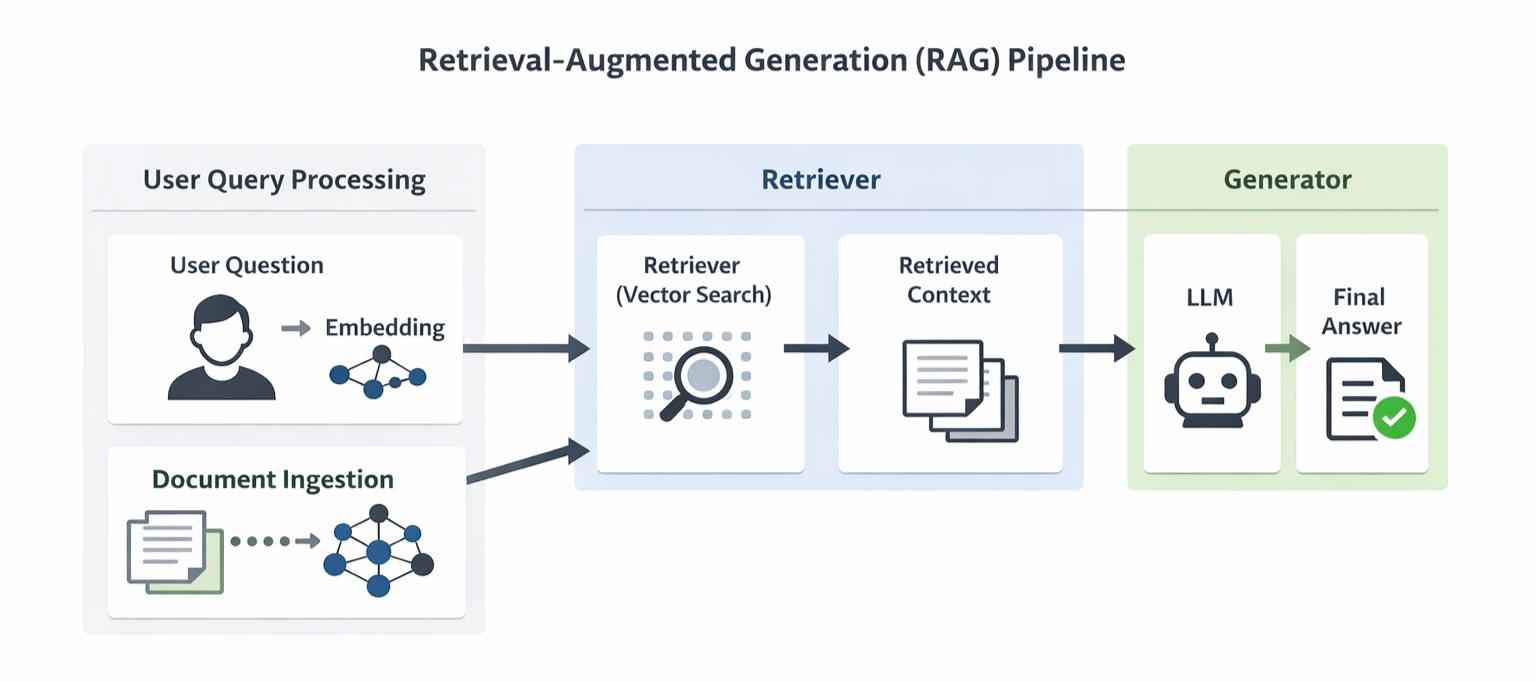
Simplified RAG pipeline

Instead of relying only on what the model already knows, RAG allows the model to retrieve relevant information from external documents.

Although many variations of RAG architectures exist today, most of them revolve around three core components: Document ingestion, retrieval, and generation.

Document Ingestion

The first step in a RAG system is preparing the documents so the system can use them.

Document Parsing

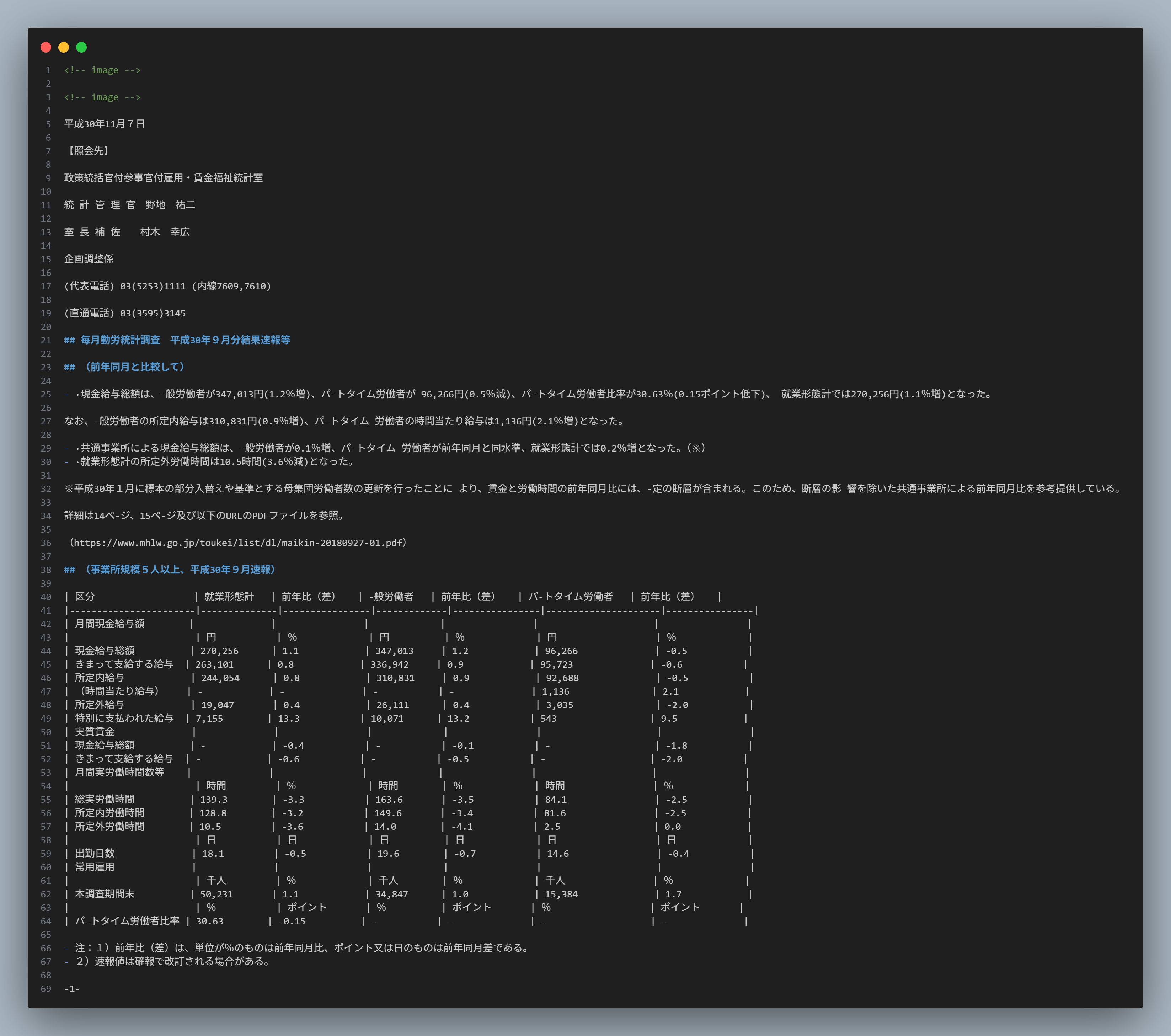
The main job of a parser is to extract text from documents such as PDFs, Word files, or HTML pages. Currently, many tools support this: Docling (Python), Langchain Document Loader (Python/TypeScript), Apache Tika (Java), etc.

Text chunking

At its most basic, we can segment by chunk size. Why do we need to chunk? LLMs have a limited context window and cannot process an entire document at once. Just as we can't remember the entire contents of a file.

For example, a chunk size of 100 means splitting the document into smaller chunks of 100 characters each. More complex methods involve segmenting based on the document's structure and layout.

In practice, chunking strategies may vary depending on the document structure and the context window of the language model.

Document
┌───────────────────────────────┐
Employee Handbook
Employees must reset their passwords every 90 days.
Passwords must contain at least 8 characters.
Two-factor authentication is recommended.
└───────────────────────────────┘

                ↓
            Text Chunking

Chunk 1                  Chunk 2                  Chunk 3
┌────────────────┐   ┌────────────────┐   ┌────────────────┐
Employees must   │   │Passwords must  │   │Two-factor      │
reset passwords  │   │contain at      │   │authentication  │
every 90 days    │   │least 8 chars   │   │is recommended  │
└────────────────┘   └────────────────┘   └────────────────┘

Embedding

Since machines process numbers rather than raw text, we have to convert letters into numbers for them. Embedding is the process of converting text into vectors using an embedding model. These vectors allow the system to measure semantic similarity between the user query and document chunks.

Chunk 1
"Employees must reset their passwords every 90 days."
↓
Embedding
[0.21, -0.33, 0.81, 0.45, -0.12, ...]

Vector Database

After the embeddings are generated, they are stored in a vector database. Unlike traditional databases that store structured data, vector databases are designed to store vector representations and efficiently perform similarity searches. Once all document chunks are stored in the vector database, the system is ready to retrieve relevant information when a user asks a question.

Retrieval

This is the core of RAG technology. Instead of searching text traditionally, the system searches for document vectors that are closest to the query vector of the user query.

Query Embedding

Similar to the previously vectorized document chunks, when a user submits a question, that question will also be converted into a vector.

Always remember this: both query embedding and chunk embedding must use the same embedding model.

User Question:
How often should employees reset their passwords?

↓
Embedding
[0.18, -0.41, 0.72, ...]

Vector Search

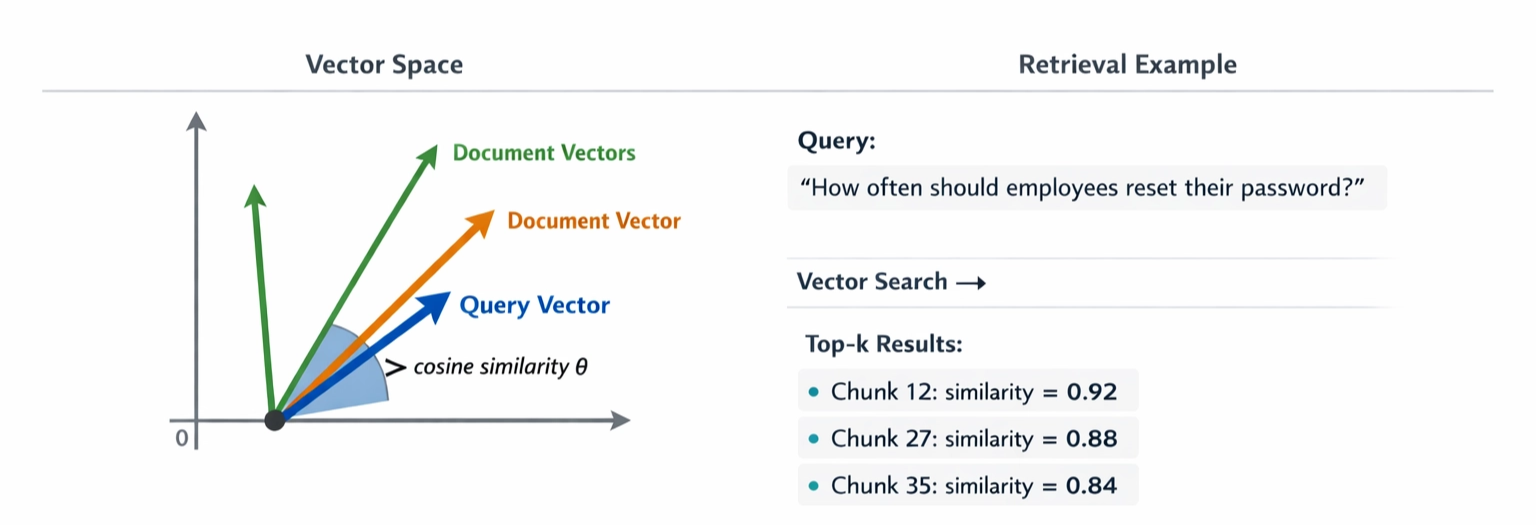
To put it simply, imagine that all document embeddings are points in a multi-dimensional space. When a user asks a question, the query is also converted into a vector and placed in the same space. The system then searches for document vectors that are closest to the query vector.

But what do we mean by “closest”?

In practice, similarity between vectors is measured using mathematical metrics such as cosine similarity or dot product. These metrics help the system identify document chunks that are semantically similar to the user's question.

Top-k Relevant Chunks

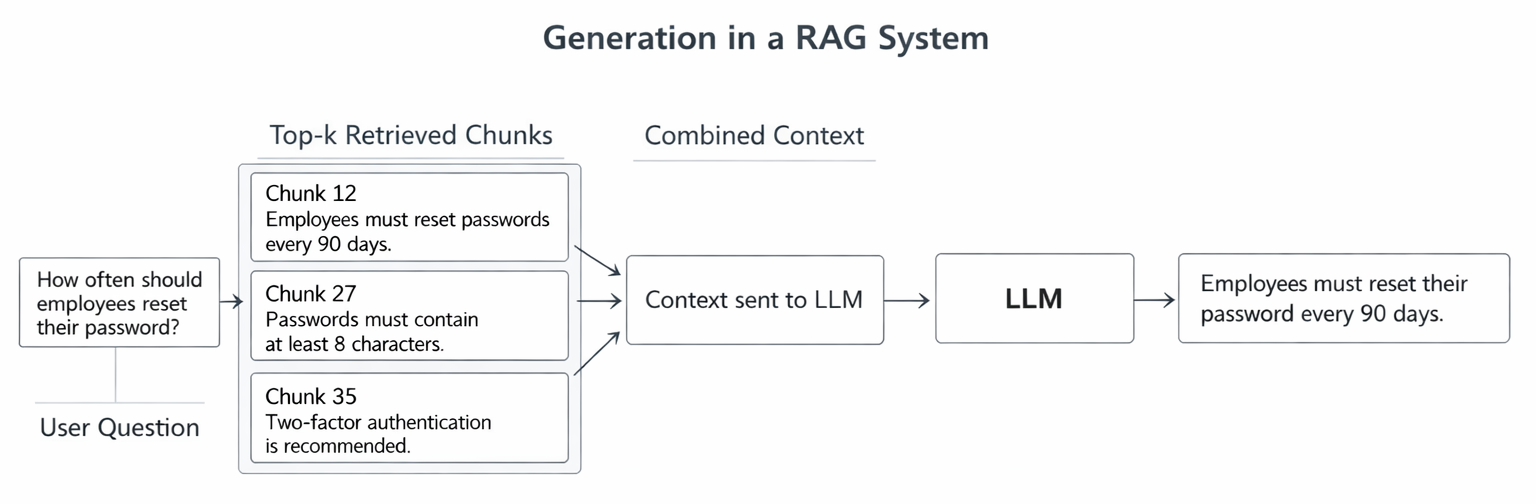
The top-k retrieved chunks are then combined and sent to the LLM as context. The exact value of k can vary depending on the system and the model’s context window.

In simple terms, the system gives the model relevant pieces of text and asks it to answer the question based on that information.

Query:
"How often should employees reset their passwords?"

↓

Top-k Retrieved Chunks

┌──────────────────────────────┐
Chunk 12
Employees must reset passwords
every 90 days.
└──────────────────────────────┘

┌──────────────────────────────┐
Chunk 27
Passwords must contain at least
8 characters.
└──────────────────────────────┘

┌──────────────────────────────┐
Chunk 35
Two-factor authentication is
recommended for all accounts.
└──────────────────────────────┘

↓

Context sent to LLM

↓

Answer

Generation

Now it's time to ask this AI a question. This step works similarly to copying text from somewhere, giving it to the AI, and asking, "Hey, what's in here?”

Prompt Construction

Besides the retrieved context, we also need to provide the LLM with a clear instruction. A simple prompt structure usually contains the context, the user’s question, and an instruction telling the model to answer based only on the provided information. Something like this:

You are an assistant who answers questions based on the provided context.

Context:
Employees must reset their passwords every 90 days.
Passwords must contain at least 8 characters.
Two-factor authentication is recommended.

Question:
How often should employees reset their passwords?

Answer:

LLM will automatically fill in the answer.

Context - Question - Answer Generation

This is the final step of the RAG process. This step is simple: after the LLM receives the prompt and context, it uses that information to answer the question. This process helps reduce hallucinations by grounding the answer in retrieved documents. commonly seen in LLMs.

However, there is one important thing to note. The accuracy of the answer depends on two factors:

  • Was the previous document search step correct? If you give it the wrong information, of course, it will give the wrong answer.
  • Is LLM strong enough? Even large models have a limited context window, so the system must carefully choose how many chunks to include.

Key Takeaways

  • Retrieval-Augmented Generation (RAG) enables LLMs to answer questions using external documents rather than relying solely on training data.
  • The documents must undergo a process of being received and encoded as vectors before they can be used.
  • A vector database is where vectors are stored and searched.
  • When a user asks a question, the system retrieves the most relevant document segments within the database.
  • The retrieved chunks are then combined into context and sent to the LLM to generate the final answer.

What’s next?

In this article, we walked through the basic pipeline of a RAG system — from document ingestion to answer generation.

In Part 2 - Running a RAG system locally, I’ll share what happened when I tried to run a RAG system locally, including the tools I used and some practical limitations I encountered during development.

This article is part of a technical blog series from ISB Vietnam, where our engineering team shares practical insights and lessons learned from real-world projects.

References

https://www.mhlw.go.jp/toukei/itiran/roudou/monthly/30/3009p/3009p.html

View More
TECH

April 23, 2026

Why Your AI Is Only As Good As Your Prompts

I. The Trust Gap

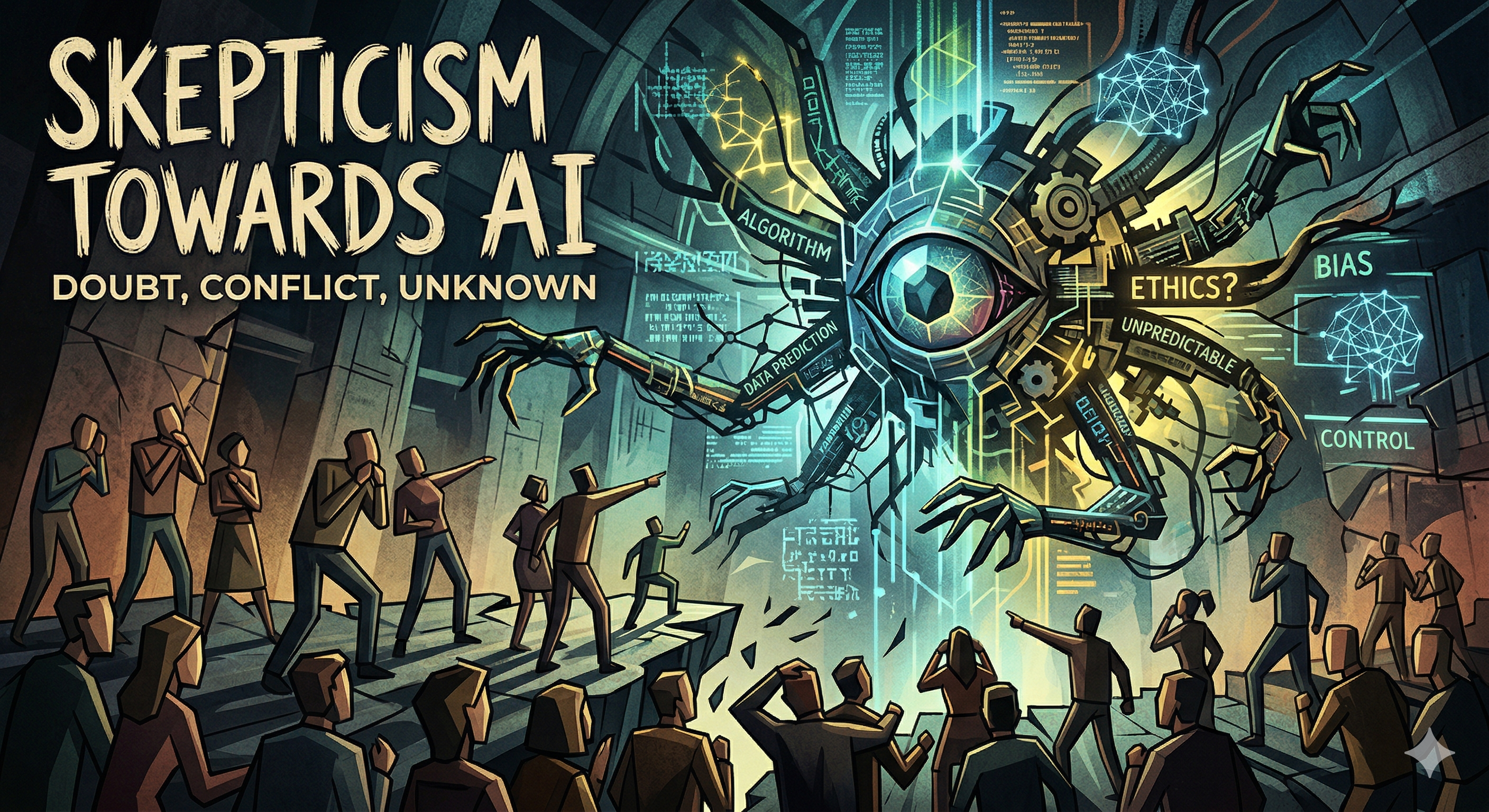
     GenAI tools, such as ChatGPT, Claude, and Google Gemini have an immense potential to improve our quality of life and help out with a lot of global issues. Yet, there is a fairly strong and widely discussed consensus that GenAI can be inaccurate.

     A recent KPMG survey[1] with over 48,000 people globally shows that even though 66% of them use GenAI regularly, only 46% felt willing to trust AI systems. It’s because many people are relying on GenAI output without evaluating its accuracy, which led to mistakes in their work.

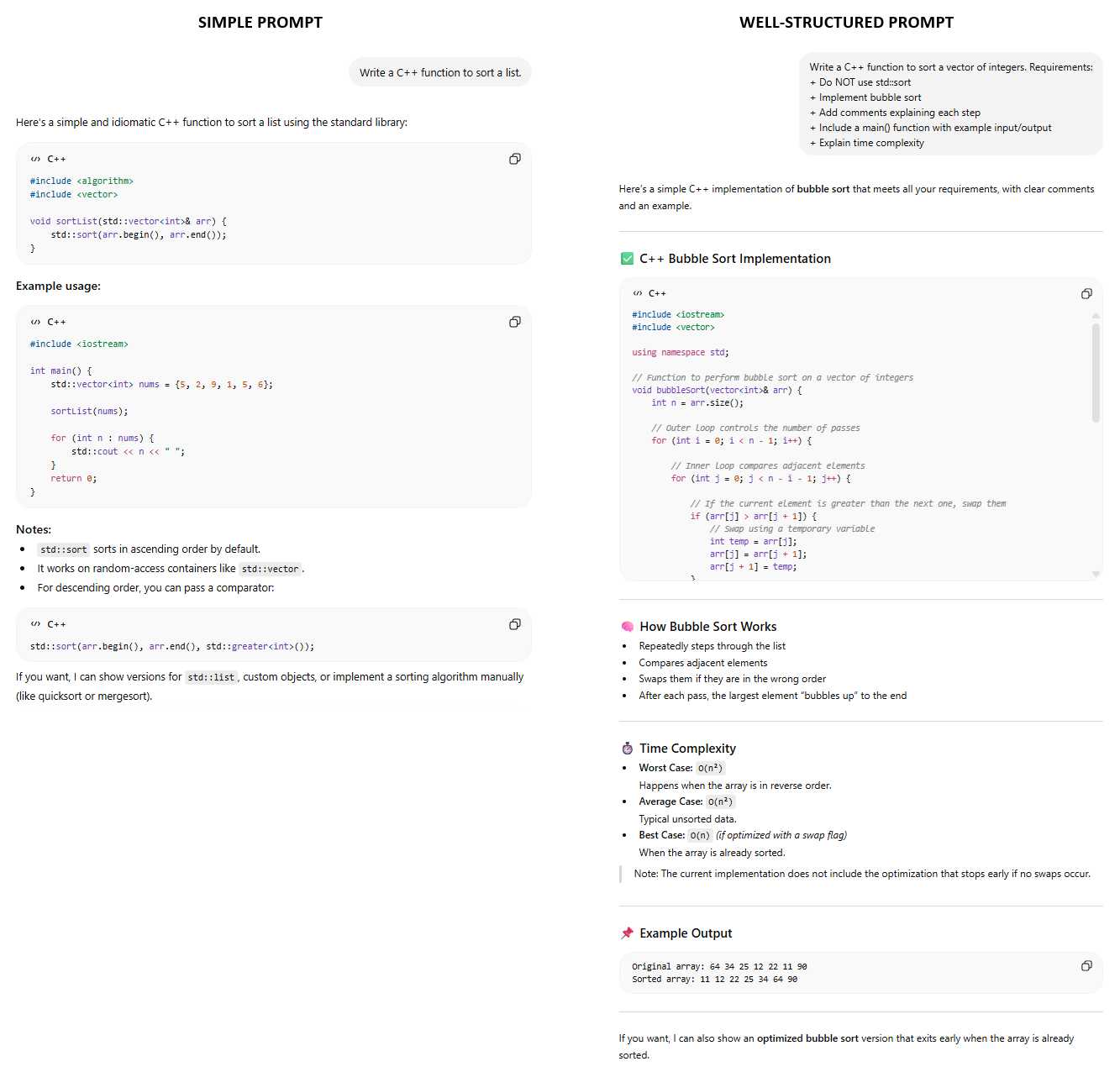
     In my opinion, the problem is often not the technology itself, but the way it’s being used. GenAI, without a doubt, is incredibly powerful, but the quality of its output depends heavily on the quality of the prompt users provide. Learning how to create a clear, specific, and well-structured command or request when working with GenAI is the key to unlock these tools real potential.


II. What is prompt Engineering?

     Prompt Engineering is the essential skill of designing and refining prompts to improve the output of GenAI systems. Because GenAI models respond based on the specific input they receive, a well-structured prompt allows you to:

  • Produce more detailed and relevant responses.
  • Significantly improve output accuracy.
  • Control the format and style of the final result.


III. Prompt Engineering Techniques.

     Now that we understand what Prompt Engineering is, let’s break down some of the widely used techniques to craft prompts[2].

1. Zero-Shot Prompting:

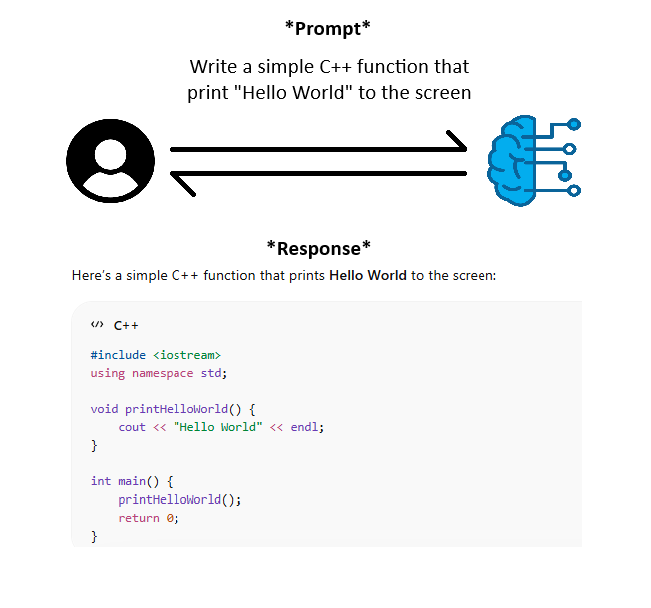
          This is a technique where you present a task to the AI model without providing any examples or task-specific demonstrations. Its accuracy relies heavily on the strength of the underlying foundation model. The more advanced and capable the foundation model, the more likely the AI is to produce accurate results.

          Zero-shot prompting is often more suitable for straightforward tasks or when a quick response is needed, even though it can still handle more complex tasks with varying reliability.


2. Few-Shot Prompting:

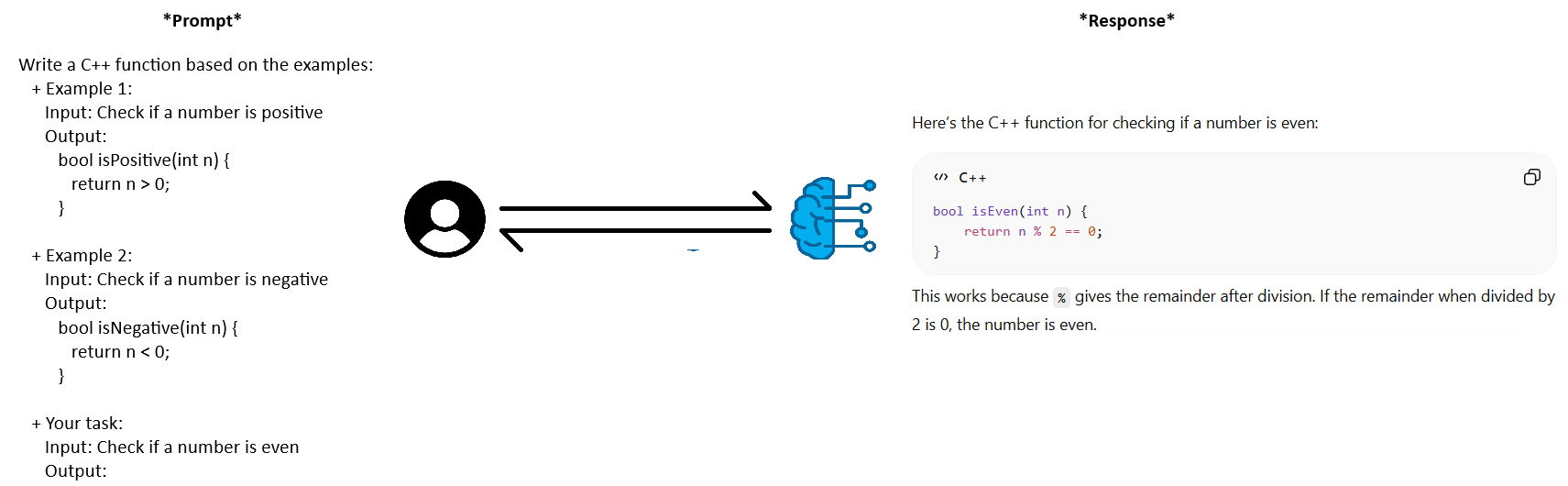
          This technique involves providing a few examples within the prompt to guide the AI’s output. Instead of training the model, you guide it during inference by providing specific contextual examples (input-output pairs).

          If you provide the AI with only one example, then this technique is also called “Single -shot” or “One-Shot Prompting”.


3. Chain-of-Thought (CoT) Prompting:

          This is a technique where you break a task into a sequence of intermediate reasoning steps. This helps the AI model process logic more effectively, leading to more structured and accurate results. You can trigger this by providing examples of step-by-step reasoning or by simply adding instructions like “Break this into steps”.

          However, CoT prompting should be used selectively, mainly for tasks that require multi-step reasoning, where accuracy matters more than speed. In simpler cases, forcing step-by-step reasoning may slow the AI down or introduce unnecessary verbosity.


IV. Conclusion

     GenAI effectiveness depends largely on how it is used. Rather than viewing them as unreliable, It’s more productive to see AI as a tool that requires skill and thoughtful interaction.

     Mastering AI communication is becoming an essential skill in today’s digital world. By crafting clear and structured prompts, users can unlock the full potential of GenAI and use it more confidently and responsibly in their work and daily lives.

     If you're eager to take your Prompt Engineering skill to the next level and apply them to impactful, real-world projects, ISB VIETNAM offers an environment where PassionsTeamworkInnovations, and continuous learning are part of our everyday work. Visit the official website now to learn more about our company services, and how you can become part of a team that values thoughtful, high-quality software engineering.


References:

[1] KPMG survey: https://kpmg.com/xx/en/our-insights/ai-and-technology/trust-attitudes-and-use-of-ai.html

[2] Inspired by: https://www.udemy.com/course/aws-ai-practitioner-certified/

View More
TECH

April 23, 2026

Introduction to Google Apps Script: Build Simple Automation with JavaScript

Google Apps Script (GAS) can transform your work. It helps you replace traditional Excel-based workflows by turning Google Sheets into a powerful task management system.

Currently, many teams struggle with task management. Often, tasks get assigned but no one knows who is doing what. Consequently, reports take hours to compile. Moreover, repetitive follow-ups drain your time and lead to human error.

What if you could turn Google Sheets into a real task management system? You can do this without building a complex backend.

This is exactly where this serverless platform becomes a game changer. So, let’s explore how it works in a real business case.

View More
TECH

April 23, 2026

Microsoft 365 Login with ExpressJS

Identity is one of the most important security layers of modern systems. Modern apps must connect to numerous services, making a centralized and stable login system essential.

In this context, Microsoft 365 login is a logical choice for enterprise systems. Azure provides a standardized identity platform, eliminating the need to build authentication mechanisms from scratch.

Overall

At the high level, ExpressJS only acts as the client. Azure AD is the main entity, acting as the identity provider. The browser only handles redirects, while all sensitive processing, such as exchanging code for tokens, takes place in the backend.

The basic flow would be:

User → ExpressJS → Microsoft login → ExpressJS callback → session creation

Most importantly, the token never appears on the frontend. This is extremely important from a security perspective.

Setting up Azure AD

First, create a new application in Azure Active Directory via the Azure Portal.

Then create a Client Secret. Simply put, this is the "password" for the backend.

Finally, we will have three values; these three are the backbone of the entire login process:

  • Client ID – app identifier
  • Tenant ID – organization identifier
  • Client Secret – backend authentication

MSAL node configuration

Microsoft provides @azure/msal-node so developers don't have to manually code OAuth2. MSAL handles the headaches of code generation, token changes, token caching, and token refresh.

Installation:

npm install express @azure/msal-node express-session dotenv

Basic configuration:

// msalConfig.js

require("dotenv").config();

module.exports = {

    auth: {

        clientId: process.env.CLIENT_ID,

        authority: "https://login.microsoftonline.com/" + process.env.TENANT_ID,

        clientSecret: process.env.CLIENT_SECRET

}};

The Authority URL simply tells MSAL which tenant we are authenticating with.

After defining the config, we will create the other file to initialize the instance to use in the project

// msalClient.js

const { ConfidentialClientApplication } = require("@azure/msal-node");
const msalConfig = require("../config/msalConfig");

const cca = new ConfidentialClientApplication(msalConfig);

module.exports = cca;

Scope: Request only what we need

Scope refers to access permissions. It determines what the app can do on behalf of the user.

Here are some common scopes:

  • user.read – read basic profiles
  • mail.read – read email
  • files.read – read OneDrive files

The first time a user logs in, they will see a consent screen. This is very good, as it helps them know what permissions the app is requesting.

Actual login flow

Here, we use the OAuth2 authorization code flow – almost the default standard for backends.

The token is not exposed to the frontend. There is a refresh token widely accepted by enterprises

Route /login

const cca = require("./services/msalClient"); 

app.get("/login", async (req, res) => {

   const url = await cca.getAuthCodeUrl({

     scopes: ["user.read"],

     redirectUri: "http://localhost:3000/redirect"

    });

   res.redirect(url);

 });

This route only serves to redirect the user to the Microsoft login page.

Note: The redirectUri in the code must match the Redirect URI declared in Azure AD.
If they don't match, the login will fail.

Route /redirect

const cca = require("./services/msalClient"); 

app.get("/redirect", async (req, res) => {

   const tokenResponse = await cca.acquireTokenByCode({

     code: req.query.code,

     scopes: ["user.read"],

     redirectUri: "http://localhost:3000/redirect"

   });

   req.session.user = tokenResponse.account;

   req.session.accessToken = tokenResponse.accessToken;

   res.redirect("/dashboard");

 });

This is the main processing point: the backend exchanges the code for a token and then saves the session.

Sessions and Middleware

After establishing the session, protecting the route with middleware is all we need to do.

 function requireAuth(req, res, next) {

   if (!req.session.user) {

     return res.redirect("/login");

   }

   next();

 }

Conclusion

Microsoft 365 login is becoming the standard for modern enterprise systems. Instead of managing users, passwords, and complex security rules ourselves, we can directly use Azure Active Directory as a trusted identity provider.

In practice, this offers better security, less maintenance, and a login system that can scale across the organization without significant changes.

Whether you need scalable software solutions, expert IT outsourcing, or a long-term development partner, ISB Vietnam is here to deliver. Let’s build something great together—reach out to us today. Or click here to explore more ISB Vietnam's case studies.

[References]

  1. https://learn.microsoft.com/en-us/entra/identity-platform/quickstart-register-app
  2. https://learn.microsoft.com/en-us/entra/identity-platform/tutorial-v2-nodejs-webapp-msal
  3. https://www.freepik.com/free-photo/email-messages-network-circuit-board-link-connection-technology_1198384.htm (Image source)
View More
1 2 3 26
Let's explore a Partnership Opportunity

CONTACT US


At ISB Vietnam, we are always open to exploring new partnership opportunities.

If you're seeking a reliable, long-term partner who values collaboration and shared growth, we'd be happy to connect and discuss how we can work together.

Add the attachment *Up to 10MB